On this page
There are three common ways to write a daily incremental load. Take events that happened after the newest one already loaded. Take events that arrived after the newest arrival already loaded. Or take exactly what arrived inside the run’s own window, the data interval Airflow hands each run. The third is what data intervals exist for: a run reads the same window however often, and in whatever order, it runs.
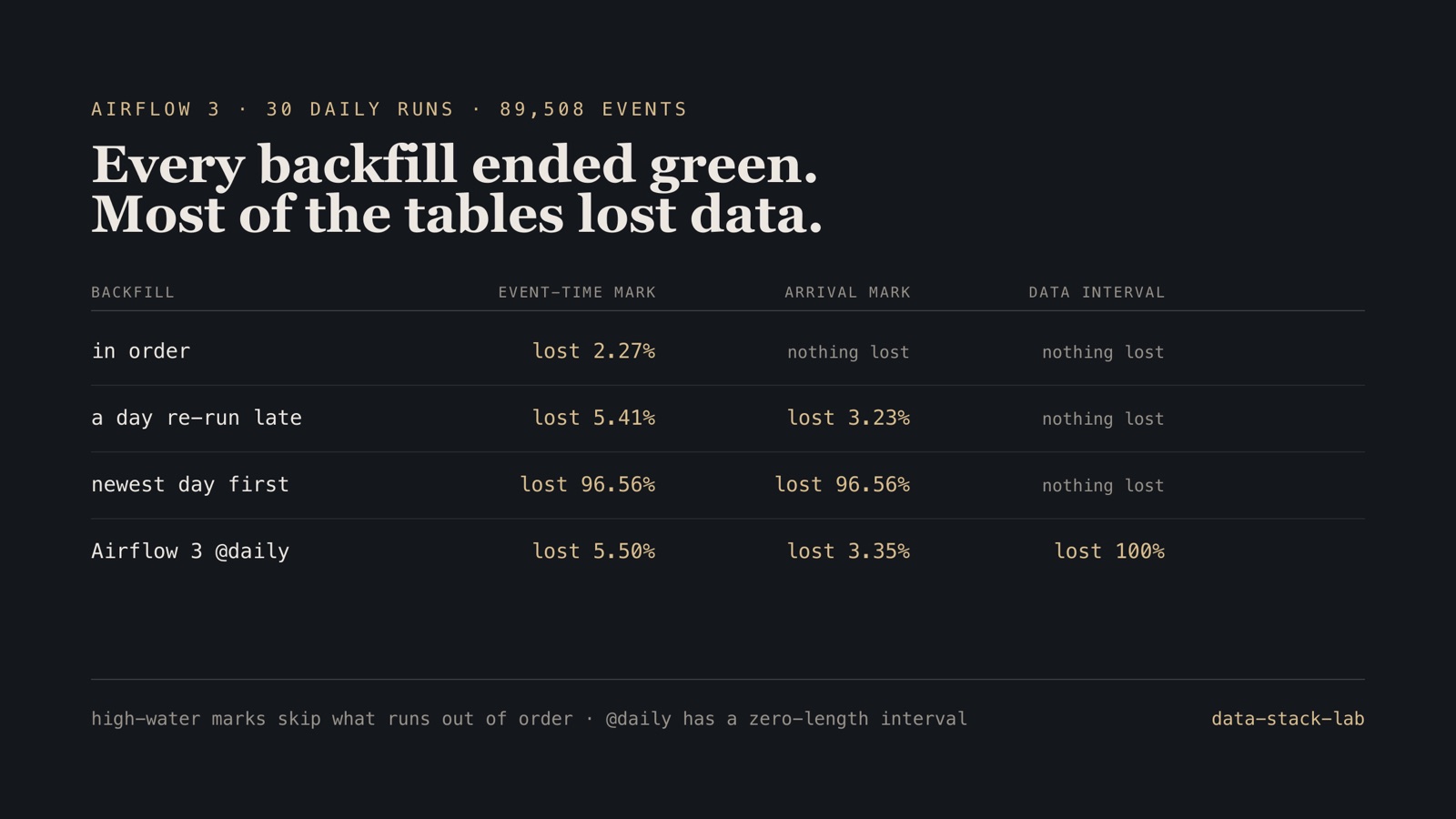
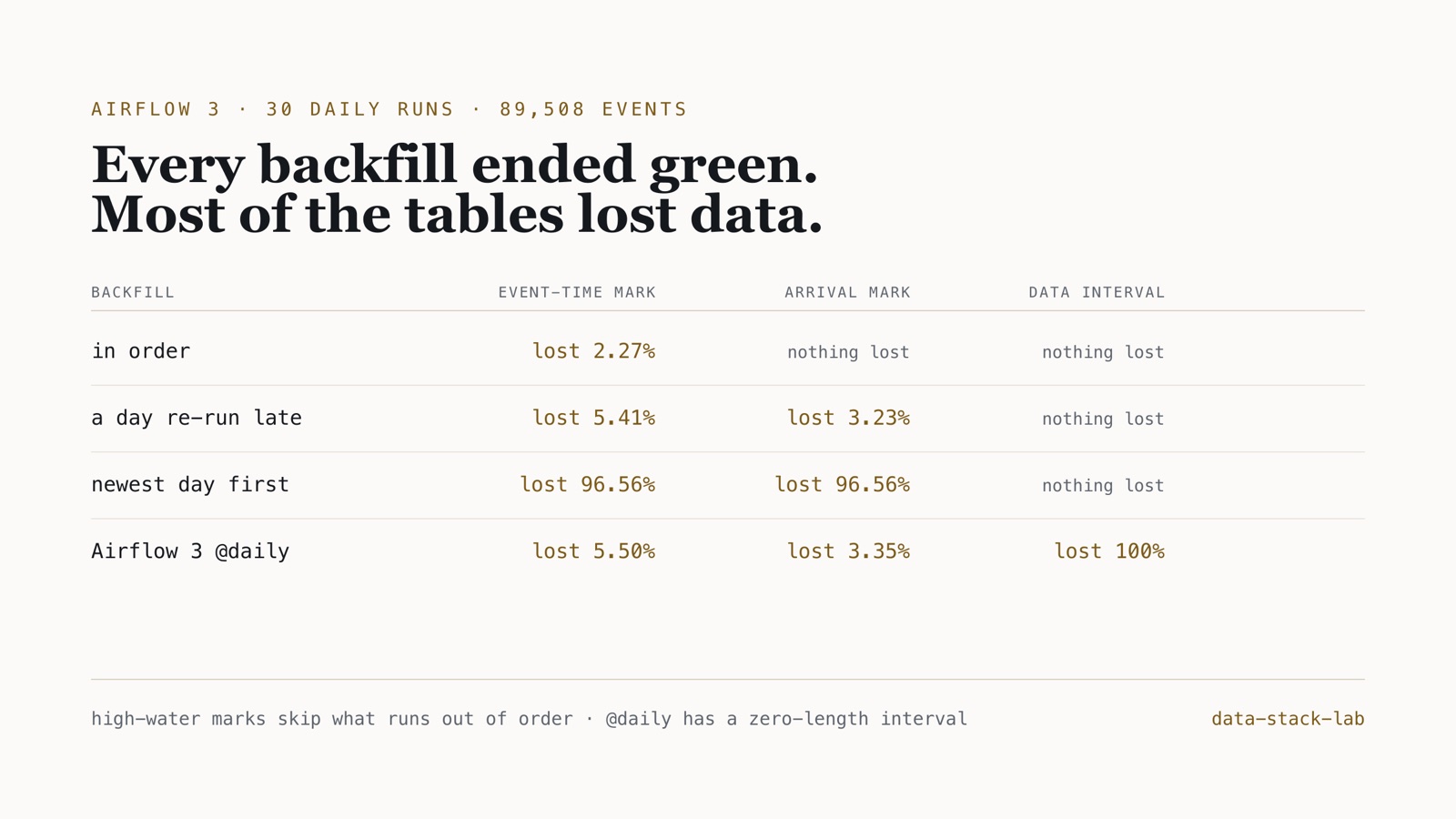
I built all three as dbt incremental models behind one Airflow 3.3 DAG and backfilled a month four ways. The first two lost data whenever a day ran out of order, up to 96.56% of the month. The third lost nothing, except on Airflow 3’s default @daily schedule. There, all 30 runs succeeded and it loaded 0 of 89,508 events.
Operating rule. Load by the run’s data interval, write so that a re-run replaces its own day, and do not trust the schedule to supply the interval: ask for CronDataIntervalTimetable by name and test that a run’s window is one day long.
The code is the Airflow project in data-stack-lab, on the same synthetic SaaS data as the dbt project. The data is generated, so the right answer is known: every table below is compared with every event that actually arrived. All figures are in its MEASUREMENTS.md, and CI re-runs the backfills and fails if one number moves.
One DAG, three ways to decide what is new
Product events land as files, one partition per day of arrival. In September, 89,508 distinct events arrived, and 2,291 of them more than an hour after they happened. The DAG has two tasks. land replaces the day’s partition in the warehouse, so a re-run cannot double it. transform runs three dbt incremental models that are identical except for the filter that picks the batch:
-- events_by_event_time: newer than the newest event already loaded
where event_at > (select max(event_at) from {{ this }})

-- events_by_arrival: arrived after the newest arrival already loaded
where received_at > (select max(received_at) from {{ this }})

-- events_by_interval: arrived inside this run's data interval
where received_at >= cast('{{ var("interval_start") }}' as timestamp)
  and received_at < cast('{{ var("interval_end") }}' as timestamp)
All three replace rows by event_id, so redelivered events never double. The month was backfilled four ways, one run per day, and each table scored against the truth:
| Backfill | Runs | Event-time mark | Arrival mark | Data interval |
|---|---|---|---|---|
| In order | 30 of 30 green | lost 2,034 (2.27%) | 0 | 0 |
| The 10 Sep file lands after the 12th’s run; the 10th is re-run | the 10th failed, then its re-run succeeded | lost 4,841 (5.41%) | lost 2,889 (3.23%) | 0 |
| Newest day first | 30 of 30 green | lost 86,432 (96.56%) | lost 86,432 (96.56%) | 0 |
Airflow 3’s default @daily |
30 of 30 green | lost 4,919 (5.50%) | lost 2,996 (3.35%) | lost 89,508 (100%) |
A high-water mark remembers how far, not what
The event-time model lost data with nothing going wrong. Running the days in order, it dropped 2,034 of the 2,291 late arrivals. An event that happened at 23:40 and arrived at 01:10, for example, is below the mark set by events that happened at 23:59 and arrived on time. It is skipped, and nothing records the skip.
The arrival-time model fixes that, and only that. It was complete in order. Then one day’s file landed late: the run for 10 September found no file and failed, the 11th and 12th ran normally, and the 10th was re-run once its file arrived. The re-run succeeded and loaded 0 of the 2,890 events that arrived on the 10th, because the mark was already at the 12th. It kept one of them only because that event was delivered again at 00:04 on the 11th and loaded with that day’s file.
Backfilling newest day first, which is what airflow backfill create --run-backwards does, both watermark models kept only the first day they processed, 30 September’s 3,076 events, and skipped everything below it. That is 96.56% of the month gone, with 30 green runs.
The data-interval model lost nothing in all three of those backfills. Each run asks for its own window and nothing else, so order does not matter, and because land and the model both replace by key, a re-run is harmless.
Airflow 3 changed what @daily means
In Airflow 2, schedule="@daily" meant a data interval from one midnight to the next, and the run for a day fired when the day ended. In Airflow 3 the same string becomes a CronTriggerTimetable, because [scheduler] create_cron_data_intervals now defaults to False. A trigger timetable fires at the cron time and has no interval: data_interval_start and data_interval_end are both the moment it fired.
For the window-based model that means received_at >= midnight and received_at < midnight. That is an empty range. All 30 runs succeeded and the table received nothing. There was a second effect upstream: land picks its partition from data_interval_start, which on this schedule is the day that has just begun, not the one that has just ended. So the run meant for 1 September loaded 2 September’s file. The watermark models never saw 1 September’s 2,996 arrivals, and the last run pulled in 72 events from 1 October.
The fix is one line, and it belongs in the DAG rather than in configuration:
from airflow.timetables.interval import CronDataIntervalTimetable

saas_daily = build(
    "saas_daily",
    # each run covers [midnight, next midnight)
    CronDataIntervalTimetable("0 0 * * *", timezone="UTC"),
    "Daily event load; each run covers one day of arrivals.",
)
Setting create_cron_data_intervals = True restores the old behaviour for every DAG at once, but it leaves the meaning of each DAG in a config file it does not travel with. The repository pins both behaviours in a test, a one-day window for saas_daily and a zero-length one for the default, so a change in Airflow’s defaults fails CI before it changes a result.
Checked on a real scheduler
The backfills above run each day through dag.test(), which executes the real tasks in-process. To check that this matches Airflow itself, the in-order month was also run on airflow standalone with airflow backfill create --dag-id saas_daily --from-date 2026-09-01 --to-date 2026-09-30 --max-active-runs 1. All 30 runs succeeded in 3 minutes 39 seconds, and all three tables were identical to the harness’s.
Writing the harness exposed one difference worth knowing. The date passed to dag.test() is treated as the moment the run fires, so on a data-interval schedule dag.test(logical_date=1 September) covers 31 August. The scheduler’s backfill gives the run covering 1 September the logical date 1 September. My first harness passed each day as the date, covered the wrong days, and reported 30 September’s 3,076 events as lost by both of the strategies that were in fact complete. A harness needs its own known answer before its output means anything.
Boundary. Synthetic events, one month, one file per day, and a file is either complete or absent: no partial files, no in-flight writes. Lateness follows the generator’s rates (2.2% of events late by 1–72 hours, 0.3% by 3–10 days), so the event-time losses scale with them. The backwards and late-file backfills ran through dag.test(); on the real scheduler only the in-order backfill was run. Airflow 3.3.2 with SQLite and DuckDB on one machine; no timing here is a performance claim.
What an incremental DAG needs
- Pick the batch by the run’s data interval, not by a high-water mark in the target table.
- Write so that a re-run replaces its own day: delete and insert by partition, or merge on a key.
- Name the timetable in the DAG. On Airflow 3,
"@daily"has no interval; useCronDataIntervalTimetable. - Test the window: assert that a run’s
data_interval_end - data_interval_startis what the load assumes. - Fail fast on a missing file instead of retrying it, and re-run the day when the file lands.
- Before trusting a backfill, run it in an order you did not plan for, and count what arrived against what loaded.
Frequently asked questions
Does Airflow 3’s @daily schedule still have a data interval?
No. In Airflow 3, a cron schedule such as @daily becomes a CronTriggerTimetable by default ([scheduler] create_cron_data_intervals is False), and each run’s data interval starts and ends at the moment the run fires. A task that loads rows between data_interval_start and data_interval_end gets an empty window. In this test it loaded 0 of 89,508 events over 30 runs, all of which succeeded. Ask for CronDataIntervalTimetable explicitly to get a one-day window.
What is the safest way to write an incremental load in Airflow?
Load exactly the rows that arrived inside the run’s data interval, and make the write replace rather than append, so a re-run of any day reloads that day and nothing else. Across four backfills of the same month, in order, with a late file re-run, newest day first, that design lost nothing. High-water marks (max event time or max arrival time already loaded) lost up to 96.56%.
Why does a high-water-mark incremental model lose data in a backfill?
A high-water mark records how far the table has got, not which days it has seen. Any day processed after a later one falls below the mark and is skipped without an error. Backfilled newest day first, both watermark models kept only the first day they processed, 3,076 of 89,508 events.
Is dag.test() a fair stand-in for the Airflow scheduler?
For this pipeline, yes: the in-order backfill was also run on airflow standalone with airflow backfill create, and all three tables came out identical. One difference matters when writing a harness: the date passed to dag.test() is treated as the moment the run fires, so on a data-interval schedule the run covers the day before it.
The DAG, the three models and the backfill harness are in data-stack-lab, with the design in the case study. The same project’s dbt write-up covers the dimensional model. More on Airflow and orchestration and data quality.