
What you'll build
A two-node amd64 lab (Ubuntu 22.04 plus a RHEL-family guest) on Apple Silicon with a shared 192.168.105.0/24 fabric the host and the peers can both reach.
- Time
- ~60–90 min first bring-up (TCG is slow)
- Level
- Intermediate
- Tested on
- macOS Darwin 25 · arm64 · Vagrant 2.4.9 · vagrant-qemu 0.6.3 · QEMU 11.0.3 · socket_vmnet · generic/ubuntu2204 · generic/centos8 · 192.168.105.0/24
Before you start
- An Apple Silicon Mac with Homebrew, Vagrant 2.4+, and about 4 GB free RAM for two TCG guests
- Comfort editing a Vagrantfile and reading `ip` / `ping` / `lsof` output
- Willingness to install a root LaunchDaemon for socket_vmnet (one-time)
On this page
What actually broke
I wanted a small cluster on this Mac that behaved like the amd64 VMs I run everywhere else: Ubuntu next to a RHEL-family node, scriptable SSH, and a private network where the host can ping every guest and the guests can ping each other. That is the minimum before Patroni, Postgres 18, or any HA story is worth installing.
What I kept getting instead was the worst kind of almost-working lab. vagrant up finished. vagrant ssh worked. The guest claimed an address like 192.168.1.111. And then the host could not reach that address, peers could not reach each other, and half an afternoon disappeared into “networking is fine, something else must be wrong.”
Two mistakes caused most of it.
The first is architecture. Apple Silicon makes aarch64 boxes feel natural. Production VMs are almost always amd64. The moment the lab lies about the instruction set, every later package, extension, and timing story is suspect. So the guests here are deliberate: qemu-system-x86_64 under TCG, slow on purpose, honest about the CPU.
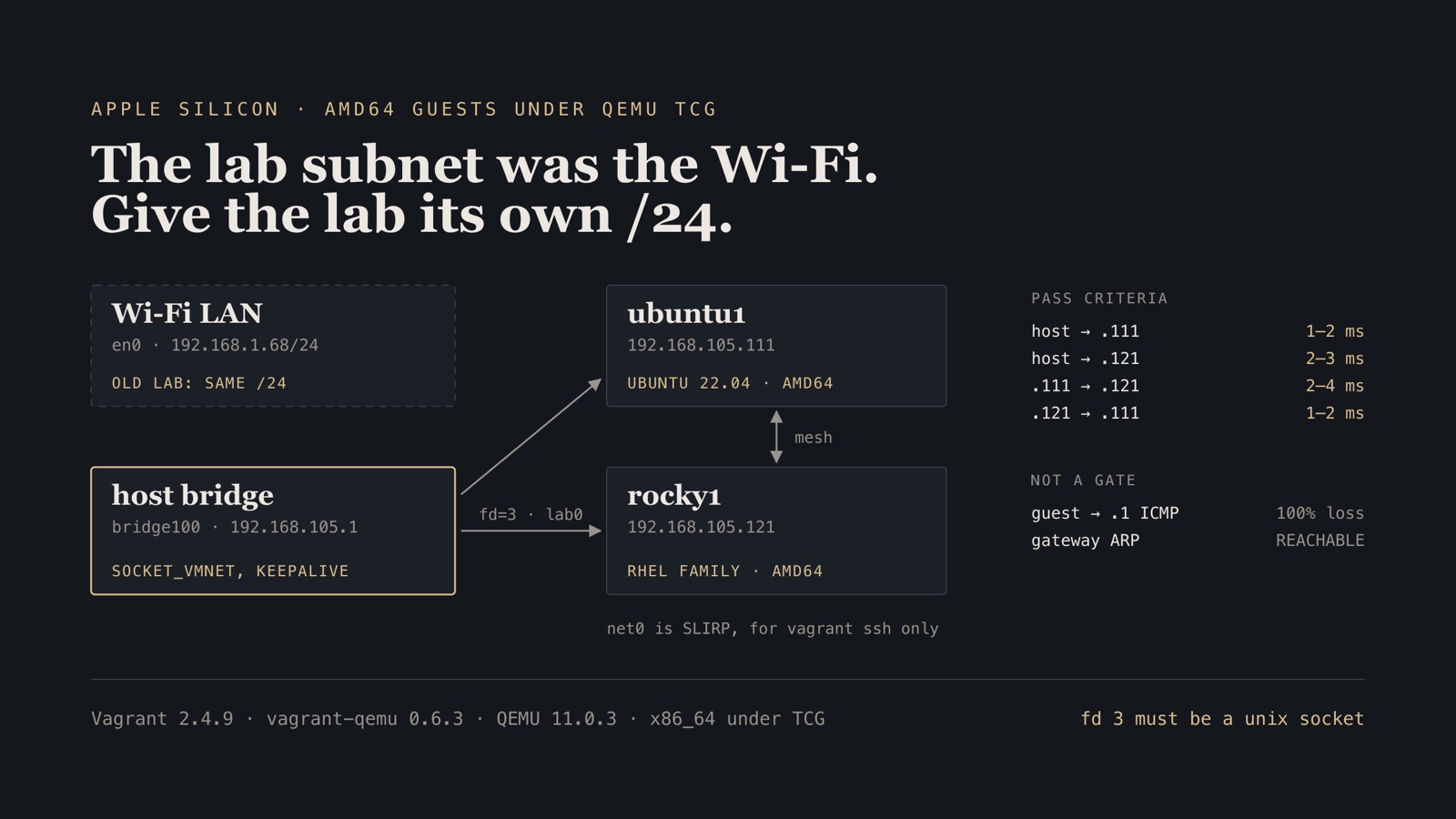
The second is the subnet. Many older Vagrantfiles hard-code 192.168.1.x. On this Mac, Wi‑Fi (en0) was already 192.168.1.68/24. The lab and the LAN were the same /24. Port-forwarded SSH still worked through SLIRP. Everything that depended on a real L2 fabric—host ping, inter-node ping, later VIP tricks—did not. The repair is boring and non-negotiable: give the lab its own unused /24. Mine is 192.168.105.0/24.
This post is the path that survived measurement: two amd64 guests, Ubuntu plus CentOS 8 as the RHEL stand-in, socket_vmnet for the shared fabric, and proof that host and mesh pings actually return.
The Vagrantfile, QEMU wrapper, LaunchDaemon plist, bin/vagrant-up and scripts/verify-mesh.sh are in postgres-ha-lab/fabric.
How the two NICs share the work
Each guest gets two interfaces on purpose.
- net0 (QEMU user / SLIRP) — Vagrant SSH lands on
127.0.0.1:<ssh_port>. This is how you get a shell when the lab NIC is still dark. - lab0 (socket_vmnet) — shared L2 with the host bridge at
192.168.105.1and every peer. Static addresses sit above the DHCP end (.100): Ubuntu.111/.112, Rocky-or-CentOS.121/.122.
The second NIC is not “another private_network line and hope.” It is wired as:
-device virtio-net-pci,netdev=lab0,mac=…
-netdev socket,id=lab0,fd=3
That fd=3 has to be the connected unix socket handed over by socket_vmnet_client. When QEMU opened the unix socket itself with a native stream connect, the guest’s eth1 transmitted forever and received nothing. lsof on fd 3 is the cheap tell: you want TYPE=unix with a live peer, not a pipe left over from an IDE shell.
Step 1 — Install QEMU, socket_vmnet, and a KeepAlive daemon
brew install qemu socket_vmnet
vagrant plugin install vagrant-qemu
vagrant plugin list | grep qemu
You want vagrant-qemu ≥ 0.6.3. The 0.3.x line does not give you a reliable path for this pattern.
socket_vmnet has to stay up for the whole boot. A one-shot process that dies while TCG is still grinding through cloud-init will leave you debugging a dead bridge. Install it as a LaunchDaemon:
<?xml version="1.0" encoding="UTF-8"?>
<!DOCTYPE plist PUBLIC "-//Apple//DTD PLIST 1.0//EN" "http://www.apple.com/DTDs/PropertyList-1.0.dtd">
<plist version="1.0">
<dict>
  <key>Label</key><string>lab.socket_vmnet</string>
  <key>ProgramArguments</key>
  <array>
    <string>/opt/homebrew/opt/socket_vmnet/bin/socket_vmnet</string>
    <string>--vmnet-gateway=192.168.105.1</string>
    <string>--vmnet-dhcp-end=192.168.105.100</string>
    <string>/opt/homebrew/var/run/socket_vmnet</string>
  </array>
  <key>RunAtLoad</key><true/>
  <key>KeepAlive</key><true/>
  <key>StandardOutPath</key><string>/opt/homebrew/var/log/socket_vmnet/stdout</string>
  <key>StandardErrorPath</key><string>/opt/homebrew/var/log/socket_vmnet/stderr</string>
</dict>
</plist>
sudo mkdir -p /opt/homebrew/var/log/socket_vmnet
sudo cp lab.socket_vmnet.plist /Library/LaunchDaemons/
sudo launchctl bootstrap system /Library/LaunchDaemons/lab.socket_vmnet.plist
# after edits: sudo launchctl kickstart -kp system/lab.socket_vmnet
Verify.
$ ifconfig bridge100 | grep 'inet '
	inet 192.168.105.1 netmask 0xffffff00 broadcast 192.168.105.255
$ ls -l /opt/homebrew/var/run/socket_vmnet
srwxr-xr-x  ... /opt/homebrew/var/run/socket_vmnet
Failure boundary. If your home LAN already owns 192.168.105.0/24, pick another free /24 and change both the daemon and every lab IP. Do not “just use 192.168.1.0/24” because a Patroni gist from 2019 did. That is how this whole mess started.
Step 2 — Cache amd64 boxes and wrap QEMU so fd 3 stays clean
vagrant box add generic/ubuntu2204 --provider libvirt
vagrant box add generic/centos8 --provider libvirt
generic/centos8 is the RHEL-family stand-in that was measured here. Swap in Rocky when you have a libvirt box cached; the networking story does not change.
Vagrant’s ChildProcess likes to leave pipes on descriptors ≥ 3. socket_vmnet_client needs a clean fd 3 for the lab NIC. The host wrapper closes everything above stderr, then execs the client onto the real QEMU binary:
#!/bin/bash
set -euo pipefail
REAL_QEMU="${REAL_QEMU:-/opt/homebrew/opt/qemu/bin/qemu-system-x86_64}"
CLIENT="${SOCKET_VMNET_CLIENT:-/opt/homebrew/opt/socket_vmnet/bin/socket_vmnet_client}"
SOCK="${SOCKET_VMNET_SOCK:-/opt/homebrew/var/run/socket_vmnet}"

[[ -S "$SOCK" ]] || { echo "socket_vmnet not running at $SOCK" >&2; exit 1; }

for fd in $(ls /dev/fd 2>/dev/null | grep -E '^[0-9]+$' | sort -n); do
  [[ "$fd" -gt 2 ]] && eval "exec ${fd}<&-" 2>/dev/null || true
done

exec "$CLIENT" "$SOCK" "$REAL_QEMU" "$@"
Point the provider at that wrapper. Do not daemonize QEMU here—forking drops the inherited lab fd. The load-bearing provider lines look like this:
config.vm.provider "qemu" do |qe|
  qe.arch = "x86_64"
  qe.machine = "q35"
  qe.cpu = "max"
  qe.smp = "2"
  qe.memory = "1536"
  qe.ssh_port = 22111
  qe.net_device = "virtio-net-pci"
  qe.no_daemonize = true
  qe.qemu_bin = File.join(File.dirname(__FILE__), "bin", "qemu-system-x86_64")
  qe.extra_qemu_args = [
    "-device", "virtio-net-pci,netdev=lab0,mac=52:54:00:12:00:11",
    "-netdev", "socket,id=lab0,fd=3",
  ]
end
A short provisioner then finds the non-SLIRP NIC (prefer the known MAC), writes a static address with netplan or NetworkManager, and records /etc/lab/ip. That is ordinary guest plumbing; the unusual part already happened on the host.
Verify.
After vagrant up has started QEMU:
$ lsof -p "$(pgrep -n qemu-system-x86_64)" -d 3
COMMAND   PID  USER FD TYPE DEVICE ... NAME
qemu-syst ...         3u unix ...      ->0x…
If fd 3 is a pipe or missing a peer, stop and fix the wrapper before you chase guest routes.
Step 3 — Bring the pair up and prove the mesh
TCG first boot is slow. Several minutes of SSH retries is normal, not a hung VM. Raise boot_timeout (I use 900). If your shell—Cursor, VS Code, anything that injects pipes—still pollutes descriptors, close them before vagrant up:
( exec 3<&- 4<&- 5<&- 6<&- 7<&- 8<&- 9<&-
  vagrant up ubuntu1 rocky1 --provider=qemu
)
Bring up one Ubuntu node and one RHEL-family node first. Four nodes fit the same Vagrantfile later; two are enough to prove L2.
Verify.
From the Mac host, after provision finishes:
$ ping -c 3 192.168.105.111
3 packets transmitted, 3 packets received, 0.0% packet loss
# ~1–2 ms on this rig

$ ping -c 3 192.168.105.121
3 packets transmitted, 3 packets received, 0.0% packet loss
# ~2–3 ms
Verify.
Then from inside each guest:
$ vagrant ssh ubuntu1 -c 'ping -c 3 192.168.105.121'
3 packets transmitted, 3 received, 0% packet loss
# ~2–4 ms

$ vagrant ssh rocky1 -c 'ping -c 3 192.168.105.111'
3 packets transmitted, 3 received, 0% packet loss
# ~1–2 ms
Those four checks are the gate. Guest ping to 192.168.105.1 may still show 100% loss while ip neigh shows the gateway REACHABLE. On this macOS vmnet setup the gateway answers ARP and carries L2, but often ignores ICMP. Do not fail the lab on gateway ping. Fail it when peers or the host cannot reach the lab IPs.
One more SSH gotcha under TCG: if your agent offers a long list of keys, you can burn through MaxAuthTries before the Vagrant key is tried. Prefer IdentitiesOnly=yes with the key Vagrant manages, or just use vagrant ssh.
Failure modes
| Symptom | Cause | Repair |
|---|---|---|
| Lab IPs look plausible but host/peers cannot reach them | Lab subnet equals Wi‑Fi (192.168.1.0/24 here) |
Move lab to an unused /24; change daemon + Vagrant IPs together |
| eth1 TX rises, RX stays 0 | fd 3 is not the vmnet client pipe, or QEMU used stream |
Wrapper + socket_vmnet_client; confirm lsof … -d 3 is unix |
| socket_vmnet vanishes mid-boot | One-shot daemon | LaunchDaemon with KeepAlive |
Too many authentication failures |
Agent offers many keys while TCG is slow | IdentitiesOnly=yes / vagrant ssh |
| First boot “hangs” for ages | x86_64 under TCG | Raise boot_timeout; wait; watch SSH retries, not wall-clock panic |
Clean up and the rule I will keep using
vagrant halt ubuntu1 rocky1
# or: vagrant destroy -f ubuntu1 rocky1
Leave lab.socket_vmnet installed while you are iterating. Stop it only when you want bridge100 gone.
The operating rule for the Postgres 18+ / Patroni write-ups that sit on top of this Mac: amd64 guests, a dedicated lab subnet, socket_vmnet_client on fd 3, and a green host-plus-mesh check before a single package install. Architecture fidelity without L2 fidelity is just a slow container with extra ceremony. Get the fabric honest first; then the database work can mean what it says.