What you'll build
pgBackRest wired into a two-node Patroni cluster by Ansible over mutual TLS: archiving through the DCS, a full backup, a replica rebuilt from the repo, and a point-in-time restore of a dropped table.
- Time
- ~90 min on an existing cluster; the restore drill itself is ~15 min
- Level
- Intermediate
- Tested on
- Rocky Linux 8 · amd64 under QEMU on Apple Silicon · PostgreSQL 18.6 (PGDG) · Patroni 4.1.5 · pgBackRest 2.59.0 over mutual TLS on 8432 · etcd 3.7.0 · ansible-core 2.15.13 · 192.168.105.140–142
Before you start
- The Patroni cluster from part 2 of this series, running PostgreSQL 18 with etcd
- Ansible on the control node (ansible-core 2.15.x against RHEL-family guests), plus the `ansible.posix` collection: `ansible-galaxy collection install -r ansible/collections/requirements.yml`
- Enough repo disk for one full backup plus WAL — 3 GB is plenty for a lab
On this page
- The thing that makes this different from single-node backup
- Step 1 — One repo, every member declared
- Step 1b — Clocks, before certificates
- Step 2 — Two settings, two different homes
- Step 3 — The restart nobody mentions
- Step 4 — Stanza, check, and the first backup
- Step 5 — Rebuild a replica from the repository
- Step 6 — Point-in-time restore of a dropped table
- Step 7 — The gotcha after a PITR
- Failure modes worth knowing
- What this buys you
The thing that makes this different from single-node backup
Backing up one PostgreSQL server is a solved problem with a well-worn runbook. Backing up a Patroni cluster is the same tool pointed at a target that moves: the primary is whichever node currently holds the leader key, and that can change between two backups without anyone touching a config file.
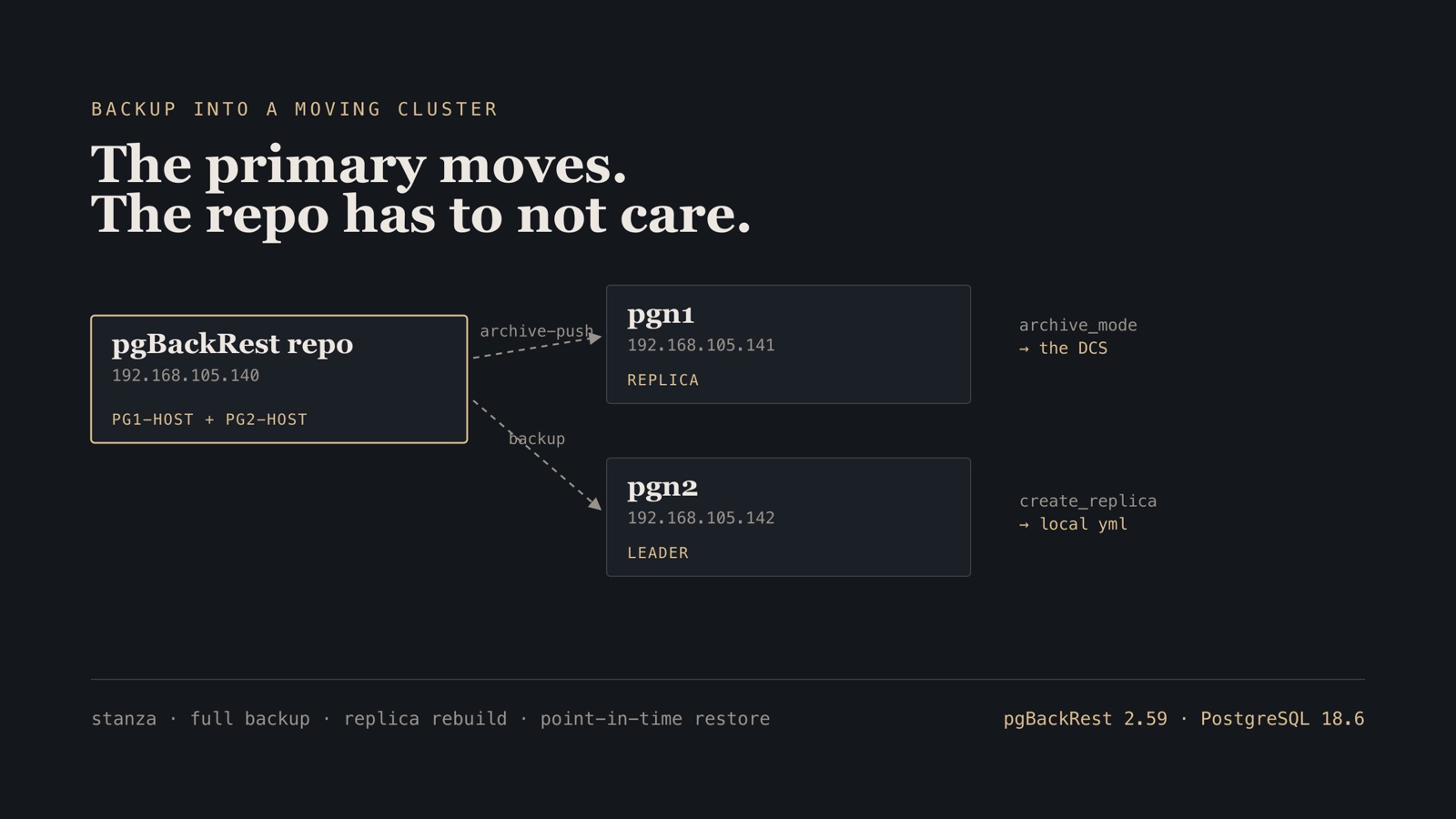
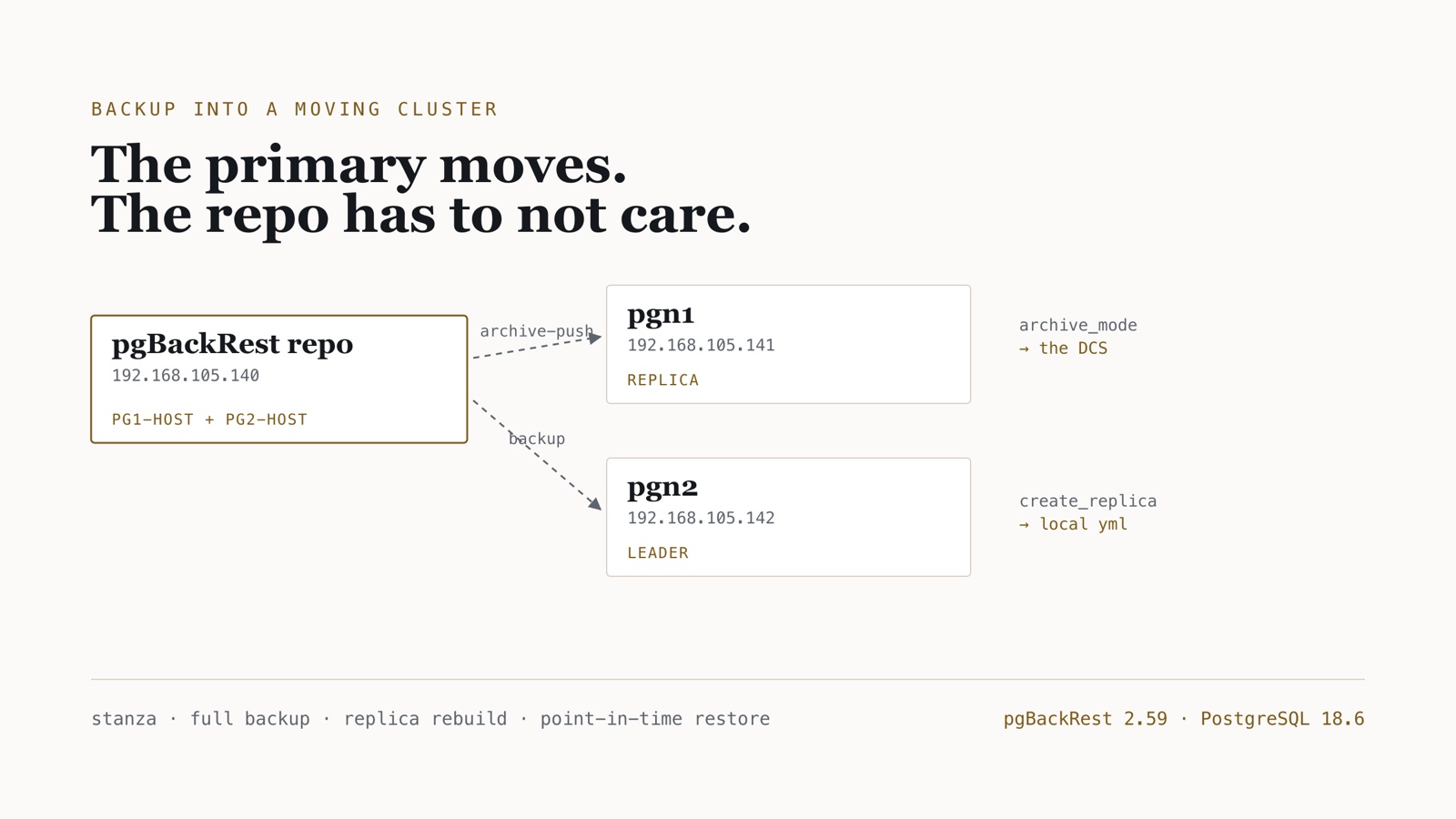
So the repository is not configured against “the primary”. It is configured against every member, and pgBackRest works out which one is writable when it runs. That single decision is what makes the setup survive a failover, and it is visible in the very first command’s output.
The wiring here is Ansible, playbooks 03–05 in postgres-ha-lab/patroni; the backup, rebuild and restore drills are commands run by hand. Part 1 of this series established the rule and it holds: Vagrant boots the box and wires the lab NIC; packages, configuration, services and certificates belong to Ansible, because a lab you fixed by hand is a lab you cannot rebuild.
The cluster is the one from part 2 — pgn1 and pgn2 on PostgreSQL 18.6 with etcd on etcd1. The repository lives on etcd1 as well, which is a lab economy and not a recommendation: in production the DCS and the backup repository are separate failure domains, and the repo does not sit on a database host at all.
Step 1 — One repo, every member declared
The first play, 03, installs pgBackRest on all three nodes, then writes a repository config that lists both cluster members:
[global]
repo1-path={{ pgbackrest_repo_path }}
repo1-retention-full=2
start-fast=y

[{{ pgbackrest_stanza }}]
{% for m in patroni_members %}
pg{{ loop.index }}-host={{ m.ip }}
pg{{ loop.index }}-host-user={{ pgbackrest_user }}
pg{{ loop.index }}-path={{ pg_data_dir }}
pg{{ loop.index }}-port={{ pg_port }}
{% endfor %}
Transport ends up as mutual TLS, the same as part 1, and it is the better answer for a cluster: authorisation is an explicit CN allow-list rather than “whatever the postgres unix user can reach over ssh”. The playbooks get there in two moves. 03 and 04 wire the repo over SSH, which is why the template above has pgN-host-user, and 04 exchanges postgres keys between all three hosts. 05 then rewrites every config for TLS, giving each pgN-host a pgN-host-type=tls, the port and the certificate files. The SSH trust from 04 stays in place; remove those authorized_keys entries if TLS should be the only path. Each side names the other:
tls-server-address=*
tls-server-port=8432
tls-server-cert-file=/etc/pgbackrest/certs/etcd1.crt
tls-server-key-file=/etc/pgbackrest/certs/etcd1.key
tls-server-ca-file=/etc/pgbackrest/certs/ca.crt
tls-server-auth=pgn1=pg18lab
tls-server-auth=pgn2=pg18lab
The database hosts get the mirror image, plus asynchronous archiving so archive_command never becomes the cluster’s write ceiling. They run a TLS server too, because the repo reaches back to them when it takes a backup:
[global]
repo1-host=192.168.105.140
repo1-host-type=tls
repo1-host-port=8432
repo1-host-ca-file=/etc/pgbackrest/certs/ca.crt
repo1-host-cert-file=/etc/pgbackrest/certs/pgn1.crt
repo1-host-key-file=/etc/pgbackrest/certs/pgn1.key
archive-async=y
spool-path=/var/spool/pgbackrest

tls-server-auth=etcd1=pg18lab
A certificate signed by the CA but missing from tls-server-auth authenticates fine and is then refused. That is the behaviour you want, and it is worth knowing before you meet the error.
Name the stanza after the Patroni scope. pgBackRest thinks in stanzas and Patroni thinks in scopes; keeping them identical saves a future reader wondering whether they are the same thing.
Verify. The playbook is clean across all three hosts:
etcd1  : ok=9  changed=4  unreachable=0  failed=0
pgn1   : ok=7  changed=3  unreachable=0  failed=0
pgn2   : ok=7  changed=3  unreachable=0  failed=0
Step 1b — Clocks, before certificates
This cost the most time of anything in the build, and the error points nowhere near the cause:
WARN: unable to check pg1: [ServiceError] TLS error [1:336151570] sslv3 alert bad certificate
ERROR: [027]: no database found
The certificates were fine. The CA fingerprint matched on every host. What did not match was the time:
control node (Mac):  2026-08-14 16:24:33 UTC
  etcd1              2026-08-14 16:24:34 UTC
  pgn1               2026-08-14 15:07:59 UTC
  pgn2               2026-08-14 15:08:00 UTC
CA notBefore:        Aug 14 16:16:14 2026 GMT
Both database nodes were 76 minutes behind. The CA was issued on the Mac at 16:16, so from their point of view it was not yet valid, and openssl verify says so plainly once you ask it directly:
error 9 at 1 depth lookup: certificate is not yet valid
TCG guests drift badly, and chronyd slews rather than steps, so it corrects a large offset far too slowly to help. Step the clock, and do it before anything issues a certificate:
- name: Force an immediate step
  ansible.builtin.command: chronyc -a makestep

- name: Fail if still skewed from the control node
  ansible.builtin.assert:
    that: "(guest_epoch.stdout | int - control_epoch | int) | abs < 120"
    fail_msg: "{{ inventory_hostname }} is too far from the control node; certificates will not validate."
The assertion matters more than the makestep. A silent 76-minute skew turns into a TLS error an hour later; a failed assertion names the problem at the point it exists.
Verify. With clocks stepped, the handshake works and check proves the whole path. This capture is from a re-run after the Step 6 restore, hence timeline 4; the first check on this cluster is in Step 4:
INFO: check repo1 (standby)
INFO: switch wal not performed because this is a standby
INFO: check repo1 configuration (primary)
INFO: WAL segment 00000004000000000000000F successfully archived ... on repo1
INFO: check command end: completed successfully (2560ms)
Step 2 — Two settings, two different homes
This is where most integrations quietly break, and the split is not arbitrary.
archive_mode and archive_command describe the whole cluster, so they belong in the DCS. Patroni regenerates postgresql.conf from the DCS every time it starts a node — so an archive_command typed straight into that file works perfectly until the first failover, then vanishes at exactly the moment you need it.
- name: Push archive settings into the DCS
  ansible.builtin.shell: |
    cat <<'YML' | patronictl -c {{ patroni_config }} edit-config --force --apply -
    postgresql:
      parameters:
        archive_mode: "on"
        archive_command: "pgbackrest --stanza={{ pgbackrest_stanza }} archive-push %p"
        archive_timeout: 60
    YML
  become_user: postgres
  run_once: true
create_replica_methods is the opposite. It names a command on that host, so it cannot live in shared cluster state and goes into the local patroni.yml:
create_replica_methods:
  - pgbackrest
  - basebackup
pgbackrest:
  command: "/usr/bin/pgbackrest --stanza=pg18lab --delta restore"
  keep_data: true
  no_params: true
Order matters. With pgbackrest first, a new replica clones from the repository; basebackup stays as the fallback. Without it, every rebuild drags a full copy off the primary while that primary is serving traffic.
Step 3 — The restart nobody mentions
Apply the config and check whether PostgreSQL actually took it:
psql -tAc "SELECT name||' = '||setting FROM pg_settings
           WHERE name IN ('archive_mode','archive_command','archive_timeout');"
archive_command = (disabled)
archive_mode = off
archive_timeout = 60
The DCS has the right values and the server does not. archive_timeout is reloadable so it applied; archive_mode is a postmaster-level parameter and needs a full restart. Patroni knows, and says so:
| Member | Role    | State     | TL | Pending restart | Pending restart reason |
| pgn1   | Replica | streaming |  3 | *               | archive_mode: off->on  |
| pgn2   | Leader  | running   |  3 | *               | archive_mode: off->on  |
patronictl restart asks each member to restart PostgreSQL in place, one after another. The leader restarts without a switchover, so writes pause for the length of its restart; to avoid even that, restart the replica, patronictl switchover, then restart the old leader. On a lab cluster the simple form is fine:
patronictl -c /etc/patroni/patroni.yml restart pg18lab --force
Verify. The flag clears and archiving is live:
archive_command = pgbackrest --stanza=pg18lab archive-push %p
archive_mode = on
Step 4 — Stanza, check, and the first backup
Run these from the repository host. stanza-create initialises the repo layout; check proves a WAL segment can actually make the trip.
sudo -u postgres pgbackrest --stanza=pg18lab stanza-create
sudo -u postgres pgbackrest --stanza=pg18lab check
Verify. Read the check output closely, because it contains the proof that the multi-host config works:
INFO: switch wal not performed because this is a standby
INFO: check repo1 configuration (primary)
INFO: WAL segment 000000030000000000000004 successfully archived to
      '/var/lib/pgbackrest/archive/pg18lab/18-1/...' on repo1
INFO: check command end: completed successfully (6795ms)
pgBackRest probed both declared hosts, found one in recovery, skipped it, and did the WAL switch on the primary. Nothing told it which node was the leader.
sudo -u postgres pgbackrest --stanza=pg18lab --type=full backup
INFO: backup start archive = 000000030000000000000006, lsn = 0/6000060
INFO: new backup label = 20260814-141156F
INFO: full backup size = 22.7MB, file total = 981
INFO: backup command end: completed successfully (23910ms)
The repo stored 2.9 MB for a 22.7 MB database — compression is on by default and worth knowing before you size the volume.
Step 5 — Rebuild a replica from the repository
The first restore drill is the cheap one, and it is the one you will actually use: throw a replica away and let Patroni rebuild it.
patronictl -c /etc/patroni/patroni.yml reinit pg18lab pgn1 --force
Verify. The Patroni journal on the rebuilt node names the method, which is the only way to know it did not silently fall back to pg_basebackup:
INFO: restore command begin 2.59.0: --delta --repo1-host=192.168.105.140 ... --stanza=pg18lab
INFO: restore command end: completed successfully (5020ms)
INFO: replica has been created using pgbackrest
Five seconds, and the primary was never touched. On a database where a full copy would take hours across a busy link, that difference is the entire reason to wire the two tools together.
Step 6 — Point-in-time restore of a dropped table
Now the drill people actually rehearse for. Note a timestamp, then break something:
SELECT now();                     -- 2026-08-14 14:15:20.119249+00
DROP TABLE failover_probe;        -- the accident
SELECT pg_switch_wal();           -- make sure the damage is archived
Patroni must be told to stand down first, or it will fight the restore by restarting PostgreSQL underneath you:
patronictl -c /etc/patroni/patroni.yml pause --wait
Then stop PostgreSQL — and this is the step that catches people. Pausing Patroni and stopping the service does not stop the database. That is what pause means: Patroni stops managing, PostgreSQL keeps serving.
ERROR: [038]: unable to restore while PostgreSQL is running
Stop it properly on both nodes, then restore the leader to the moment before the drop:
sudo -u postgres /usr/pgsql-18/bin/pg_ctl -D /var/lib/pgsql/18/data -m fast stop

sudo -u postgres pgbackrest --stanza=pg18lab --delta --type=time \
  --target='2026-08-14 14:15:20' --target-action=promote restore
INFO: repo1: restore backup set 20260814-141156F, recovery will start at 2026-08-14 14:11:56
INFO: restore command end: completed successfully (4198ms)
Start the server and let it replay forward to the target:
sudo -u postgres /usr/pgsql-18/bin/pg_ctl -D /var/lib/pgsql/18/data -w -t 300 start
Verify. The table is back, on a new timeline, and out of recovery:
in recovery: f
timeline:    4
table back:  t
row count:   5

 id |              note
----+---------------------------------
  1 | written on pgn1 before kill
 34 | written on pgn2 after promotion
 35 | after etcd recovery
 36 | before replica reinit
 37 | the row we must not lose
Step 7 — The gotcha after a PITR
Resume Patroni, start the other node, and rebuild it — and it hangs in starting forever:
LOG:  fetching timeline history file for timeline 3 from primary server
FATAL: could not receive timeline history file from the primary server:
       ERROR: could not open file "pg_wal/00000003.history": No such file or directory
The replica restored from a backup whose base is on timeline 3 and is asking the leader for that timeline’s history. After the point-in-time restore the leader is on timeline 4 and never had the file. archive-get cannot supply it either, because archiving was switched on after the cluster had already reached timeline 3 — so that history file was never archived at all.
The fix is not a flag. It is an ordering rule: after a point-in-time restore, take a fresh full backup before rebuilding any replica. The new backup’s base is on the current timeline, so nothing has to reach backwards.
sudo -u postgres pgbackrest --stanza=pg18lab --type=full backup
patronictl -c /etc/patroni/patroni.yml reinit pg18lab pgn1 --force
Verify. Both members on timeline 4, streaming, and both holding the recovered rows:
| Member | Host            | Role    | State     | TL | Replay LSN | Lag |
| pgn1   | 192.168.105.141 | Replica | streaming |  4 | 0/E000060  |   0 |
| pgn2   | 192.168.105.142 | Leader  | running   |  4 |            |     |

  .141: 5 rows
  .142: 5 rows
Failure modes worth knowing
| Symptom | Cause | Repair |
|---|---|---|
archive_command disabled after edit-config |
archive_mode is postmaster-level |
Rolling patronictl restart; watch the Pending restart column |
| archive settings vanish after a failover | Written into postgresql.conf by hand |
Put them in the DCS with edit-config |
unable to restore while PostgreSQL is running |
pause and stop-service do not stop the database | pg_ctl -m fast stop on every node first |
Replica stuck starting, wants 0000000N.history |
Backup base predates the current timeline | Fresh full backup after the PITR, then reinit |
| Replica rebuild is slow and loads the primary | create_replica_methods missing or wrong order |
List pgbackrest before basebackup in the local yml |
check reports the wrong host as primary |
Only one pgN-host declared |
Declare every member; the primary moves |
sslv3 alert bad certificate, certs look correct |
Guest clock behind the CA’s notBefore | chronyc -a makestep, then assert the offset |
| Peer authenticates then is refused | CN missing from tls-server-auth |
Add tls-server-auth=<CN>=<stanza> on the receiving side |
What this buys you
The cluster now survives three separate things, and they are worth naming separately because they fail separately. A node dying is handled by Patroni, in about twenty seconds, from part 2. A replica needing to come back is handled by pgBackRest in five seconds without touching the primary. And an operator error — the dropped table — is handled by a point-in-time restore that recovered every row.
Only the first of those is automatic. The other two are drills, and a drill you have not run is a plan, not a capability. The useful outcome of this post is not the config; it is that the restore was performed once, on purpose, while nothing was actually on fire.