What you'll build
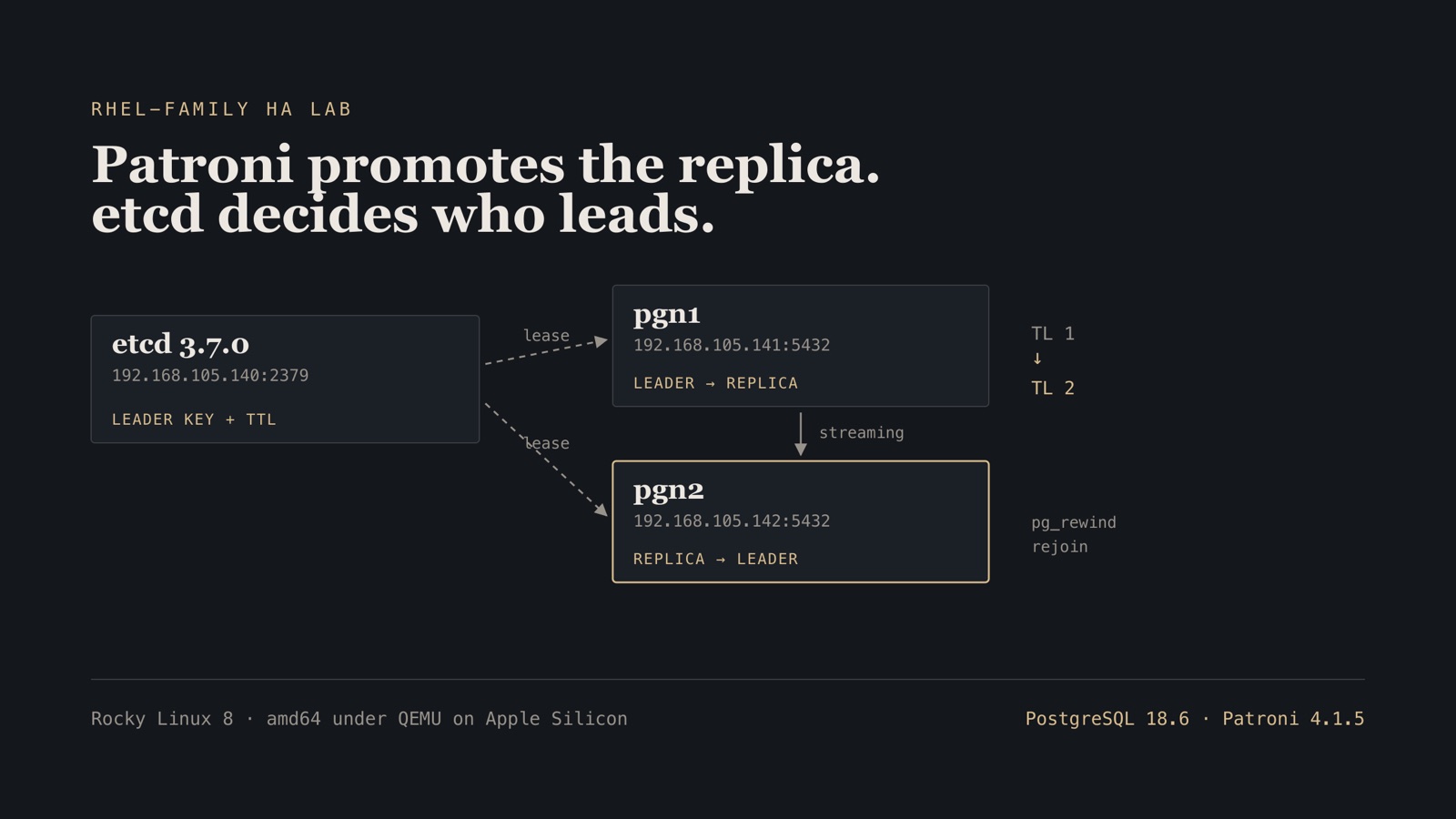
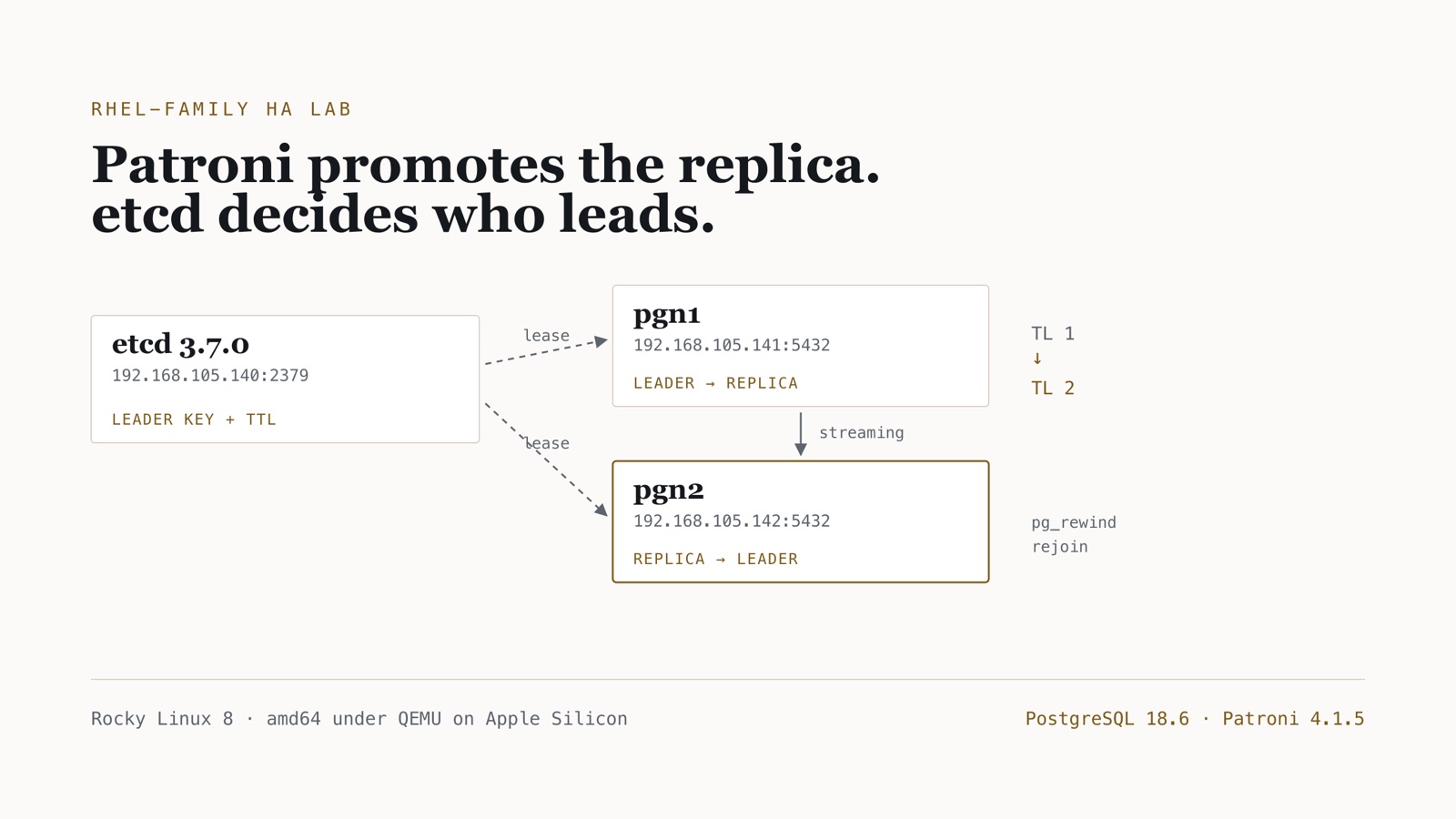
A single-node etcd plus a two-node Patroni cluster on PostgreSQL 18.6, on amd64 Rocky 8 guests, with a measured failover and an automatic pg_rewind rejoin.
- Time
- ~2–3 h first bring-up (TCG is slow); ~5 min for the failover itself
- Level
- Intermediate
- Tested on
- macOS Darwin 25 · arm64 host · generic/rocky8 (Rocky 8.8, repos serving 8.10) · amd64 under QEMU 11.0.3 TCG · PostgreSQL 18.6 (PGDG) · Patroni 4.1.5 · etcd 3.7.0 · Python 3.12.13 · 192.168.105.140–142
Before you start
- The amd64 + socket_vmnet fabric from the companion networking tutorial (lab subnet 192.168.105.0/24)
- Vagrant with vagrant-qemu on Apple Silicon, and about 4 GB free RAM for three TCG guests
- Comfort reading systemd unit files, firewalld rules, and psql output
On this page
- What this proves, and what it does not
- Step 1 — Why Rocky 8 and not generic/rhel8
- Step 2 — Three guests on the lab fabric
- Step 3 — etcd, and the GPG error that is not a GPG error
- Step 4 — PostgreSQL 18 and Patroni from packages
- Step 5 — Kill the leader and measure
- Step 6 — The half everyone skips: rejoining the old primary
- “Doesn’t Patroni need three nodes?”
- Failure modes worth knowing
- Clean up, and what this changes
What this proves, and what it does not
Most Patroni walkthroughs stop at patronictl list showing a Leader and a Replica. That is the setup, not the result. The question worth answering is what happens when the primary dies badly — not a graceful systemctl stop, but a SIGKILL that leaves the cluster to work it out — and then whether the dead node can come back without a rebuild.
This post builds that on three amd64 guests and measures it. The numbers below came off the run, not off a docs page: promotion observed in a 10–20 second window — patronictl was polled every 10 s, so that interval is the instrument’s resolution and not the precision of the result — the timeline advancing 1 → 2, and the old primary rejoining as a streaming replica 15 seconds after it was restarted, via pg_rewind from the last common checkpoint.
It is also honest about the shape of the lab. etcd runs on one node, which is a single point of failure — so rather than wave that away, the last section stops etcd and measures what a DCS outage actually costs. The answer is worth knowing before you design one: the healthy leader demotes itself and the cluster goes read-only.
The guests are amd64 under QEMU TCG on an Apple Silicon Mac, on the shared 192.168.105.0/24 fabric from the networking tutorial. Slow on purpose: a lab that lies about the instruction set makes every later packaging and timing story suspect.
The Vagrantfile and the exact etcd and Patroni config files are in postgres-ha-lab/patroni.
Step 1 — Why Rocky 8 and not generic/rhel8
I started this on generic/rhel8 and it does not work, for a reason worth stating plainly because it is invisible until the last command fails.
An unregistered RHEL 8 box has no BaseOS and no AppStream. Only EPEL and PGDG are enabled:
sudo subscription-manager status
sudo dnf -q repolist
Overall Status: Unknown
epel pgdg-common pgdg14 pgdg15 pgdg16 pgdg17 pgdg18
PGDG packages Patroni 4.1.5 as patroni-etcd, and that package needs a Python 3.12 interpreter:
nothing provides python(abi) = 3.12 needed by python3.12-etcd-0.4.5-49PGDG.rhel8.noarch
python3.12 lives in AppStream. No subscription, no AppStream, no Patroni. Registering a RHEL box fixes it and is the right answer in an enterprise where entitlements exist. For a lab anyone should be able to reproduce, a RHEL-compatible rebuild is better: Rocky Linux 8 is binary-compatible, needs no account, and its $releasever of 8 serves current 8.10 content.
Verify. On a Rocky 8 guest the interpreter is there:
sudo dnf -q list available python3.12
python3.12.x86_64 3.12.13-3.el8_10 appstream
Every command from here works unchanged on a registered RHEL 8. It is only the unregistered box that cannot get there.
Step 2 — Three guests on the lab fabric
The Vagrantfile boots three nodes and does nothing else. Packages, configuration and services come later; Vagrant’s job is a booted box with a routable lab NIC.
LAB_PREFIX = "192.168.105"

NODES = [
  { name: "etcd1", ip: "#{LAB_PREFIX}.140", ssh_port: 22140, memory: "1024", smp: "1", mac: "52:54:00:12:01:40" },
  { name: "pgn1",  ip: "#{LAB_PREFIX}.141", ssh_port: 22141, memory: "1536", smp: "2", mac: "52:54:00:12:01:41" },
  { name: "pgn2",  ip: "#{LAB_PREFIX}.142", ssh_port: 22142, memory: "1536", smp: "2", mac: "52:54:00:12:01:42" },
].freeze

Vagrant.configure("2") do |config|
  config.vm.box = "generic/rocky8"
  config.vm.synced_folder ".", "/vagrant", disabled: true
  config.vm.box_check_update = false
  # TCG boots a RHEL-family guest slowly. The 300s default expires mid-cloud-init
  # and Vagrant reports a timeout for a VM that is still coming up.
  config.vm.boot_timeout = 900
  # ... provider block: q35, cpu max, the socket_vmnet wrapper, and
  #     -netdev socket,id=lab0,fd=3 as in the networking post
end
Two settings are load-bearing and both were learned the hard way. boot_timeout = 900 because TCG is slow enough that the default makes Vagrant declare failure on a healthy boot. And no_daemonize = true in the provider, because forking drops the inherited lab file descriptor and the lab NIC transmits into nothing.
Verify. Every node holds its lab address:
for n in etcd1 pgn1 pgn2; do
  vagrant ssh $n -c "hostname -s; ip -4 -o addr show eth1 | awk '{print \$4}'"
done
etcd1
192.168.105.140/24
pgn1
192.168.105.141/24
pgn2
192.168.105.142/24
Then prove the mesh: host to every guest, and every guest to every other, with the same checks as fabric/scripts/verify-mesh.sh pointed at .140–.142.
Guest ICMP to the vmnet gateway at .1 fails on macOS even when everything else is healthy. Host-to-guest and guest-to-guest are the pass criteria; do not chase the gateway ping.
Step 3 — etcd, and the GPG error that is not a GPG error
etcd left the RHEL AppStream after RHEL 7. PGDG ships it in a repository that is present but disabled by default, and enabling it produces a message that sends people straight to a tarball:
Error: Failed to download metadata for repo 'pgdg-rhel8-extras':
repomd.xml GPG signature verification error: Bad GPG signature
The signature is fine. Verifying it by hand against the key the repo already shipped proves it:
gpg --verify repomd.xml.asc repomd.xml
gpg: Signature made Thu 13 Aug 2026 07:34:54 AM UTC
gpg:                using RSA key D4BF08AE67A0B4C7A1DBCCD240BCA2B408B40D20
gpg: Good signature from "PostgreSQL RPM Repository <pgsql-pkg-yum@lists.postgresql.org>"
What actually happens is that dnf wants to import that key, asks Is this ok [y/N]:, gets no answer in a non-interactive shell, and reports the refusal as a bad signature. The fix is -y:
sudo dnf -y --enablerepo=pgdg-rhel8-extras install etcd
Installed:
  etcd-3.7.0-1PGDG.rhel8.10.x86_64
Point it at the lab address, not localhost, or Patroni on the other two nodes cannot reach it:
name: etcd1
data-dir: /var/lib/etcd
listen-client-urls: http://192.168.105.140:2379,http://127.0.0.1:2379
advertise-client-urls: http://192.168.105.140:2379
listen-peer-urls: http://192.168.105.140:2380
initial-advertise-peer-urls: http://192.168.105.140:2380
initial-cluster: etcd1=http://192.168.105.140:2380
initial-cluster-state: new
initial-cluster-token: pg18-patroni-lab
The PGDG unit reads a different path, so override it rather than editing the shipped file:
[Service]
ExecStart=
ExecStart=/usr/bin/etcd --config-file=/etc/etcd/etcd.conf.yaml
sudo systemctl daemon-reload
sudo systemctl enable --now etcd
sudo firewall-cmd --permanent --add-port=2379/tcp --add-port=2380/tcp && sudo firewall-cmd --reload
Verify. The endpoint is healthy from the fabric address, not just from localhost:
etcdctl --endpoints=http://192.168.105.140:2379 endpoint health
http://192.168.105.140:2379 is healthy: successfully committed proposal: took = 472.211084ms
One deprecation worth noting: ETCDCTL_API=3 is now an unrecognised environment variable and etcd 3.7 warns about it. Every older Patroni guide still sets it. Drop it.
Step 4 — PostgreSQL 18 and Patroni from packages
On both database nodes, install from PGDG and let it resolve its own Python:
sudo dnf -y install https://download.postgresql.org/pub/repos/yum/reporpms/EL-8-x86_64/pgdg-redhat-repo-latest.noarch.rpm
sudo dnf -qy module disable postgresql
sudo dnf -y install postgresql18-server postgresql18-contrib patroni-etcd
postgres (PostgreSQL) 18.6
patroni 4.1.5
Python 3.12.13
That last line is the point of doing it this way. RHEL 8 and Rocky 8 ship Python 3.6 as python3, which current Patroni does not support. pip install patroni fails, and the usual workaround is a hand-built interpreter nobody maintains. The PGDG package pulls python3.12-etcd, python3.12-dns and the rest of a parallel 3.12 stack, and the system Python is never involved.
Do not run initdb. Patroni owns the data directory and will bootstrap it.
scope: pg18lab
name: pgn1

restapi:
  listen: 192.168.105.141:8008
  connect_address: 192.168.105.141:8008

etcd3:
  hosts: 192.168.105.140:2379

bootstrap:
  dcs:
    ttl: 30
    loop_wait: 10
    retry_timeout: 10
    postgresql:
      use_pg_rewind: true
      parameters:
        wal_level: replica
        max_wal_senders: 10
        max_replication_slots: 10
  pg_hba:
    - host replication replicator 192.168.105.0/24 scram-sha-256
    - host all all 192.168.105.0/24 scram-sha-256
    - local all all peer

postgresql:
  listen: 192.168.105.141:5432
  connect_address: 192.168.105.141:5432
  data_dir: /var/lib/pgsql/18/data
  bin_dir: /usr/pgsql-18/bin
  authentication:
    replication: { username: replicator, password: replpass }
    superuser:   { username: postgres,   password: pgpass }
Use etcd3, not etcd. The older key is the v2 API, which modern etcd no longer serves. And use_pg_rewind: true is what makes Step 6 work at all.
Start pgn1 first and let it win the bootstrap, then start pgn2:
sudo systemctl enable --now patroni
sudo -u postgres patronictl -c /etc/patroni/patroni.yml list
Verify. Two members, one leader, replica streaming with no lag:
+ Cluster: pg18lab (7673867291462481394) --------+----+-------------+-----+------------+-----+
| Member |       Host      |   Role  |   State   | TL | Receive LSN | Lag | Replay LSN | Lag |
+--------+-----------------+---------+-----------+----+-------------+-----+------------+-----+
| pgn1   | 192.168.105.141 | Leader  | running   |  1 |             |     |            |     |
| pgn2   | 192.168.105.142 | Replica | streaming |  1 |   0/302C4F8 |   0 |  0/302C4F8 |   0 |
+--------+-----------------+---------+-----------+----+-------------+-----+------------+-----+
Step 5 — Kill the leader and measure
Write something first, so survival is a fact rather than an assumption:
PGPASSWORD=pgpass psql -h 192.168.105.141 -U postgres \
  -c "CREATE TABLE failover_probe(id serial primary key, note text, at timestamptz default now());" \
  -c "INSERT INTO failover_probe(note) VALUES ('written on pgn1 before kill');"
Confirm it reached the replica, which should also report that it is in recovery:
PGPASSWORD=pgpass psql -h 192.168.105.142 -U postgres \
  -tAc "SELECT count(*), pg_is_in_recovery() FROM failover_probe;"
1|t
Now kill it properly. Not systemctl stop — that is a handover, and a handover is the easy case:
sudo systemctl kill -s SIGKILL patroni
sudo pkill -9 -f 'postgres -D'
Poll the surviving node while it happens:
+10s  pgn2 role=Replica
+20s  pgn2 role=Leader
Verify. The survivor is a writable leader on a new timeline, and the pre-kill row is still there:
in recovery:    f
rows survived:  1
INSERT 0 1
rows now:       2
timeline:       2
Twenty seconds is not a tuning result, it is arithmetic: ttl: 30 with loop_wait: 10 means the leader key expires somewhere inside a 30-second window and the next loop notices. Shortening the TTL shortens the outage and raises the chance a slow node gets demoted for a hiccup. That trade is the whole design conversation, and it belongs in your environment, not in a lab default.
Step 6 — The half everyone skips: rejoining the old primary
A promoted replica is only half a failover. The old primary now holds writes that never reached the new leader — it diverged at the moment it died — so it cannot simply start following. Plenty of runbooks resolve this by wiping the data directory and re-cloning, which on a real database means hours and a lot of network.
use_pg_rewind: true makes Patroni do the cheap thing instead. Start it and watch:
sudo systemctl start patroni
sudo journalctl -u patroni -f
pg_rewind: rewinding from last common checkpoint at 0/20000B8 on timeline 1
pg_rewind: Done!
INFO: no action. I am (pgn1), a secondary, and following a leader (pgn2)
Verify. Fifteen seconds after the restart, the old primary is a streaming replica on the new timeline with zero lag:
| Member |       Host      |   Role  |   State   | TL | Receive LSN | Lag | Replay LSN | Lag |
| pgn1   | 192.168.105.141 | Replica | streaming |  2 |   0/306F940 |   0 |  0/306F940 |   0 |
| pgn2   | 192.168.105.142 | Leader  | running   |  2 |             |     |            |     |
pg_rewind needs either wal_log_hints = on or data checksums to work. The bootstrap above sets no initdb options; checksums are on because PostgreSQL 18’s initdb enables them by default, which is why this succeeded without extra configuration. On a cluster with neither, Patroni cannot rewind, and by default it does not re-clone either: the old primary cannot follow the new timeline until you run patronictl reinit, unless remove_data_directory_on_diverged_timelines is set.
“Doesn’t Patroni need three nodes?”
Almost, but the number belongs to a different component than most people attach it to.
Patroni does not require three Postgres nodes. Two — a primary and a standby — is a normal production topology and the one built above. The three-node minimum is a property of the DCS: etcd, Consul or ZooKeeper need an odd number of members to hold a quorum, and three is the smallest count that tolerates losing one. The two get conflated because the usual deployment co-locates etcd on the same three machines that run Postgres, so “a three-node Patroni cluster” ends up describing the DCS.
That distinction is not academic, because a single-member DCS fails in a way that surprises people. It does not merely stop protecting you. Stop the one etcd node here and wait:
sudo systemctl stop etcd # on etcd1
psql -h 192.168.105.142 -U postgres -tAc "SELECT pg_is_in_recovery();"
psql -h 192.168.105.142 -U postgres -c "INSERT INTO failover_probe(note) VALUES ('after etcd loss');"
Verify. Within about 45 seconds the healthy leader has demoted itself and the cluster is read-only:
t
ERROR:  cannot execute INSERT in a read-only transaction
Nothing is wrong with Postgres. Patroni cannot renew the leader key, so it cannot prove it is still the leader, so it refuses to accept writes — which is the correct choice, because the alternative is two nodes both believing they are primary. With Patroni’s defaults, a DCS outage converts into a full write outage, not a degraded one. failsafe_mode: true changes that: the leader keeps writing while it can reach every member over the REST API.
Restarting etcd restores service on its own:
| pgn1 | 192.168.105.141 | Replica | streaming |  3 |
| pgn2 | 192.168.105.142 | Leader  | running   |  3 |
INSERT 0 1
Note the timeline: 3, not 2. The demote-and-repromote cycle is a new timeline, exactly like a failover, which is worth knowing before you go looking for the failover that “must have happened” in your logs.
So: two Postgres nodes is a legitimate cluster. One etcd node is not a legitimate DCS. Put etcd on three hosts before this goes anywhere near production, and treat that as the availability floor for the whole system.
Failure modes worth knowing
| Symptom | Cause | Repair |
|---|---|---|
nothing provides python(abi) = 3.12 |
Unregistered RHEL 8: no AppStream | Register the box, or use Rocky/Alma 8 |
Bad GPG signature on pgdg-rhel8-extras |
dnf refusing a non-interactive key import | Add -y, or rpm --import the key first |
| Patroni starts, never joins | etcd: instead of etcd3: in the config |
Use etcd3; the v2 API is gone |
Replica stuck in creating replica |
etcd unreachable from that node | Open 2379/tcp; check advertise-client-urls is the lab IP |
| Vagrant reports boot timeout on a healthy VM | TCG slower than the 300s default | config.vm.boot_timeout = 900 |
| Old primary cannot follow the new leader after a failover | No checksums and no wal_log_hints, so pg_rewind is impossible |
initdb with data-checksums, or set the hint parameter |
| Healthy leader goes read-only, no failover in logs | DCS unreachable: Patroni cannot renew the leader key | Restore etcd; run three DCS members so one loss is survivable |
Clean up, and what this changes
cd postgres-ha-lab/patroni && vagrant destroy -f # https://github.com/technobasant/postgres-ha-lab
The operating consequence is the part to carry forward. This cluster survives a dead primary in about twenty seconds without anyone being paged, and it repairs the dead node automatically instead of demanding a rebuild — but only because two settings were right before the incident: use_pg_rewind and data checksums. Neither can be added usefully while you are recovering.
The single etcd node is the honest limit of this lab. It proves the Postgres half. Whether the cluster stays available when the DCS itself goes down is a separate test, and it deserves a separate rig rather than an assumption.