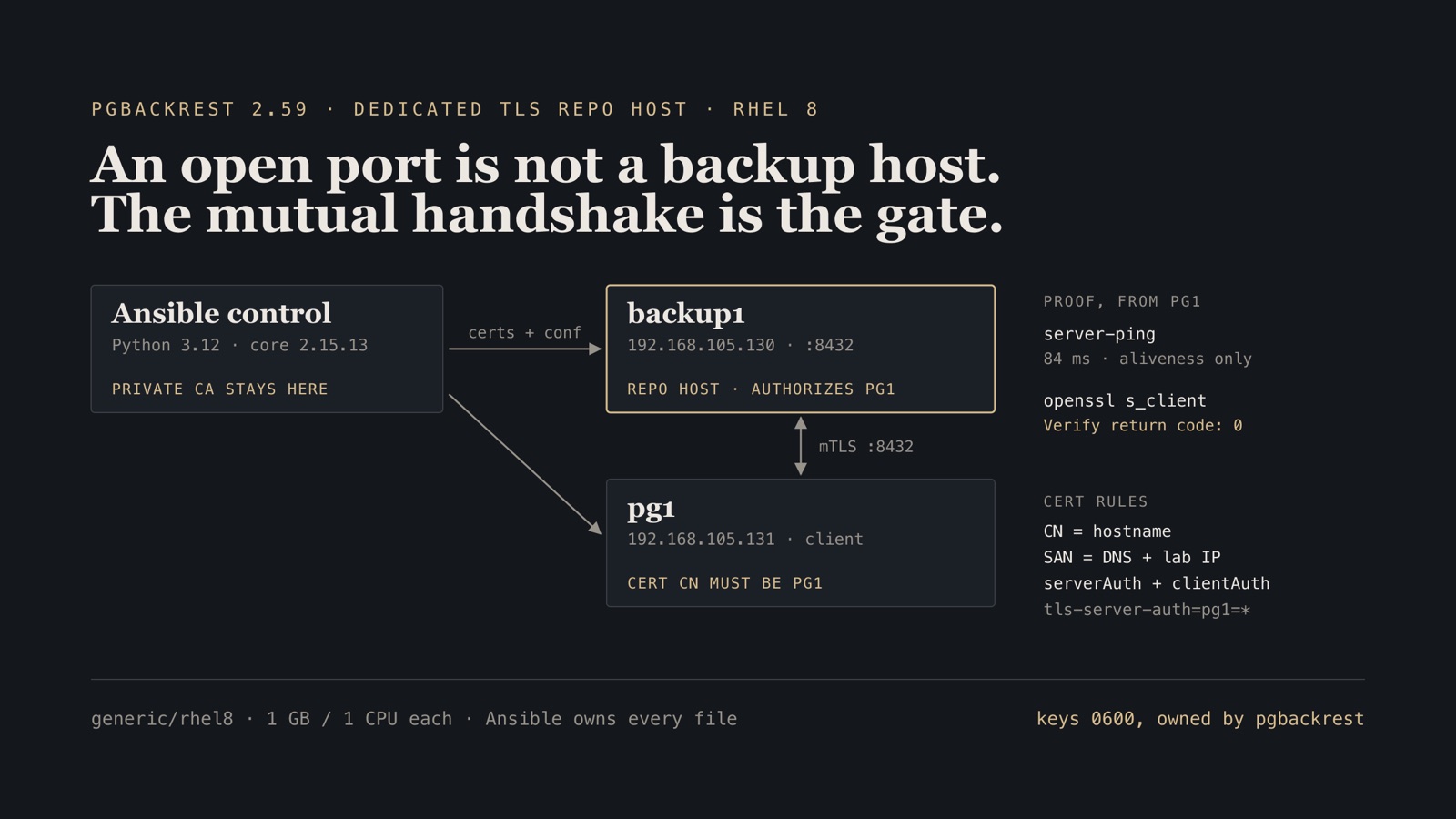

What you'll build
A 1G/1CPU generic/rhel8 backup host running pgBackRest’s TLS server, plus one client VM with Ansible-distributed certs and a proven handshake—no manual guest edits.
- Time
- ~90 min first bring-up (TCG + dnf)
- Level
- Intermediate
- Tested on
- macOS Darwin 25 · arm64 · generic/rhel8 · pgBackRest 2.59.0 (PGDG) · ansible-core 2.15.13 · Python 3.12 venv · 192.168.105.130/131
Before you start
- The amd64 + socket_vmnet fabric from the companion networking tutorial (lab subnet 192.168.105.0/24)
- Vagrant with vagrant-qemu, cached generic/rhel8 (libvirt), and ~2 GB free RAM for two small TCG guests
- A Python 3.12 venv on the Mac with ansible-core 2.15.x (RHEL 8 guests still speak Python 3.6)
On this page
What failed
The usual pgBackRest lab starts with Postgres already running and SSH already trusted. That hides the failure you actually get in production: the backup host is up, port 8432 is open, and the first backup still dies on certificate CN, SAN, or a CLI option that does not mean what the docs from two versions ago said.
I wanted the opposite order. A dedicated backup1 is the TLS repo host. A tiny pg1 is only a TLS client. Ansible owns packages, pgbackrest.conf, firewalld, systemd, the private CA, and cert distribution. Vagrant boots the box and the lab NIC. Postgres is the next post in this series, not this one.
The measured package on this rig was pgBackRest 2.59.0 from PGDG on generic/rhel8. Your dnf may land a newer patch; record what you installed. This sits on the Apple Silicon amd64 networking tutorial. If host and mesh ping are not green, stop. A dead fabric looks like a pgBackRest bug and is not one.
The load-bearing files are reproduced below; the full playbook, roles and Vagrantfile are in postgres-ha-lab/pgbackrest-tls.
Topology
Mac (Ansible control, Python 3.12 + ansible-core 2.15.13)
  │  SSH to lab IPs, not SLIRP hostfwd
  │
  ├─ backup1   192.168.105.130   generic/rhel8   1G / 1 CPU
  │              pgbackrest server  :8432
  │              repo1-path         /var/lib/pgbackrest
  │              certs              /etc/pgbackrest/certs/backup1.{crt,key}
  │
  └─ pg1       192.168.105.131   generic/rhel8   1G / 1 CPU
                 client cert        /etc/pgbackrest/certs/pg1.{crt,key}
                 proof              server-ping + openssl s_client mTLS
Two NICs per guest, same as the fabric post: SLIRP for vagrant ssh, socket_vmnet for the addresses Ansible and pgBackRest will actually use. Private keys live on the control node under ansible/artifacts/certs/ and are gitignored. Guests get copies owned by the pgbackrest user, mode 0600 on keys.
Step 1 — Boot two small RHEL 8 guests
NODES = [
  { name: "backup1", box: "generic/rhel8", ip: "192.168.105.130",
    ssh_port: 22130, memory: "1024", smp: "1", mac: "52:54:00:12:01:30" },
  { name: "pg1",     box: "generic/rhel8", ip: "192.168.105.131",
    ssh_port: 22131, memory: "1024", smp: "1", mac: "52:54:00:12:01:31" },
]
Each provider block is arch = "x86_64", no_daemonize = true, and a second NIC on fd=3 through the socket_vmnet wrapper. The only shell provisioner is lab NIC + /etc/hosts. No packages, no pgBackRest.
./bin/vagrant-up backup1 pg1
First TCG boot is slow. When provision finishes, eth1 holds the lab IP.
Verify.
$ ping -c 2 192.168.105.130
2 packets transmitted, 2 packets received, 0.0% packet loss

$ ping -c 2 192.168.105.131
2 packets transmitted, 2 packets received, 0.0% packet loss
Step 2 — Use an Ansible that still speaks RHEL 8
Homebrew Ansible (core 2.21 on Python 3.14) fails against RHEL 8’s platform Python 3.6 with module deserialization errors (future feature annotations is not defined). Python 3.14 also breaks Ansible when: parsing (ast.Str). The control node for this lab is a Python 3.12 venv pinned to ansible-core 2.15.13.
python3.12 -m venv .venv
.venv/bin/pip install 'ansible-core==2.15.13'
Inventory talks to lab IPs. vagrant ssh over SLIRP is fine for a rescue shell; backups must use the fabric.
all:
  hosts:
    localhost:
      ansible_connection: local
      ansible_python_interpreter: "{{ ansible_playbook_python }}"
  children:
    pgbackrest_servers:
      hosts:
        backup1:
          ansible_host: 192.168.105.130
          ansible_user: vagrant
          ansible_ssh_private_key_file: "{{ inventory_dir }}/../../.vagrant/machines/backup1/qemu/private_key"
          ansible_ssh_common_args: "-o StrictHostKeyChecking=no -o UserKnownHostsFile=/dev/null -o IdentitiesOnly=yes"
          lab_ip: 192.168.105.130
    pgbackrest_clients:
      hosts:
        pg1:
          ansible_host: 192.168.105.131
          ansible_user: vagrant
          ansible_ssh_private_key_file: "{{ inventory_dir }}/../../.vagrant/machines/pg1/qemu/private_key"
          ansible_ssh_common_args: "-o StrictHostKeyChecking=no -o UserKnownHostsFile=/dev/null -o IdentitiesOnly=yes"
          lab_ip: 192.168.105.131
        pg2:
          ansible_host: 192.168.105.132
          ansible_user: vagrant
          ansible_ssh_private_key_file: "{{ inventory_dir }}/../../.vagrant/machines/pg2/qemu/private_key"
          ansible_ssh_common_args: "-o StrictHostKeyChecking=no -o UserKnownHostsFile=/dev/null -o IdentitiesOnly=yes"
          lab_ip: 192.168.105.132
pg2 is reserved and not booted in this post, so run the playbook with --limit 'backup1:pg1:localhost'. It is in the inventory because the repo host’s tls-server-auth list is rendered from the pgbackrest_clients group.
lab_ip is not decorative. The cert play uses it as a SAN. If the certificate only names backup1 and Ansible later connects by IP, OpenSSL will tell you the truth.
Verify.
$ .venv/bin/ansible -i ansible/inventory/lab.yml backup1,pg1 -m ping
backup1 | SUCCESS => { "ping": "pong" }
pg1     | SUCCESS => { "ping": "pong" }
Step 3 — Install from PGDG, issue a CA, start the TLS server
The playbook is four jobs in order, and the order is load-bearing:
- Install
pgbackrestand create the system user/dirs on every TLS node. - Generate CA + per-host certs on localhost (no sudo).
- Copy
ca.crt,<host>.crt,<host>.keyto/etc/pgbackrest/certs/. - Template conf, open firewalld
8432/tcpon the repo host, startpgbackrest-server, then prove frompg1.
Install the PGDG EL8 repo RPM, then dnf install the newest pgbackrest. On this run that resolved to 2.59.0. Disable the AppStream postgresql module if it exists; on this box the module was already absent, so that task is allowed to fail.
Certificates are created on the Mac so the CA private key never lives on a guest except as a local artifact you can delete:
openssl genrsa -out ca.key 4096
openssl req -new -x509 -days 3650 -key ca.key -out ca.crt \
  -subj "/O=Lab/CN=lab-pgbackrest-ca"

# per host: CN = hostname, SAN = DNS:hostname,IP:lab_ip
openssl genrsa -out backup1.key 2048
openssl req -new -key backup1.key -out backup1.csr -subj "/O=Lab/CN=backup1"
# extfile: serverAuth,clientAuth + subjectAltName=DNS:backup1,IP:192.168.105.130
openssl x509 -req -in backup1.csr -CA ca.crt -CAkey ca.key -CAcreateserial \
  -out backup1.crt -days 3650 -extfile backup1.ext
chmod 600 ca.key backup1.key
Both serverAuth and clientAuth are required. pgBackRest TLS is mutual: the repo host presents a server cert, the client presents a client cert, and tls-server-auth matches the client CN to a stanza list. A SAN-only cert with a wrong CN will handshake in openssl s_client and still fail pgBackRest auth.
Repo host config:
[global]
log-level-console=info
log-level-file=detail
log-path=/var/log/pgbackrest
repo1-path=/var/lib/pgbackrest
repo1-retention-full=2
repo1-bundle=y
repo1-block=y
tls-server-address=*
tls-server-port=8432
tls-server-cert-file=/etc/pgbackrest/certs/backup1.crt
tls-server-key-file=/etc/pgbackrest/certs/backup1.key
tls-server-ca-file=/etc/pgbackrest/certs/ca.crt
tls-server-auth=pg1=*
tls-server-auth=pg2=*

[demo]
# pg1-path filled when Postgres is installed
Four lines are load-bearing.
tls-server-address=*. Listen on every interface, including the lab NIC. localhost would make server-ping from pg1 hang.
tls-server-auth=pg1=*. Authorize the client certificate whose CN is pg1 for every stanza. Until Postgres exists the stanza is a placeholder; the auth line is still required or the later backup is refused as an unauthorized client.
repo1-bundle / repo1-block. Both are off by default in pgBackRest 2.59; I turn them on before the first backup. Harmless on an empty repo; leave them so the series never changes repo format midway.
Keys 0600, owned by pgbackrest. The systemd unit does not run as root. A root-owned key makes pgbackrest server fail after a restart that looks unrelated.
Client config (no local repo path — the repo is on backup1):
[global]
log-level-console=info
log-path=/var/log/pgbackrest
repo1-host=backup1
repo1-host-type=tls
repo1-host-user=pgbackrest
repo1-host-port=8432
repo1-host-cert-file=/etc/pgbackrest/certs/pg1.crt
repo1-host-key-file=/etc/pgbackrest/certs/pg1.key
repo1-host-ca-file=/etc/pgbackrest/certs/ca.crt
tls-server-address=*
tls-server-port=8432
tls-server-cert-file=/etc/pgbackrest/certs/pg1.crt
tls-server-key-file=/etc/pgbackrest/certs/pg1.key
tls-server-ca-file=/etc/pgbackrest/certs/ca.crt
tls-server-auth=backup1=*
The client also runs a TLS server so the repo host can call back once Postgres exists. Mutual TLS is the model, not “open 8432 and hope.”
[Unit]
Description=pgBackRest TLS server
After=network-online.target
Wants=network-online.target

[Service]
Type=simple
User=pgbackrest
Group=pgbackrest
ExecStart=/usr/bin/pgbackrest server
Restart=on-failure
RestartSec=3

[Install]
WantedBy=multi-user.target
firewalld on backup1 only: firewall-cmd --permanent --add-port=8432/tcp then --reload. If the unit is inactive, server-ping fails for a mundane reason: nothing is listening.
Verify.
$ systemctl is-active pgbackrest-server
active

$ ss -lntp | grep 8432
LISTEN 0 100 0.0.0.0:8432 0.0.0.0:* users:(("pgbackrest",pid=…,fd=4))

$ pgbackrest version
pgBackRest 2.59.0
Step 4 — Prove aliveness and mutual TLS from the client
server-ping in 2.59 is an aliveness check. It does not take repo1-host-*. Ping address and port:
sudo -u pgbackrest pgbackrest server-ping \
  --tls-server-address=backup1 \
  --tls-server-port=8432
Then prove the client certificate is accepted. server-ping does not authenticate; a green ping with a broken client cert is a false pass.
echo | openssl s_client -connect 192.168.105.130:8432 \
  -cert /etc/pgbackrest/certs/pg1.crt \
  -key /etc/pgbackrest/certs/pg1.key \
  -CAfile /etc/pgbackrest/certs/ca.crt \
  -servername backup1 2>/dev/null \
  | grep -E 'Verify return code:|subject='
Verify.
# from pg1 — measured
server-ping command begin 2.59.0: --tls-server-address=backup1 --tls-server-port=8432
server-ping command end: completed successfully (84ms)

subject=O = Lab, CN = backup1
issuer=O = Lab, CN = lab-pgbackrest-ca
Verify return code: 0 (ok)
That pair is the gate. A listening socket without mTLS success is not enough. Ansible runs both checks at the end of the playbook so a green recap means the handshake, not merely that packages installed.
Failure boundary. Passing repo1-host=… on server-ping fails with ERROR: [031]: option 'repo-host' not valid for command 'server-ping'. That is a CLI mismatch, not a dead server. Use --tls-server-address and --tls-server-port, then prove auth with openssl s_client. A later pgbackrest info / backup is the first command that actually exercises tls-server-auth.
Failure modes
| Symptom | Cause | Repair |
|---|---|---|
future feature annotations is not defined |
Control Ansible too new for guest Python 3.6 | Python 3.12 venv + ansible-core 2.15.x |
Invalid conditional … ast.Str |
Ansible running on Python 3.14 | Same venv; do not use Homebrew ansible |
| Lab IPs unreachable | Fabric / subnet collision | Fix socket_vmnet first |
option 'repo-host' not valid for command 'server-ping' |
Wrong options for 2.59 | --tls-server-address + port |
Port open, Verify return code ≠ 0 |
Wrong CA, missing SAN, or CN ≠ hostname | Re-issue certs; SAN must include DNS and lab IP |
server-ping hangs |
tls-server-address=localhost or firewalld closed |
Listen on *; open 8432/tcp on backup1 |
| Unit active, process cannot read key | Key not 0600 / not owned by pgbackrest |
Fix ownership before restarting |
dnf cannot see pgbackrest |
PGDG repo missing | Re-install pgdg-redhat-repo-latest |
Clean up and operating consequence
vagrant halt backup1 pg1
# or: vagrant destroy -f backup1 pg1
Leave socket_vmnet running if you will rebuild. Rotate certs by deleting ansible/artifacts/certs/ and re-running the generate play. Do not commit *.key.
Next in this series: Patroni HA on PostgreSQL 18, then pgBackRest against that cluster, which reuses this TLS model with the repository on etcd1 and the stanza named pg18lab. The operating rule is dedicated repo host, Ansible-owned TLS, measured handshake before any pg_basebackup story.