What you'll build
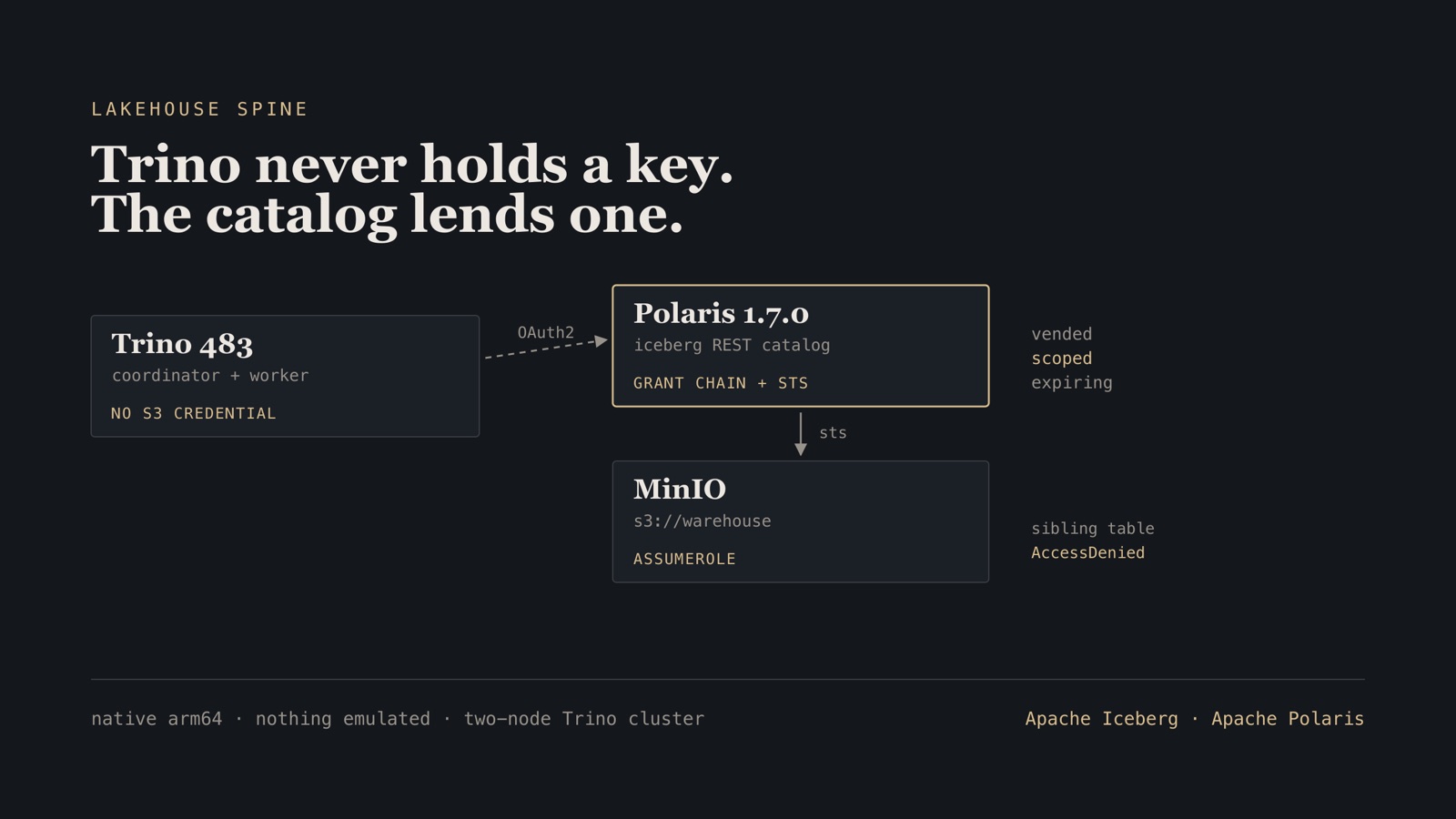
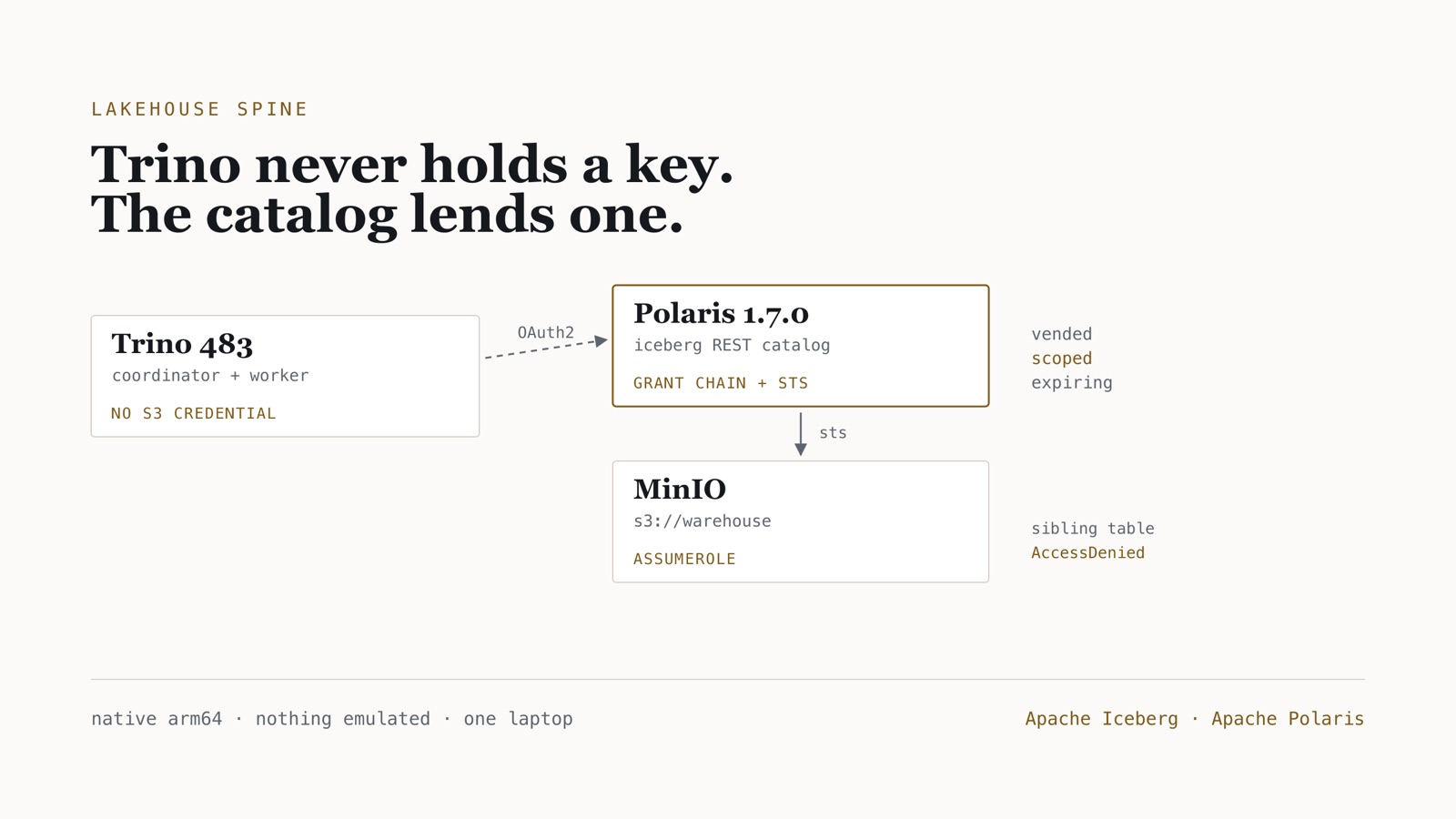
MinIO, Apache Polaris 1.7.0 and a two-node Trino 483 cluster, writing partitioned Iceberg tables where Trino holds no S3 credential at all.
- Time
- ~45 min to a working stack; the credential-vending section is the part that takes the time
- Level
- Intermediate
- Tested on
- macOS Darwin 25 · arm64 host · Docker Desktop 8 CPU / 11.67 GB · Trino 483 · Apache Polaris 1.7.0 · MinIO RELEASE.2025-09-07 · PostgreSQL 18.1 · all images native arm64, nothing emulated
Before you start
- Docker with about 6 GB available to containers, and roughly 3 GB of disk for images
- Comfort reading a docker-compose file and a Trino catalog properties file
- No AWS account: MinIO stands in for S3, including its STS endpoint
On this page
- What this is, and when it was built
- Step 1 — Storage, and a catalog that survives a restart
- Step 2 — The grant chain
- Step 3 — Trino, holding no S3 credential
- Step 4 — The two failures that made vending work
- Step 5 — Prove the scoping, do not trust the label
- Step 6 — What it costs
- Failure modes
- Clean up and operating consequence
What this is, and when it was built
I first built this stack in January 2024 for a client who wanted to see whether Trino over Iceberg could replace a warehouse they were outgrowing. That build pinned Trino 437, tabulario/iceberg-rest:0.2.0 as the catalog, and Hive Metastore underneath it.
Every one of those three has since been superseded. Trino is on 483. The tabulario image has not been updated since August 2024. Apache Polaris graduated incubation and was on 1.7.0 for this rebuild; 1.8.0 has shipped since. So this post is the same architecture, rebuilt on current versions and measured, and the interesting part turned out to be the piece the 2024 build did not have at all: credentials that expire.
The claim I wanted to test is the one that justifies a REST catalog over a metastore. Hive Metastore tells you where a table is. Polaris decides whether you may touch it, and hands out short-lived S3 credentials scoped to that table’s prefix. If that works, Trino never holds a standing key. If it does not, you have added a service and gained a lookup.
It works. Proving it took five failures, and four of them fail in a way that points somewhere else.
The compose file, the scripts and the measurements are in lakehouse-lab.
Step 1 — Storage, and a catalog that survives a restart
Three services before Trino enters the picture: MinIO for objects, Postgres for Polaris’s own metadata, and Polaris itself.
services:
  minio:
    image: minio/minio:RELEASE.2025-09-07T16-13-09Z
    command: server /data --console-address ":9001"
    environment:
      MINIO_ROOT_USER: lakehouse
      MINIO_ROOT_PASSWORD: lakehouse-dev-only
    ports: ["9000:9000", "9001:9001"]
    healthcheck:
      test: ["CMD", "mc", "ready", "local"]
      interval: 5s
      retries: 20

  polaris-db:
    image: postgres:18.1-alpine
    environment:
      POSTGRES_USER: polaris
      POSTGRES_PASSWORD: polaris-dev-only
      POSTGRES_DB: polaris
    healthcheck:
      test: ["CMD-SHELL", "pg_isready -U polaris -d polaris"]
      interval: 5s
      retries: 20
Polaris defaults to in-memory persistence, which loses every namespace on restart. A lab that forgets its catalog when you reboot is not reproducible, so this one runs on Postgres.
On Postgres, POLARIS_BOOTSTRAP_CREDENTIALS does nothing. The server only bootstraps itself for the persistence types listed in polaris.persistence.auto-bootstrap-types, which defaults to in-memory. Point Polaris at an empty Postgres with that variable set and it starts cleanly, passes its healthcheck, and then fails every single request:
Failed to retrieve polaris entity due to Failed due to
'ERROR: relation "polaris_schema.entities" does not exist'
The schema is the admin tool’s job. And the admin tool does not read POLARIS_BOOTSTRAP_CREDENTIALS — only the server’s in-memory auto-bootstrap does. Passing only -r exits 3 with Specify either --credentials or --print-credentials, so the same credential has to be repeated in the tool’s own form.
  polaris-bootstrap:
    image: apache/polaris-admin-tool:1.7.0
    depends_on:
      polaris-db: { condition: service_healthy }
    environment:
      polaris.persistence.type: relational-jdbc
      quarkus.datasource.jdbc.url: jdbc:postgresql://polaris-db:5432/polaris
      quarkus.datasource.username: polaris
      quarkus.datasource.password: polaris-dev-only
    command: ["bootstrap", "-r", "POLARIS", "-c", "POLARIS,root,s3cr3t-dev-only"]
Bootstrap is idempotent — running it against an already-bootstrapped realm is a no-op — which is why it can sit in depends_on rather than in a script somebody has to remember not to run twice.
Verify. Realm 'POLARIS' successfully bootstrapped. on first run, and no error on the second.
Now the server itself:
  polaris:
    image: apache/polaris:1.7.0
    depends_on:
      polaris-bootstrap: { condition: service_completed_successfully }
    ports: ["8181:8181", "8182:8182"]
    environment:
      polaris.realm-context.realms: POLARIS
      polaris.persistence.type: relational-jdbc
      quarkus.datasource.jdbc.url: jdbc:postgresql://polaris-db:5432/polaris
      quarkus.datasource.username: polaris
      quarkus.datasource.password: polaris-dev-only
      polaris.features."ALLOW_INSECURE_STORAGE_TYPES": "true"
      polaris.features."SUPPORTED_CATALOG_STORAGE_TYPES": "[\"S3\"]"
      polaris.readiness.ignore-severe-issues: "true"
    healthcheck:
      test: ["CMD", "curl", "-f", "http://localhost:8182/q/health/ready"]
      interval: 10s
      retries: 30
/healthcheck 404s. The getting-started compose for Polaris’s Spark plugin still uses http://localhost:8182/healthcheck. That path was removed in 1.3.0 — Quarkus serves health under /q/health. Upstream gets away with it only because its curl has no -f, so the 404 counts as healthy and the check checks nothing. With -f it never passes: after 30 failed probes — five minutes here — the container turns unhealthy, and Compose refuses to start every service with a service_healthy dependency on it. Nothing in Polaris’s logs mentions it, because from Polaris’s point of view nothing is wrong.
Step 2 — The grant chain
Polaris is an authorisation boundary, and three objects have to line up before Trino can write a row:
principal → principal_role → catalog_role → catalog
Miss the last link and Trino authenticates perfectly, then sees no namespaces at all — which reads exactly like a connection problem and is not one.
TOKEN=$(curl -s -X POST http://localhost:8181/api/catalog/v1/oauth/tokens \
  -d grant_type=client_credentials -d client_id=root \
  -d client_secret=s3cr3t-dev-only -d 'scope=PRINCIPAL_ROLE:ALL' \
  | sed -n 's/.*"access_token":"\([^"]*\)".*/\1/p')

curl -X POST http://localhost:8181/api/management/v1/catalogs \
  -H "Authorization: Bearer $TOKEN" -H 'Content-Type: application/json' -d '{
  "catalog": {
    "name": "lakehouse", "type": "INTERNAL",
    "properties": {"default-base-location": "s3://warehouse/lakehouse"},
    "storageConfigInfo": {
      "storageType": "S3",
      "allowedLocations": ["s3://warehouse/lakehouse"],
      "endpoint": "http://minio:9000",
      "endpointInternal": "http://minio:9000",
      "pathStyleAccess": true,
      "stsUnavailable": false,
      "stsEndpoint": "http://minio:9000",
      "roleArn": "arn:aws:iam::123456789012:role/polaris",
      "kmsUnavailable": true,
      "region": "us-east-1"
    }}}'
Four things in that storage config are worth naming, because three of them cost me time.
There is no S3_COMPATIBLE storage type. The enum is S3 | GCS | AZURE | FILE. Sending S3_COMPATIBLE — which is what the name suggests for MinIO — returns a bare HTTP 400 with an empty body. No message, no field name.
The S3 knobs are flat camelCase. endpoint and pathStyleAccess, not the dotted s3.endpoint keys you write in Iceberg client configuration. Same concepts, different layer, different spelling.
roleArn is optional, and against MinIO it is better left out. MinIO ignores it and returns an empty AssumedRoleUser.Arn, but Polaris parses an AWS account id out of it — and that account id is what adds the KMS statement below.
kmsUnavailable: true is the one that is in no quickstart. It is only needed because of that placeholder roleArn. More on that in a moment.
Then the roles:
curl -X POST .../catalogs/lakehouse/catalog-roles      -d '{"catalogRole":{"name":"engineer"}}'
curl -X PUT  .../catalog-roles/engineer/grants         -d '{"grant":{"type":"catalog","privilege":"CATALOG_MANAGE_CONTENT"}}'
curl -X POST .../principal-roles                       -d '{"principalRole":{"name":"data_engineer"}}'
curl -X PUT  .../principal-roles/data_engineer/catalog-roles/lakehouse -d '{"catalogRole":{"name":"engineer"}}'
curl -X PUT  .../principals/root/principal-roles       -d '{"principalRole":{"name":"data_engineer"}}'
Verify. Every call returns 201, and a re-run returns 409 Conflict rather than erroring — the script should be safe to run twice.
Step 3 — Trino, holding no S3 credential
connector.name=iceberg
iceberg.catalog.type=rest
iceberg.rest-catalog.uri=http://polaris:8181/api/catalog
iceberg.rest-catalog.warehouse=lakehouse
iceberg.rest-catalog.security=OAUTH2
iceberg.rest-catalog.oauth2.credential=root:s3cr3t-dev-only
iceberg.rest-catalog.oauth2.scope=PRINCIPAL_ROLE:ALL
iceberg.rest-catalog.vended-credentials-enabled=true

iceberg.file-format=PARQUET

fs.native-s3.enabled=true
s3.endpoint=http://minio:9000
s3.region=us-east-1
s3.path-style-access=true
Note what is absent: any S3 access key. Trino authenticates to Polaris as an OAuth2 principal; Polaris does the rest.
Do not add iceberg.register-table-procedure.enabled=true. With vended credentials it makes Trino refuse to start:
Using the `register_table` procedure with vended credentials is currently not supported
That is a startup failure, not a query failure. The coordinator exits 100, every dependent container fails its healthcheck, and the offending catalog is named only inside the stack trace.
Step 4 — The two failures that made vending work
This is the part worth reading twice, because the failure modes are actively misleading.
MinIO answers AssumeRole with “Unsupported action”
Polaris mints scoped credentials by calling sts:AssumeRole. The first attempt against MinIO came back with:
<Code>InvalidParameterValue</Code>
<Message>Unsupported action AssumeRole</Message>
That message says the action is unsupported, so the obvious conclusion is that MinIO has no STS. It does. In MinIO’s source, that message never comes from the AssumeRole handler at all: an STS request that arrives without a SigV4 signature is routed to the web-identity handler, which rejects AssumeRole as an action it does not handle. The request never reached the code that would have answered it.
What fixed it here was giving Polaris explicit keys for a dedicated MinIO user:
mc admin user add local polaris-svc polaris-svc-dev-only
mc admin policy attach local readwrite --user polaris-svc
Then point Polaris at that identity rather than root:
      AWS_ACCESS_KEY_ID: polaris-svc
      AWS_SECRET_ACCESS_KEY: polaris-svc-dev-only
Verify. aws sts assume-role --endpoint-url http://minio:9000 --role-arn arn:aws:iam::123456789012:role/polaris --role-session-name probe returns a Credentials block with an Expiration.
The KMS statement that breaks the session policy
With STS reachable, CREATE TABLE AS SELECT succeeded. 1.5 million rows, 84 objects in the bucket. Then every SELECT failed:
Query ... failed: Failed to load table: orders in bronze namespace
The real error is four layers down, in Polaris’s log:
invalid resource 'arn:aws:kms:us-east-1:123456789012:key/*'
(Service: Sts, Status Code: 400)
Polaris builds a session policy for the AssumeRole call. When it knows a region and an AWS account id — here, parsed from the placeholder roleArn — and the credential is read-only, it adds a wildcard KMS statement for every key in that account. MinIO’s policy engine does not understand KMS ARNs and rejects the whole request. Leaving roleArn out stops the statement being added; so does kmsUnavailable: true on the catalog, which is what this lab uses.
This is the worst failure in the series. The data lands. The bucket fills. Only reads break, and the message Trino prints mentions neither KMS, nor STS, nor Polaris.
Why writes survived and reads did not. Polaris adds the wildcard KMS statement only to read-only credentials. The CTAS asked for write access and never carried it; loadTable for a SELECT did. If you are debugging this, the tell is that SHOW TABLES works and SELECT does not.
Step 5 — Prove the scoping, do not trust the label
Polaris returns a prefix field with each vended credential. That is a label, not evidence. The only thing that settles it is taking the credential and trying to read something it should not reach.
# credentials for bronze.orders only
curl -H "Authorization: Bearer $TOKEN" \
     -H 'X-Iceberg-Access-Delegation: vended-credentials' \
     "$POLARIS/api/catalog/v1/lakehouse/namespaces/bronze/tables/orders"
credential vended for bronze.orders
  prefix: s3://warehouse/lakehouse/bronze/orders-964137655cf046eb8a7eeabf4b97c257

using only that credential:
  own prefix                         ALLOW  84 objects
  sibling bronze.customers           DENY   AccessDenied
  whole warehouse bucket             DENY   AccessDenied
Alongside the keys, Polaris returns s3.session-token and s3.session-token-expires-at-ms. The credential is short-lived as well as narrow.
Verify. Your own prefix lists objects; the sibling table and the bucket root both return AccessDenied.
Two things make this look broken when it is not. The vended prefix carries the table UUID Iceberg assigns at create time — bronze/orders-964137655cf0…, not bronze/orders. Probing the tidy path denies, and reads as a scoping failure. And aws s3 ls needs both a trailing slash and a region set; without them it fails in a way indistinguishable from AccessDenied at a glance.
Step 6 — What it costs
A partitioned table, written through the whole chain:
CREATE TABLE lakehouse.bronze.orders
WITH (partitioning = ARRAY['month(orderdate)']) AS
SELECT orderkey, custkey, orderstatus, totalprice, orderdate, orderpriority, clerk
FROM tpch.sf1.orders;
1,500,000 rows in 5.4 s, landing as 80 Parquet files, 2 Avro manifests, one Puffin .stats file and one metadata.json — 16 MiB total.
Query timings, median of 7 server-side runs read from system.runtime.queries:
| query | tpch generator | Iceberg on MinIO |
|---|---|---|
| scan + aggregate over 1.5M rows | 238 ms | 183 ms |
| one-month partition predicate | 615 ms | 88 ms |
| non-partition predicate | 595 ms | 202 ms |
tpch is a generator, not a storage format, and never touches the network — it is a floor rather than a fair “before”. The 7× gap on the partition predicate is pruning: Iceberg reads one manifest entry while tpch regenerates all 1.5 million rows.
Measure server-side. My first numbers were wall-clock around the Trino CLI: 603 ms for the query that actually takes 88 ms. The other 515 ms was docker compose exec plus the CLI’s own JVM startup — six times the figure I was trying to measure.
Failure modes
| Symptom | Cause | Repair |
|---|---|---|
relation "polaris_schema.entities" does not exist |
Schema never created | Run polaris-admin-tool bootstrap before the server |
| Bootstrap exits 3 | Admin tool ignores POLARIS_BOOTSTRAP_CREDENTIALS |
Pass -c realm,clientId,clientSecret explicitly |
Container health: starting, then unhealthy |
Healthcheck points at /healthcheck |
Use /q/health/ready on port 8182 |
HTTP 400, empty body, on catalog create |
storageType: S3_COMPATIBLE |
Use S3 with flat endpoint / pathStyleAccess |
| Trino exits 100 at startup | register-table-procedure + vending |
Remove the procedure flag |
Unsupported action AssumeRole |
STS request reached MinIO unsigned and was routed to the web-identity handler | Give Polaris explicit keys for a dedicated MinIO user |
| Writes succeed, all reads fail | KMS statement in the read-only session policy, from a placeholder roleArn |
Drop the placeholder roleArn, or kmsUnavailable: true on the catalog |
Credential vending was requested … but no credentials are available |
stsUnavailable: true |
Enable STS, or disable vending and accept standing keys |
Clean up and operating consequence
docker compose down -v
The operating rule this lab produced: a REST catalog is only worth the extra service if vending actually works. Turn vending off and Polaris becomes a metadata lookup with a permissions table in front of it, while every Trino user still holds a key to the whole bucket. That is not obviously better than Hive Metastore.
Turn it on and the boundary is real, but you inherit an STS dependency that must be exercised in whatever object store you actually run. Against MinIO that meant a service user and one flag to undo a placeholder role ARN. Against a different S3-compatible store it will mean something else — and the way to find out is to take a vended credential and try to read the table next door.
Part 2 builds bronze, silver and gold on top of this with dbt-trino, where the interesting failure is a partition spec that dbt accepts and silently discards.