What you'll build
A dbt-trino medallion pipeline writing Iceberg tables through Polaris, with an incremental MERGE proven at the file level, orchestrated by an Airflow 3 DAG.
- Time
- ~40 min, most of it waiting on two container builds
- Level
- Intermediate
- Tested on
- macOS Darwin 25 · arm64 host · Docker Desktop 8 CPU / 11.67 GB · Trino 483 · dbt-core 1.12.2 with dbt-trino 1.10.3 · Apache Airflow 3.3.1 · Apache Polaris 1.7.0
Before you start
- The stack from part one: MinIO, Polaris and Trino, with credential vending working
- About 3 GB of additional container memory for Airflow
- Familiarity with dbt models and materialisations
On this page
- The claim worth testing
- Step 1 — dbt against Trino, holding no credentials
- Step 2 — The schema names that were not what I wrote
- Step 3 — The partition spec dbt threw away
- Step 4 — 403 on a drop you did not know you were doing
- Step 5 — Prove the MERGE touched one file
- Step 6 — Airflow 3, and a date that is no longer guaranteed
- Failure modes
- Clean up and operating consequence
The claim worth testing
Every lakehouse article asserts that Iceberg gives you row-level MERGE, so incremental models rewrite only what changed instead of replacing the table. That is the difference between a pipeline that scales and one that gets slower every day.
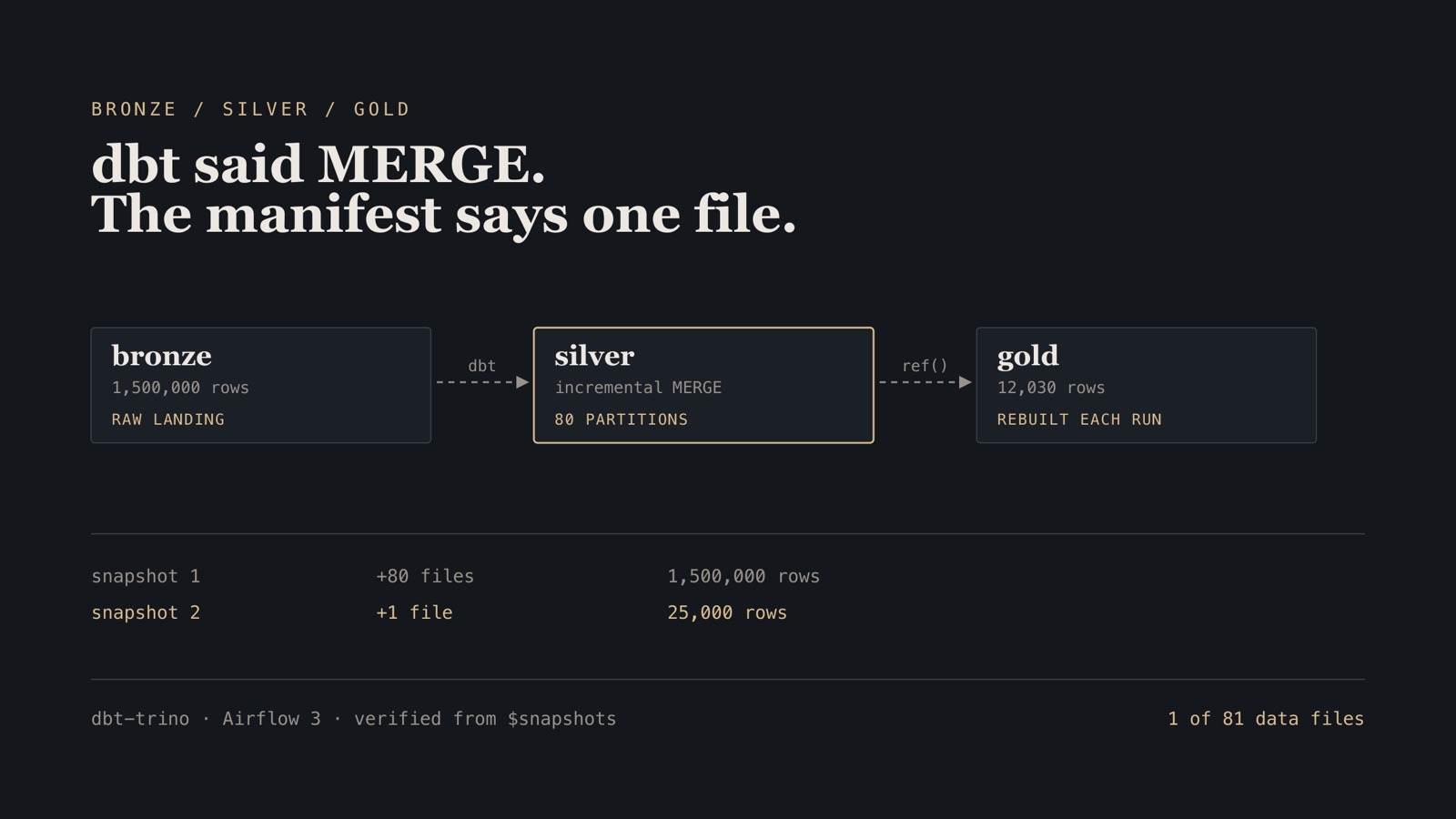
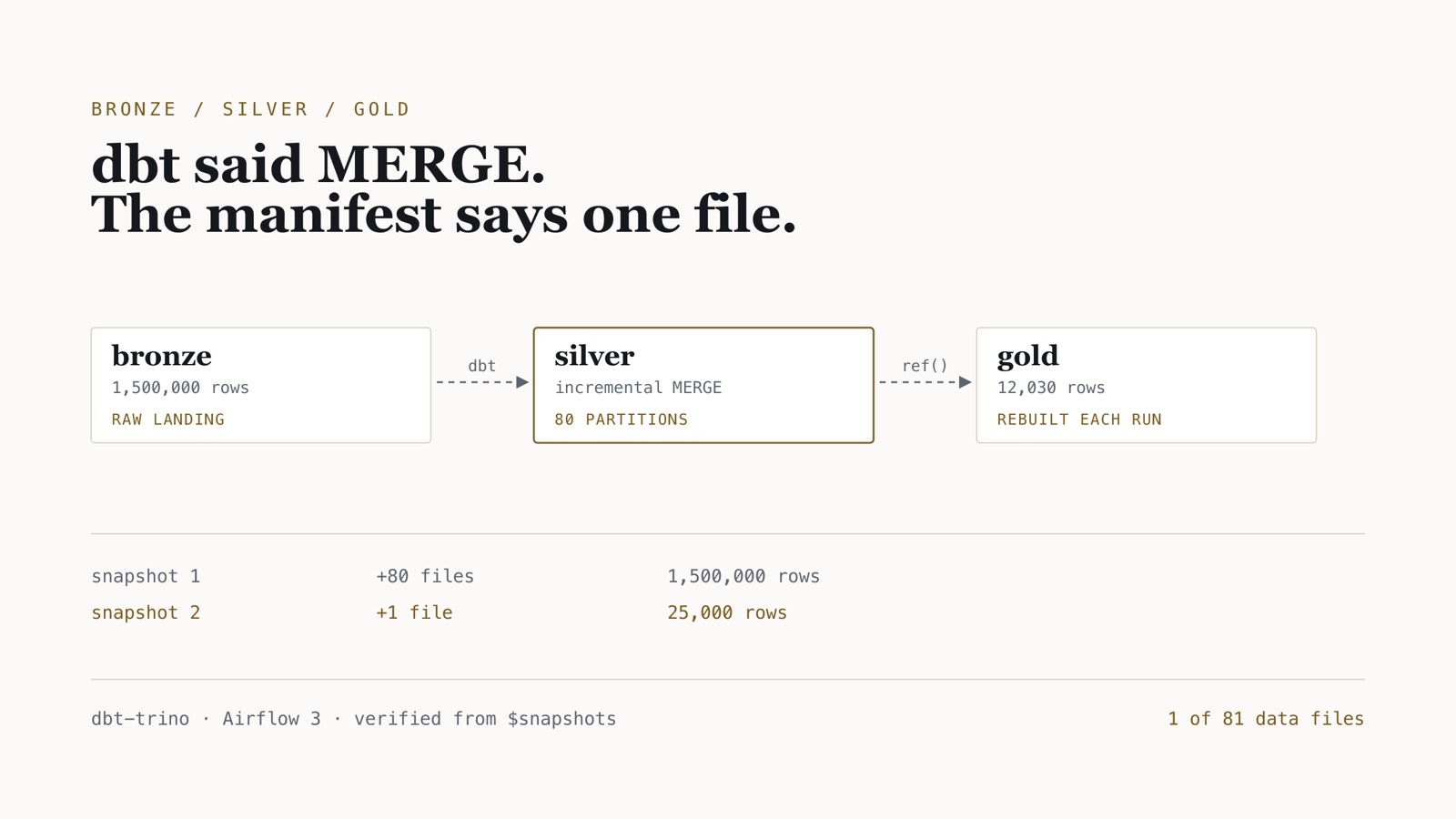
It is also the kind of claim that is easy to state and rarely shown. dbt will happily print MERGE (25_000 rows) whether it rewrote one file or all eighty. The evidence is not in dbt’s output — it is in Iceberg’s $snapshots metadata table, which records exactly how many data files each commit added and deleted.
The stack is a rebuild of a January 2024 client project on current versions — Trino 437 became 483, Hive Metastore became Apache Polaris. This post builds bronze → silver → gold on the spine from part one, hands it to Airflow, and then goes and reads that table. The dbt project and the DAG are in lakehouse-lab, under dbt/ and airflow/.
Four things went wrong on the way. Two of them failed silently.
Step 1 — dbt against Trino, holding no credentials
lakehouse:
  target: dev
  outputs:
    dev:
      type: trino
      host: trino-coordinator
      port: 8080
      user: dbt
      catalog: lakehouse
      schema: silver
      http_scheme: http
      threads: 4
Note what is not in this file: any S3 credential. dbt talks to Trino, Trino asks Polaris, Polaris vends per table. The whole chain from part one holds.
FROM python:3.12-slim
# git is not decoration: dbt shells out to it for package installs and to stamp
# the run manifest, and `dbt debug` fails a check without it.
RUN apt-get update && apt-get install -y --no-install-recommends git \
 && rm -rf /var/lib/apt/lists/*
RUN pip install --no-cache-dir "dbt-trino==1.10.3"
WORKDIR /dbt
ENTRYPOINT ["dbt"]
Verify. dbt debug reports Connection test: OK connection ok.
Step 2 — The schema names that were not what I wrote
models:
  lakehouse:
    +table_type: iceberg
    silver:
      +schema: silver
      +materialized: incremental
    gold:
      +schema: gold
      +materialized: table
First run:
1 of 2 OK created sql incremental model silver_silver.orders_enriched
2 of 2 OK created sql table model silver_gold.daily_revenue
Both models built. Both queries worked. Both namespaces in Polaris were wrong.
dbt’s default generate_schema_name returns <profile_schema>_<custom_schema>. That default exists so several developers can share a warehouse without colliding, and it is the right default for that. A lakehouse whose layer names are the contract does not want it:
{% macro generate_schema_name(custom_schema_name, node) -%}
    {%- if custom_schema_name is none -%}
        {{ target.schema }}
    {%- else -%}
        {{ custom_schema_name | trim }}
    {%- endif -%}
{%- endmacro %}
Verify. SHOW SCHEMAS FROM lakehouse lists bronze, silver, gold — and not silver_silver.
Step 3 — The partition spec dbt threw away
This is the one that matters.
{{
  config(
    materialized   = 'incremental',
    incremental_strategy = 'merge',
    unique_key     = 'orderkey',
    partitioning   = ["month(orderdate)"],
    table_type     = 'iceberg'
  )
}}
That runs. dbt reports success. The model builds 1.5 million rows. And the table is not partitioned:
SHOW CREATE TABLE lakehouse.silver.orders_enriched;
WITH (
   format = 'PARQUET',
   format_version = 2,
   location = 's3://warehouse/lakehouse/silver/orders_enriched-09054d82…'
)
No partitioning property. dbt-trino expects it inside properties, as a literal Trino SQL fragment:
{{
  config(
    materialized         = 'incremental',
    incremental_strategy = 'merge',
    unique_key           = 'orderkey',
    table_type           = 'iceberg',
    properties           = {
      "partitioning": "ARRAY['month(orderdate)']"
    }
  )
}}
The cost of getting it wrong, on the same rows and the same predicate:
| table | data files | partitions | median query |
|---|---|---|---|
partitioning at config level (ignored) |
2 | — (unpartitioned) | 131 ms |
properties = {"partitioning": …} |
80 | 80 | 99 ms |
-- comments are a compilation error inside config(). That block is a Jinja expression, not SQL. A -- like this line inside it produces invalid syntax for function call expression, pointing at the config( line rather than the comment. Use {# … #} outside the call.
Verify. SHOW CREATE TABLE includes partitioning = ARRAY['month(orderdate)'], and SELECT count(*) FROM "orders_enriched$partitions" returns 80 rather than 1 — on an unpartitioned table, $partitions is a single row for the whole table.
Step 4 — 403 on a drop you did not know you were doing
With partitioning fixed, dbt run --full-refresh failed:
TrinoExternalError(type=EXTERNAL, name=ICEBERG_CATALOG_ERROR,
  message="Failed to drop table 'orders_enriched__dbt_backup'")
Nothing in that message is the cause. It is in Polaris’s log:
Unable to purge entity: orders_enriched__dbt_backup. To enable this feature, set
the Polaris configuration DROP_WITH_PURGE_ENABLED
…
"DELETE /api/catalog/v1/lakehouse/namespaces/silver/tables/
 orders_enriched__dbt_backup?purgeRequested=true HTTP/1.1" 403
--full-refresh on an incremental model builds an <model>__dbt_backup table and then drops it. Trino asks for a purging drop; Polaris refuses by default, because purge deletes the data files and not merely the catalog entry. That is a defensible default. It is also one that leaves a stuck __dbt_backup table you cannot remove by hand either.
polaris.features."DROP_WITH_PURGE_ENABLED": "true"
Verify. DROP TABLE lakehouse.silver.orders_enriched__dbt_backup succeeds, and dbt run --full-refresh completes.
Step 5 — Prove the MERGE touched one file
Now the actual claim. Baseline after a full refresh, then 25,000 new rows landed in bronze, then an incremental run:
SELECT operation,
       element_at(summary,'added-data-files')   AS added,
       element_at(summary,'deleted-data-files') AS deleted,
       element_at(summary,'added-records')      AS added_rows,
       element_at(summary,'total-data-files')   AS total
FROM lakehouse.silver."orders_enriched$snapshots"
ORDER BY committed_at;
 operation | added | deleted | added_rows | total
-----------+-------+---------+------------+-------
 append    | 80    | NULL    | 1500000    | 80
 append    | 1     | NULL    | 25000      | 81
dbt reported MERGE (25_000 rows) in 2.66s. The commit added one data file out of eighty-one and deleted none. That is the claim, verified from the table’s own metadata rather than from the tool’s summary line.
Note the operation is append, not overwrite. Every incoming key was new, so Iceberg degraded the MERGE to an append — it had nothing to rewrite. A MERGE that genuinely matches existing rows shows a non-null deleted-data-files, because Iceberg rewrites the files containing the matched rows. If you are testing MERGE behaviour, feed it keys that already exist, or you will measure the wrong thing and conclude MERGE is free.
Use element_at(summary, …) rather than summary['…']: the bracket form throws Key not present in map on any snapshot where that key is absent, which is most of them.
Step 6 — Airflow 3, and a date that is no longer guaranteed
@dag(
    dag_id="lakehouse_pipeline",
    schedule="@daily",
    start_date=pendulum.datetime(2026, 8, 1, tz="UTC"),
    catchup=False,
    max_active_runs=1,
)
def lakehouse_pipeline():
    @task
    def land(**context) -> int:
        run = context["dag_run"]
        stamp = getattr(run, "logical_date", None) or run.run_after
        ...

    @task.bash(cwd="/opt/airflow/dbt")
    def transform() -> str:
        return "dbt build --profiles-dir /opt/airflow/dbt"

    @task
    def maintain() -> dict[str, int]:
        ...

    land() >> transform() >> maintain()
context["logical_date"] raises KeyError on Airflow 3. AIP-83 made logical date optional: a manually triggered run has none at all, so the key is simply absent and the task dies before it reaches Trino. dag_run.run_after is always populated. This is a quiet migration break — the DAG parses, imports cleanly, and only fails when someone presses Trigger.
dbt lives inside the Airflow image rather than behind a DockerOperator. The alternative means mounting the host Docker socket into Airflow, which is a real privilege escalation for the sake of avoiding one pip install. Pinning the same dbt-trino==1.10.3 in both images keeps the adapter identical between a DAG run and a manual dbt run. dbt-core is left to pip — anything from 1.8 up to 2.0 satisfies the adapter — so pin it too if the two images are built at different times.
Verify. All three tasks report success, and land, transform, maintain appear in that order.
Failure modes
| Symptom | Cause | Repair |
|---|---|---|
Models built into silver_silver |
dbt’s default schema concatenation | Override generate_schema_name |
SHOW CREATE TABLE has no partitioning |
partitioning at config level |
Move it into properties as a SQL fragment |
invalid syntax for function call expression |
-- comment inside config() |
Use {# … #} outside the call |
Failed to drop table '…__dbt_backup' |
Polaris refuses purging drops | DROP_WITH_PURGE_ENABLED: "true" |
KeyError: 'logical_date' |
AIP-83 made it optional | Fall back to dag_run.run_after |
Key not present in map on $snapshots |
Bracket access to an absent summary key | element_at(summary, '…') |
Clean up and operating consequence
docker compose --profile orchestration --profile tools down -v
The rule this produced: verify the physical layout, not the tool’s summary line. Two of the four failures here reported success. dbt said the models built, and they had — in silver_silver, and unpartitioned. And dbt said MERGE for what Iceberg recorded as an append, only because the keys happened not to collide.
SHOW CREATE TABLE and the $snapshots / $files metadata tables are the ground truth, and they are cheap to query. A CI check that asserts a silver table has the partition count you expect costs one query and catches a config key that everything else in the stack was willing to ignore.
Part 3 takes the same tables and asks the operational question: what happens after a few thousand of these runs, and can you get back a table somebody deleted.