On this page
A daily batch job is re-run all the time: a bug is fixed, a late file lands, a day’s numbers look wrong. The usual way to re-run one day of a Spark job that writes a partitioned table is to compute that day and write it back with mode("overwrite"). With Spark’s defaults, that write replaces the entire table with the one day.
I measured it, along with the other default a partitioned Spark write gets wrong: how many files it produces. Both use PySpark 4.2.0 on the same synthetic SaaS events as the rest of data-stack-lab, and CI re-runs every count.
Operating rule. Any job that writes a partitioned table with mode("overwrite") sets spark.sql.sources.partitionOverwriteMode to dynamic in its own configuration, and repartitions by the partition column before writing. Then re-running a day replaces that day, and a day is one file.
The job
The rollup reads the delivered events, keeps the first delivery of each event, and counts events and distinct users per day, account and event type: 333,082 rows over 365 days, written as Parquet with partitionBy("activity_date").
(rollup(spark, day="2026-09-15")
    .repartition("activity_date")
    .write.mode("overwrite")
    .partitionBy("activity_date")
    .parquet(path))
What the re-run left behind
The year was written first: 365 daily partitions. Then 15 September was recomputed alone, 1,070 rows, and written back with the code above.
partitionOverwriteMode |
Partitions after | Rows after |
|---|---|---|
static, Spark’s default |
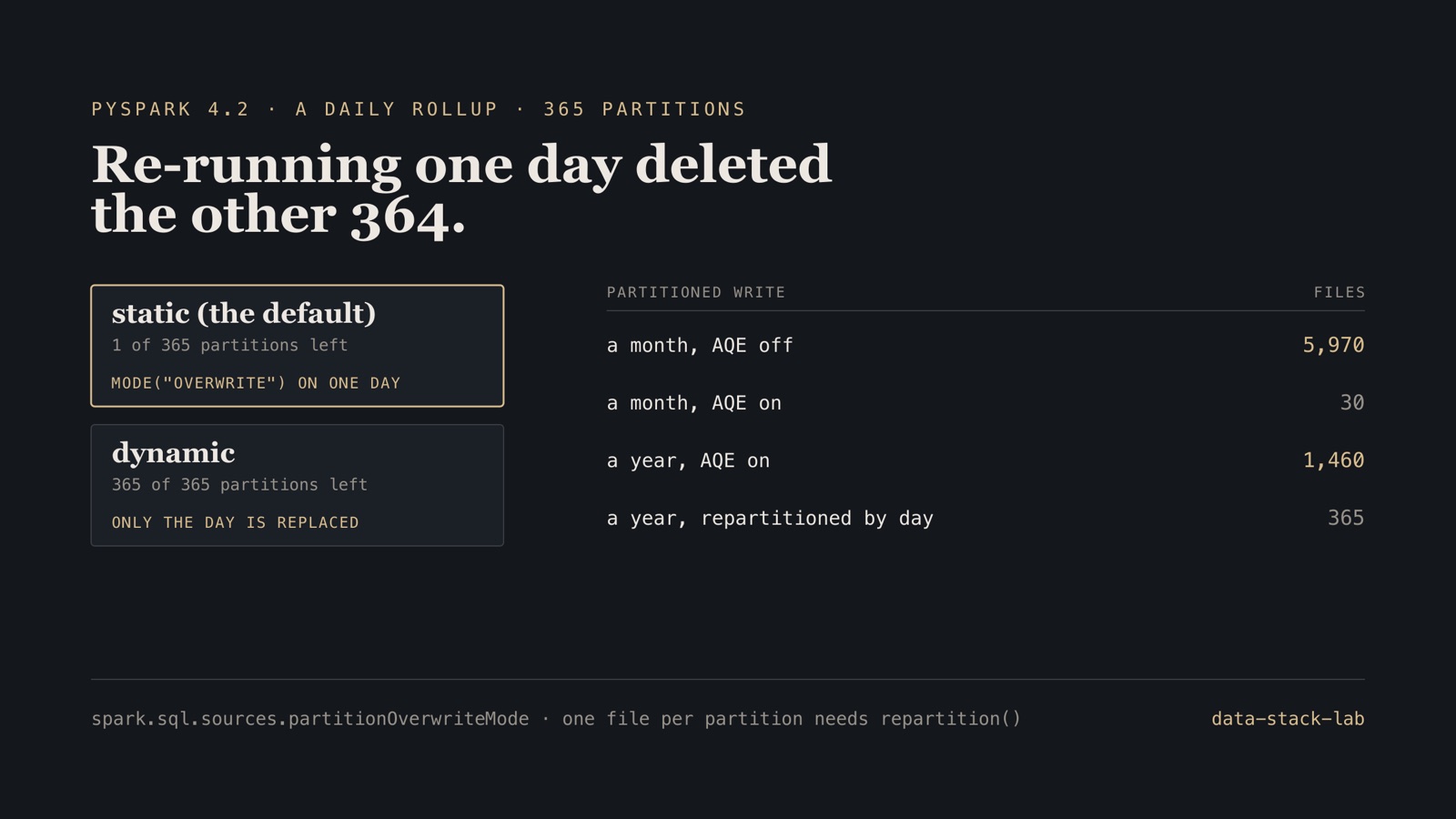
1 of 365 | 1,070 of 333,082 |
dynamic |
365 of 365 | 333,082 |
Under static, an overwrite means the whole output path, so the write that contained one day replaced every partition with that day. Nothing failed. The job reported success, and the next morning’s dashboards would show one day of history.
dynamic replaces only the partitions present in the data being written. It has to be set before the write, and it belongs in the job’s own configuration, not in a cluster default someone may change or a notebook nobody else runs. Table formats make the same choice explicit in the write itself: Delta Lake’s replaceWhere names the range being replaced, and Iceberg’s dynamic overwrite replaces only the partitions the data touches.
How many files a partitioned write makes
Each task in the last shuffle writes one file into every partition it has rows for. How many files that is depends on how many tasks there are and how the rows are spread across them.
| Write | Data | Files | Most in one day | Median file |
|---|---|---|---|---|
| AQE off | a month | 5,970 | 200 | 1.5 KB |
| AQE on | a month | 30 | 1 | 5.6 KB |
| AQE on | a year | 1,460 | 4 | 2.8 KB |
| AQE on, repartitioned by day first | a year | 365 | 1 | 5.0 KB |
With adaptive query execution off, Spark’s default of 200 shuffle partitions meant up to 200 files per day: 5,970 files of about 1.5 KB for a month of rollup. Writing them took 386 seconds against 5 with AQE on, in one run on one machine. On an object store, where every file is a request, the cost is larger.
AQE coalesces small shuffle partitions, and a month of this rollup fit in one: 30 files, one a day. A year did not. AQE settled on four partitions, the four cores of the local session, and wrote four files into every day: 1,460. It reduced the problem without removing it, and how much it reduces it depends on the data’s size and the cluster’s parallelism, which both change.
Repartitioning by the partition column puts each day’s rows in one task, whatever the size: 365 files for 365 days, and in this run the year wrote in 23 seconds against 78 without it. Past a size where one day no longer fits comfortably in one file, the same idea applies with a bounded number of files per day.
What a one-day query reads
The layout decides what a query for one day has to open. In the year partitioned by day, 15 September’s rows sat in 1 of 365 files: Spark skips the other directories from the path alone. In the same rollup written without partitionBy, the rows were spread across 199 of its 200 files, and every one of them has to be opened to find them.
Boundary. PySpark 4.2.0 in local mode with four cores on one machine, Java 17, local disk. There is no network shuffle and no object store, where small files cost much more. The counts follow from Spark’s partitioning rules and are checked in CI; the times are one run each and only illustrate the scale. The month-long AQE-off write is used because the same write for a year produces about 73,000 files.
Before a partitioned job goes to production
- Set
spark.sql.sources.partitionOverwriteMode=dynamicin the job, or write through a table format that names what an overwrite replaces. - Re-run one day in a test environment and count the partitions afterwards.
- Repartition by the partition column before
partitionBy, or cap files per partition explicitly. - Count files per partition after the first real run, not only rows.
- Partition by the column queries filter on, and check a one-day query’s plan for partition filters.
Frequently asked questions
What does spark.sql.sources.partitionOverwriteMode do?
It decides what mode("overwrite") replaces in a partitioned write. With the default, static, the whole output path is replaced: writing one day of a 365-day table left 1 of 365 partitions. With dynamic, only the partitions present in the new data are replaced, and all 365 days survived the same re-run.
Why does Spark write so many small files with partitionBy?
Each task of the last shuffle writes one file into every partition it holds rows for. With adaptive query execution off, Spark’s 200 shuffle partitions wrote 5,970 files for 30 days. AQE coalesces small shuffles, so a month became 30 files, but a year came out as 1,460 files, four a day. Repartitioning by the partition column before writing gave exactly one file per day.
How much does partitioning by date save on a one-day query?
In this test, the rows for one day sat in 1 of 365 files when the output was partitioned by day, and in 199 of 200 files when it was not, so an unpartitioned layout makes a one-day query open nearly every file.
The job, the three experiments and their counts are in data-stack-lab, with the projects together in the case study. The Airflow side of re-runs is in the incremental-load write-up. More on Apache Spark.