On this page
Files are the most common way data reaches a Databricks table: a producer writes a file a day into cloud storage, and something loads it. COPY INTO and Auto Loader are the standard choices because they are idempotent: they remember which files they have loaded, so a re-run or a retry loads nothing twice. That memory is by path. When a producer fixes a file and sends it again under the same name, the path has already been loaded.
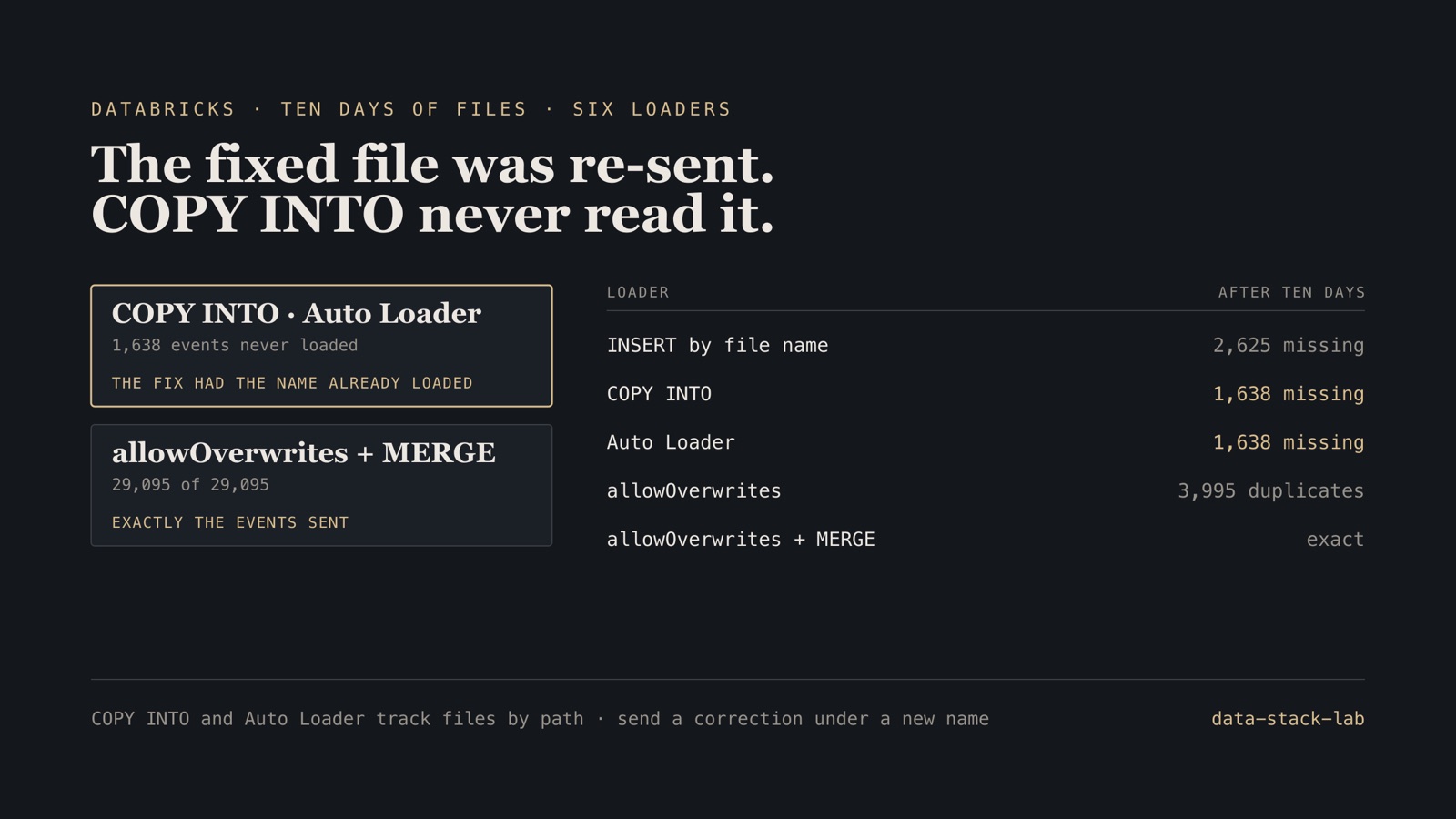
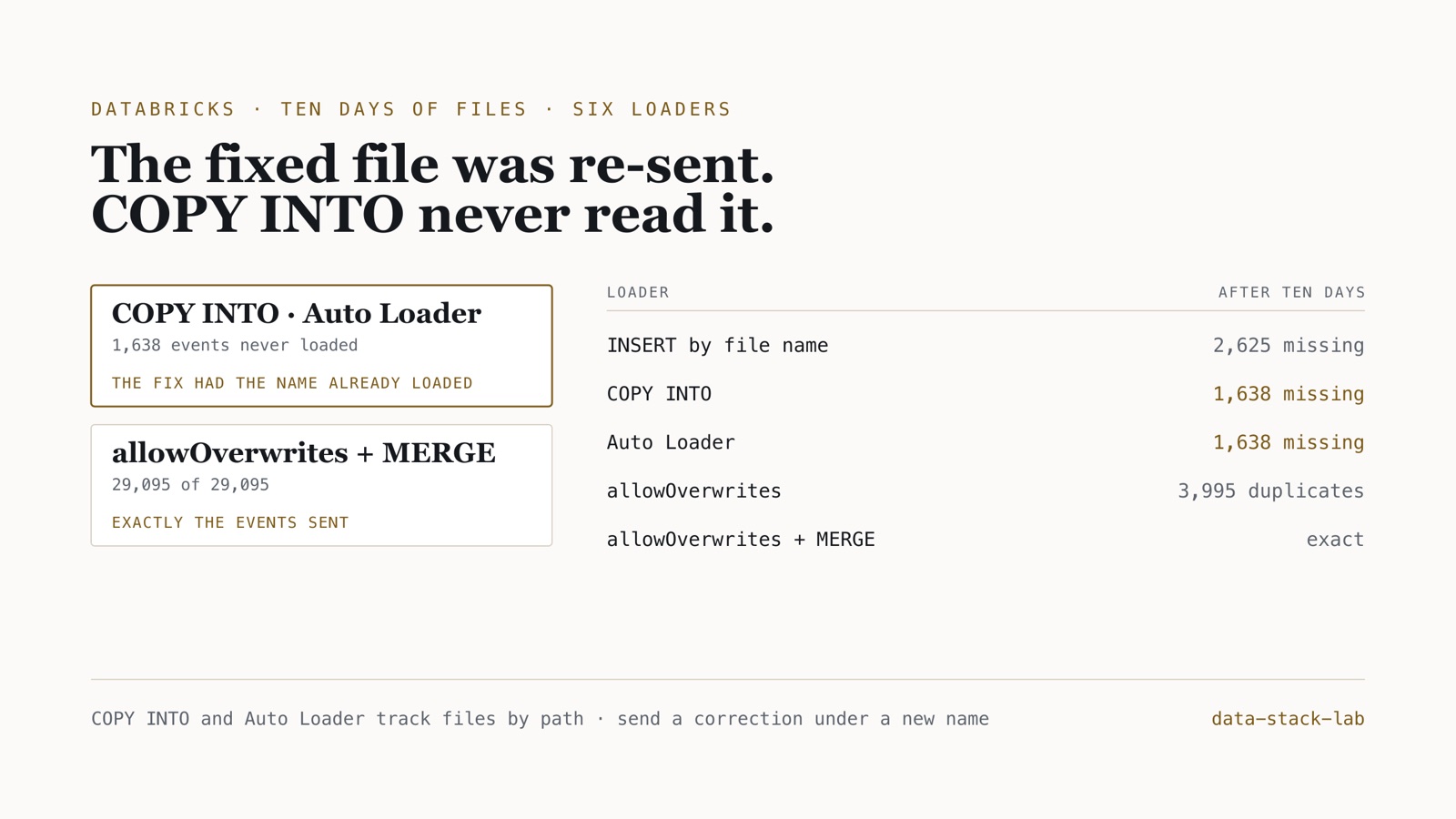
I delivered ten days of event files with four ordinary incidents and loaded them six ways on Databricks. One incident, a truncated upload corrected in place, cost two of the most common loaders 1,638 events without an error.
Operating rule. Agree with every producer that a corrected file is a new file with a new name, and load into a table keyed by the event’s id. Where that agreement cannot be had, set Auto Loader’s cloudFiles.allowOverwrites and MERGE on the key after it.
The code is the Databricks project in data-stack-lab, on the same synthetic SaaS events as the Airflow, data-quality and Spark projects. It ran on Databricks Free Edition: a serverless SQL warehouse, Unity Catalog, and a Lakeflow pipeline for Auto Loader.
Ten days of files
Events received from 1 to 10 September, one file a day into a Unity Catalog volume, each event in exactly one day’s file: 29,095 events in all. Four things happened that happen to real deliveries:
| Day | What happened | Events |
|---|---|---|
| 2 Sep | the day’s file was sent again under another name | 2,904 |
| 4 Sep | the upload stopped at 40% of the file | 1,091 of 2,729 |
| 5 Sep | the producer re-sent the complete 4 Sep file under the same name | 2,729 |
| 6 Sep | a third of the day’s events arrived two days later, in their own file | 987 |
| 9 Sep | the day’s load was run twice | 2,775 |
Six loaders, the same files
Each loader ran after every day’s delivery. After the tenth day, each table was compared with the events that were sent:
| Loader | Rows | Events missing | Duplicate rows |
|---|---|---|---|
INSERT … SELECT FROM read_files('events-<day>*') |
32,149 | 2,625 | 5,679 |
COPY INTO |
30,361 | 1,638 | 2,904 |
COPY INTO, then MERGE on event_id |
27,457 | 1,638 | 0 |
| Auto Loader | 30,361 | 1,638 | 2,904 |
Auto Loader with allowOverwrites |
33,090 | 0 | 3,995 |
Auto Loader with allowOverwrites, then MERGE |
29,095 | 0 | 0 |
Before the workspace run, I predicted every number in this table from the documented behaviour of each loader alone. The run matched the prediction exactly, and CI re-checks the prediction on every commit.
The correction that was never read
On 5 September the complete file for 4 September arrived under the name already loaded. COPY INTO skipped it, and so did Auto Loader. The 1,638 events the truncated upload had lost never reached either table, and neither loader raised anything: from their point of view there was nothing new.
Both behave as documented. COPY INTO skips files already loaded, “even if the files have been modified since they were loaded”. Auto Loader, by default, processes each file exactly once. Both are designed for files that never change, and Databricks says so; the problem is that producers do not always know it.
A MERGE after COPY INTO did not help. It removed duplicates perfectly and still lacked the same 1,638 events, because they never got as far as the table it merged from. Deduplication cannot recover rows that were never read.
Setting cloudFiles.allowOverwrites made Auto Loader read the corrected file. It read all of it, so the 1,091 events of the first upload went in a second time beside the 1,638 that had been missing. Only with a MERGE on event_id after it did the table hold exactly the events sent.
What the file-tracking loaders got right
The same memory by path is what makes COPY INTO and Auto Loader good at the other incidents. The late third of 6 September arrived on the 8th in a file of its own, and both loaded it on the next run, whatever its date. The second run on 9 September found no new files and loaded nothing.
The plain INSERT that read each day’s files by name had neither property. On the 8th it read only files named for the 8th, so the late file was never read, and neither was the correction. On the 9th it loaded the same file twice. No loader caught the duplicate file sent under another name on 2 September; only the MERGE removed it.
Re-running a day on Delta
The Spark project found that re-writing one day of a partitioned Parquet table with Spark’s defaults deleted the other 364. I repeated the test on Delta, on the same 365-day rollup (333,082 rows), from the SQL warehouse:
| Write-back of 15 September (1,070 rows) | Days left |
|---|---|
INSERT OVERWRITE t SELECT … |
1 of 365 |
then RESTORE TABLE t TO VERSION AS OF 0 |
365 |
INSERT OVERWRITE t PARTITION (activity_date) SELECT … |
1 of 365 |
INSERT INTO t REPLACE WHERE activity_date = '2026-09-15' SELECT … |
365 |
INSERT INTO t REPLACE USING (activity_date) SELECT … |
365 |
The fix from the Spark project, setting spark.sql.sources.partitionOverwriteMode to dynamic, is not available here: a SQL warehouse refuses it with CONFIG_NOT_AVAILABLE. Naming the partition column in a PARTITION clause did not help either; that overwrite also left one day. Delta’s own REPLACE WHERE and REPLACE USING replaced exactly the day, and REPLACE WHERE refused a write whose rows fell outside its predicate instead of writing them.
The difference from plain Parquet is that the mistake was recoverable: the overwritten table was one RESTORE away. That lasts only as long as the earlier version’s files are kept, which VACUUM and the table’s retention settings decide.
Boundary. Databricks Free Edition, one serverless SQL warehouse (2X-Small) and serverless Lakeflow pipelines, on 19 October 2026 (Databricks SQL 2026.39). About 3,000 events a day. The counts follow from each loader’s documented semantics, were predicted without the workspace, and do not depend on scale. File notification mode, Auto Loader’s cloudFiles.backfillInterval, and files changed while being written were not tested. Free Edition allows one active pipeline per type, so both Auto Loader tables ran in one pipeline.
Before files feed a table
- Write down, with each producer, that files are immutable and a correction is a new file with a new name.
- Load into a table keyed by the record’s id, and
MERGEon that key, so a duplicate file costs nothing. - If corrections can arrive under the same name, set
cloudFiles.allowOverwritesand follow it with aMERGE. - Count rows per source file against the producer’s manifest, so a truncated file is noticed before its correction is due.
- Re-run a day of a Delta table with
REPLACE WHEREorREPLACE USING, neverINSERT OVERWRITE, and know how far backRESTOREcan go.
Frequently asked questions
Does COPY INTO load a file again if it changes?
No. Databricks documents that files already loaded are skipped even if they have been modified since. In this test a truncated upload was re-sent complete under the same name, and COPY INTO never read it: the 1,638 events the first upload had lost stayed missing. The force copy option loads files again, but then everything already loaded is loaded twice.
What does cloudFiles.allowOverwrites do in Auto Loader?
It makes Auto Loader process a file again when it is overwritten or appended to. It reads the whole new version, so rows that were in the first version are loaded a second time: here the corrected file brought its 1,638 missing events and 1,091 duplicates. A MERGE on the event key after it gave exactly the events sent.
How do I re-run one day of a partitioned Delta table without deleting the rest?
Use INSERT INTO … REPLACE WHERE with a predicate on the day, or REPLACE USING on the partition column. On a Databricks SQL warehouse both replaced exactly one day of a 365-day table, while INSERT OVERWRITE, with or without a PARTITION clause, left 1 of 365 days. RESTORE TABLE brought the overwritten table back.
The deliveries, the six loaders, the prediction and the recorded run are in data-stack-lab, with the projects together in the case study. Checking deliveries against a manifest is in the data-quality write-up. More on Databricks.