
What you'll build
A PostgreSQL 18 primary and streaming hot standby on Docker with a replication slot, promoted to a new timeline with pg_promote().
- Time
- ~35 min hands-on
- Level
- Intermediate
- Tested on
- PostgreSQL 18 (official `postgres:18` image) · Docker Compose v2 · 8 CPU / 12.5 GB
Before you start
- Docker 24+ with at least 2 GB of RAM available to the daemon
- Docker Compose v2 — the `docker compose` subcommand, not `docker-compose`
- Working knowledge of psql and basic SQL
On this page
- The line that breaks every copied compose file
- Step 1 — Write the compose file PG 18 accepts
- Step 2 — Create the replication role and slot on the primary
- Step 3 — Bring up the pair and watch the clone
- Step 4 — Prove replication, and that the standby refuses writes
- Step 5 — Read the lag properly
- Step 6 — Fail over with pg_promote()
- Step 7 — Base backup and WAL archiving for PITR
- Step 8 — Clean up
- Troubleshooting
The line that breaks every copied compose file
There is one line that appears in every PostgreSQL docker-compose file written between 2017 and 2025:
volumes:
  - pgdata:/var/lib/postgresql/data
On postgres:18 it does not work. The container exits at startup with an error listing /var/lib/postgresql/data (unused mount/volume) and refuses to initialise.
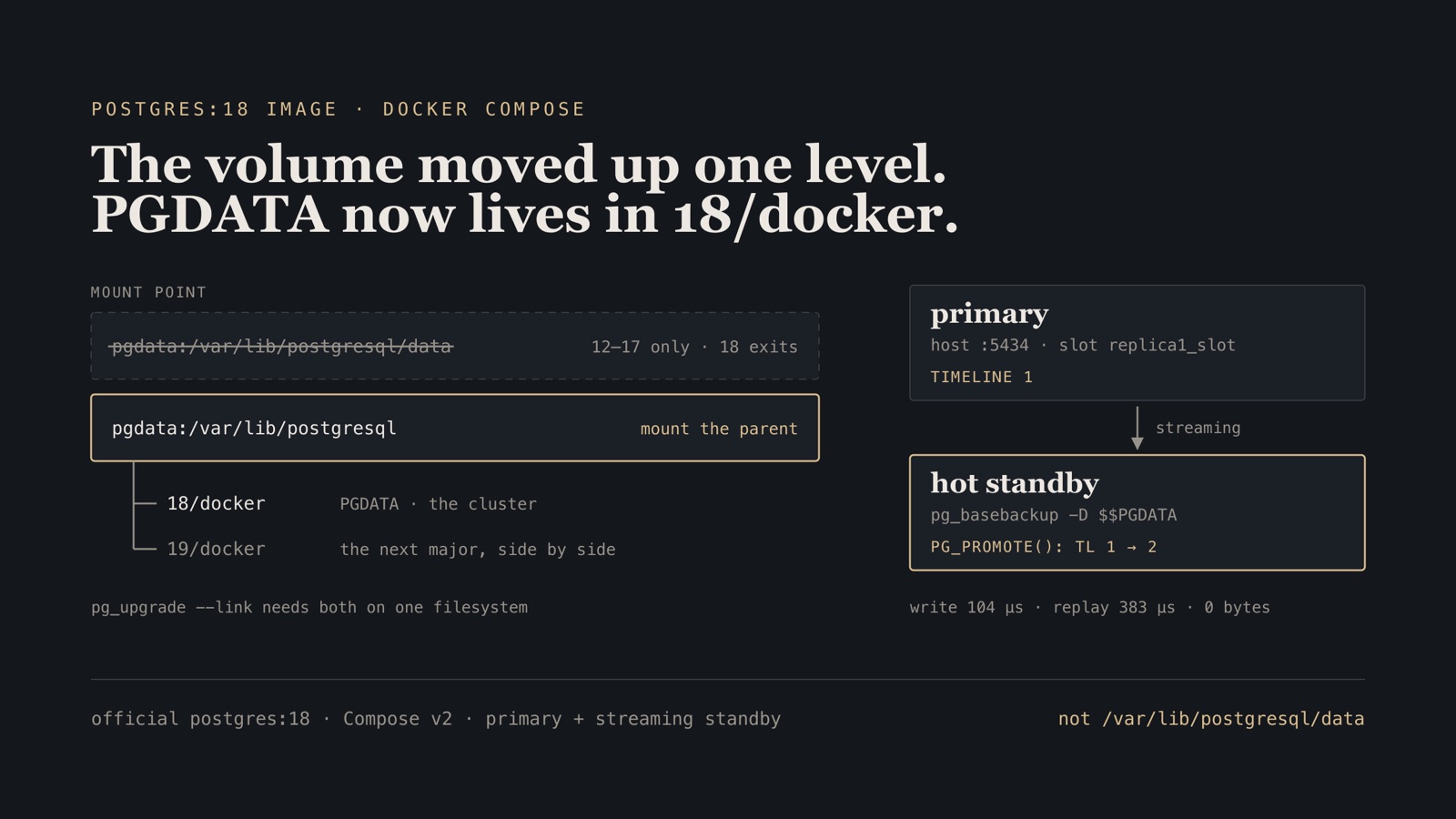
The image changed where it wants the volume. In 12 through 17 the data directory was the mount point. In 18 the mount point is the parent, /var/lib/postgresql, and the cluster lives in an 18/docker subdirectory beneath it. The reason is pg_upgrade --link: an in-place major upgrade needs the old and new data directories side by side on the same filesystem, and that is impossible when the data directory is itself the mount point. Moving the mount up one level makes room for 18/docker and 19/docker to coexist during an upgrade.
 volumes:
-  - pgdata:/var/lib/postgresql/data
+  - pgdata:/var/lib/postgresql
That is the whole fix, and if that is all you came for you can stop here. The rest of this post builds a primary and a streaming hot standby on top of the corrected file, measures the replication lag, promotes the standby, and sets up WAL archiving for point-in-time recovery — which is where the second half of the change bites, because a replica cloned by pg_basebackup writes wherever -D points, and that path is worth pinning.
The compose file and the init script are reproduced inline, and both are in db-failover-lab/pg-replication.
Gotcha. The error lists /var/lib/postgresql/data (unused mount/volume), which reads like a warning about a stray volume rather than what it is — the image telling you the data directory is not where the mount is. Read past that line: a dozen lines down, the same message suggests the fix, a single mount at /var/lib/postgresql.
Step 1 — Write the compose file PG 18 accepts
Two services: a primary with the replication settings turned on, and a replica that clones itself from the primary on first boot and then streams.
name: pg-replication

services:
  pgprimary:
    image: postgres:18
    environment:
      POSTGRES_USER: admin
      POSTGRES_PASSWORD: admin123
      POSTGRES_DB: poc
    command:
      - postgres
      - -c
      - wal_level=replica
      - -c
      - max_wal_senders=10
      - -c
      - max_replication_slots=10
      - -c
      - hot_standby=on
    ports: ["5434:5432"]
    # PG18 image wants the mount at /var/lib/postgresql (data lands in an 18/docker
    # subdir) — NOT /var/lib/postgresql/data, which the image now rejects.
    volumes:
      - pgp:/var/lib/postgresql
      - ./primary-init.sh:/docker-entrypoint-initdb.d/primary-init.sh:ro

  pgreplica:
    image: postgres:18
    environment:
      PGDATA: /var/lib/postgresql/18/docker
    depends_on: [pgprimary]
    ports: ["5435:5432"]
    # If the data dir is empty, clone the primary with pg_basebackup, then start as
    # a hot standby. Runs the clone as the postgres user so file ownership is correct.
    command:
      - bash
      - -c
      - |
        set -e
        if [ ! -s "$$PGDATA/PG_VERSION" ]; then
          until pg_isready -h pgprimary -p 5432 -U admin -d poc; do
            echo "waiting for primary..."; sleep 2;
          done
          export PGPASSWORD=replpass
          gosu postgres pg_basebackup -h pgprimary -p 5432 -U replicator \
            -D "$$PGDATA" -Fp -Xs -R -P -S replica1_slot
        fi
        exec docker-entrypoint.sh postgres
    volumes:
      - pgr:/var/lib/postgresql

volumes:
  pgp:
  pgr:
Four details in there are load-bearing.
PGDATA: /var/lib/postgresql/18/docker on the replica. The 18 image already defaults PGDATA to this path. The replica does not run initdb — it runs pg_basebackup, which writes wherever -D points, so the line pins the destination in the file rather than leaving it to an image default that has already moved once.
$$PGDATA, with two dollar signs. Compose does variable interpolation on the file before Docker ever sees it. $$ escapes to a literal $, so the shell inside the container gets $PGDATA. A single $ here means Compose substitutes an empty string and the test becomes [ ! -s /PG_VERSION ].
gosu postgres around pg_basebackup. The command runs as root. The entrypoint chowns PGDATA to postgres before it starts the server anyway, but cloning as postgres keeps ownership right if you ever start the server another way.
-Xs -R -S replica1_slot on pg_basebackup. -Xs streams WAL alongside the base backup, so the backup is consistent without needing archived WAL. -R writes standby.signal and a primary_conninfo line so the clone comes up as a standby with no further editing. -S binds it to a named replication slot.
Verify. Nothing to run yet — but read the volume lines once more. Both are :/var/lib/postgresql, not :/var/lib/postgresql/data.
Step 2 — Create the replication role and slot on the primary
The entrypoint runs anything in /docker-entrypoint-initdb.d/ once, on the first boot, after initdb and before the server is opened to the network. That is the right place to create the replication role, the slot, and the pg_hba.conf line that lets the replica in.
#!/bin/bash
# Runs once on the primary during initdb. Creates a replication role and a slot,
# and allows replication connections in pg_hba.conf.
set -e

psql -v ON_ERROR_STOP=1 -U "$POSTGRES_USER" -d "$POSTGRES_DB" <<-EOSQL
  CREATE ROLE replicator WITH REPLICATION LOGIN PASSWORD 'replpass';
  SELECT pg_create_physical_replication_slot('replica1_slot');
EOSQL

# Allow the replica to connect for streaming replication.
echo "host replication replicator all scram-sha-256" >> "$PGDATA/pg_hba.conf"
The pg_hba.conf line is easy to forget because replication is a pseudo-database — a normal host all all ... rule does not cover replication connections, so the role can log in for queries and still be refused for streaming.
A physical replication slot makes the primary keep WAL that the replica has not consumed yet. Without one, a replica that falls far enough behind gets its WAL recycled out from under it and has to be rebuilt. With one, you get the opposite failure mode: a replica that is down forever makes the primary’s WAL grow without bound. Pick your problem knowingly and monitor for it.
chmod +x pg-replication/primary-init.sh
Verify.
$ ls -l pg-replication/primary-init.sh
-rwxr-xr-x  1 basant  staff  500 Aug 11 09:00 pg-replication/primary-init.sh
Step 3 — Bring up the pair and watch the clone
docker compose -f pg-replication/docker-compose.yml up -d
The replica polls pg_isready until the primary answers, then clones. On this rig that took a few seconds; -P prints basebackup progress into the container log while it happens.
Verify. The replica’s log walks through four states, in this order. Timestamps and LSNs are elided here — yours will differ:
$ docker compose -f pg-replication/docker-compose.yml logs pgreplica
...  entering standby mode
...  consistent recovery state reached
...  database system is ready to accept read-only connections
...  started streaming WAL ... on timeline 1
All four have to appear. “Entering standby mode” alone means the clone worked but streaming has not started. “Ready to accept read-only connections” without “started streaming WAL” means the standby is replaying from disk but has not connected back to the primary — usually the pg_hba.conf line or the slot.
Step 4 — Prove replication, and that the standby refuses writes
Two separate promises, and they are worth checking separately: the standby has your data, and the standby will not accept a write that would diverge from the primary.
On the primary:
docker exec -it pg-replication-pgprimary-1 psql -U admin -d poc
CREATE TABLE t (id int);
INSERT INTO t (id) VALUES (1);
On the replica:
docker exec -it pg-replication-pgreplica-1 psql -U admin -d poc
Verify. The row is there, and the write is refused:
poc=# SELECT * FROM t;
 id
----
  1
(1 row)

poc=# INSERT INTO t (id) VALUES (2);
ERROR:  cannot execute INSERT in a read-only transaction
That error is the standby doing its job. hot_standby=on buys you read traffic on the replica, not a second writable node — the moment two nodes accept conflicting writes on the same timeline you have a reconciliation problem that PostgreSQL will not solve for you.
Step 5 — Read the lag properly
“Replication lag” is three different numbers and people quote whichever one is smallest. pg_stat_replication on the primary gives all of them: write_lag is time until the standby wrote the WAL, flush_lag until it fsynced, replay_lag until it applied and the data became visible to a reader. replay_lag is the one that matters for read-after-write, and it is always the largest.
SELECT application_name, state, sync_state, write_lag, replay_lag,
       pg_wal_lsn_diff(sent_lsn, replay_lsn) AS lag_bytes
  FROM pg_stat_replication;
Verify.
 application_name |   state   | sync_state |    write_lag    |   replay_lag    | lag_bytes
------------------+-----------+------------+-----------------+-----------------+-----------
 walreceiver      | streaming | async      | 00:00:00.000104 | 00:00:00.000383 |         0
(1 row)
write_lag ≈ 104 µs, replay_lag ≈ 383 µs, and zero bytes of outstanding WAL. Both containers are on the same host with no network in between, so treat these as a floor for the configuration rather than anything you will see across a WAN, and not as a prediction of lag under load.
sync_state reads async, which is the default and the right default for most setups: the primary does not wait for the standby to acknowledge, so a stalled standby cannot stall your writes. It also means a hard primary failure can lose the last few transactions. If that is unacceptable, synchronous_standby_names trades write latency for that guarantee.
Check the slot too:
SELECT slot_name, slot_type, active, wal_status FROM pg_replication_slots;
   slot_name   | slot_type | active | wal_status
---------------+-----------+--------+------------
 replica1_slot | physical  | t      | reserved
(1 row)
active = t means a replica is attached. wal_status = reserved means the WAL the slot needs is still within max_slot_wal_keep_size. When that column reads extended, unreserved or lost, you are on the path to either a full disk or a replica that can never catch up. It is the single best column to alert on for this topology.
Step 6 — Fail over with pg_promote()
There is no automatic failover here, and that is not an oversight. PostgreSQL leaves the decision to something that can tell a dead primary apart from an unreachable one — Patroni with etcd and a watchdog, or repmgr. What those tools ultimately trigger is this promotion:
docker exec pg-replication-pgreplica-1 psql -U admin -d postgres -c "SELECT pg_promote();"
Verify. Promotion returns true, recovery ends, and writes are accepted:
postgres=# SELECT pg_promote();
 pg_promote
------------
 t
(1 row)

postgres=# SELECT pg_is_in_recovery();
 pg_is_in_recovery
-------------------
 f
(1 row)
poc=# INSERT INTO t (id) VALUES (2);
INSERT 0 1
And the timeline advances:
poc=# SELECT timeline_id FROM pg_control_checkpoint();
 timeline_id
-------------
           2
(1 row)
That bump from 1 to 2 is the most important thing on this page after the volume path. A timeline is PostgreSQL’s record of a divergence: the new primary is now writing history that the old primary knows nothing about.
Do not restart the old primary and point traffic at it. After a promotion, the old primary is on timeline 1 and the new one is on timeline 2. They are two different databases that agree about the past. Bringing the old one back as a writable node is how you get split brain. It has to be rewound onto the new timeline with pg_rewind, or rebuilt from a fresh pg_basebackup, before it can rejoin as a standby.
Step 7 — Base backup and WAL archiving for PITR
Replication protects you from a node dying. It does not protect you from DELETE without a WHERE clause, because the standby replays that faithfully in 383 microseconds. Point-in-time recovery is the other half, and it is two pieces: a base backup, plus every WAL segment written since.
Add archiving to the primary’s command list and give it somewhere to write:
    command:
      - postgres
      - -c
      - wal_level=replica
      - -c
      - max_wal_senders=10
      - -c
      - max_replication_slots=10
      - -c
      - hot_standby=on
      - -c
      - archive_mode=on
      - -c
      - archive_command=test ! -f /archive/%f && cp %p /archive/%f
    volumes:
      - pgp:/var/lib/postgresql
      - pgarchive:/archive
      - ./primary-init.sh:/docker-entrypoint-initdb.d/primary-init.sh:ro

volumes:
  pgp:
  pgr:
  pgarchive:
archive_mode needs a restart, not a reload. The test ! -f guard makes the command refuse to overwrite an existing segment: archive_command must fail rather than silently clobber, because a segment overwritten is a recovery that stops early.
Take the base backup as the postgres user, for the same ownership reason as the replica clone:
docker exec pg-replication-pgprimary-1 sh -c '
  PGPASSWORD=replpass gosu postgres pg_basebackup \
    -h localhost -p 5432 -U replicator -D /archive/base -Fp -Xs -P'
Force a segment switch so there is something in the archive to look at:
docker exec pg-replication-pgprimary-1 \
  psql -U admin -d poc -c "SELECT pg_switch_wal();"
Verify. A base backup directory and at least one archived segment:
$ docker exec pg-replication-pgprimary-1 ls /archive
base
000000010000000000000003
000000010000000000000003.00000028.backup
To restore to a point in time you start from a copy of /archive/base, add a recovery.signal file to its data directory, and set two parameters in postgresql.conf:
restore_command = 'cp /archive/%f "%p"'
recovery_target_time = '2026-08-11 09:15:00+05:45'
The server then replays archived WAL up to that timestamp and pauses. SELECT pg_wal_replay_resume(); completes the recovery and opens the cluster for writes on a new timeline.
What I measured and what I did not. The replication, lag, promotion and timeline numbers above came off this rig. For PITR I verified the base backup and the archive — the restore_command and recovery_target_time recipe is the documented path, and I have not shown output for a full point-in-time rewind because I did not run one here. Test yours on real data before you rely on it; an untested restore is a hypothesis.
Step 8 — Clean up
docker compose -f pg-replication/docker-compose.yml down -v
Verify.
$ docker volume ls --filter name=pg-replication
DRIVER    VOLUME NAME
Note that a promoted replica plus a full base backup is three copies of the same cluster on disk. down without -v keeps all three.
Troubleshooting
| Symptom | Cause | Fix |
|---|---|---|
Container exits at startup listing /var/lib/postgresql/data (unused mount/volume) |
The volume is mounted at /var/lib/postgresql/data, which PG 18 no longer uses as the data directory |
Mount at /var/lib/postgresql; the cluster lands in 18/docker beneath it |
| The replica’s clone test always fires, even on a warm volume | Single $ in the compose command, so Compose interpolated $PGDATA to an empty string |
Write $$PGDATA in the compose file |
pg_basebackup is rejected with a pg_hba.conf entry error |
replication is a pseudo-database and is not covered by a host all all rule |
Append host replication replicator all scram-sha-256 in the init script |
pg_basebackup fails saying the replication slot does not exist |
The slot was never created, or the init script did not run because the volume already had data | Create it with SELECT pg_create_physical_replication_slot('replica1_slot');, or down -v and start clean |
| Log shows “ready to accept read-only connections” but never “started streaming WAL” | The standby is replaying from disk and has not connected to the primary | Check primary_conninfo in the standby’s config, the pg_hba.conf line, and the replicator password |
pg_stat_replication is empty on the primary |
No standby is attached | Confirm the replica container is running and that the slot shows active = t |
| Primary’s disk fills with WAL | A replication slot is holding WAL for a replica that is gone | Watch wal_status in pg_replication_slots; set max_slot_wal_keep_size, or drop the slot if the replica is not coming back |
Writes on the standby fail with cannot execute INSERT in a read-only transaction |
It is still a standby | This is correct. Promote it with SELECT pg_promote(); only if you actually mean to fail over |
| Both nodes accept writes after a failover | The old primary was restarted on timeline 1 while the new one is on timeline 2 | Never do this. Rewind the old node with pg_rewind or rebuild it from pg_basebackup before it rejoins |
| Recovery stops earlier than the target time | archive_command overwrote or skipped a segment |
Keep the test ! -f guard so archiving fails loudly instead of clobbering |
Earlier in this series: A failover lab: six database engines, eight scenarios, every one run for the rig and the full results matrix, and nodetool refresh only reads upload/ for the ScyllaDB restore that returns zero rows two different ways.