What you'll build
A three-node ScyllaDB cluster at RF=3 that survives a node loss at QUORUM, and a snapshot restore that actually returns your rows instead of zero.
- Time
- ~40 min hands-on
- Level
- Advanced
- Tested on
- ScyllaDB 2026.1 · Docker Compose v2 · 8 CPU / 12.5 GB
Before you start
- Docker 24+ with 8 CPU and 12.5 GB of RAM available to the daemon
- Docker Compose v2 — the `docker compose` subcommand, not `docker-compose`
- Ability to run a privileged container, to raise a sysctl inside the Docker VM
- Basic CQL: CREATE KEYSPACE, CREATE TABLE, SELECT
On this page
- What went wrong
- Step 1 — Raise fs.aio-max-nr before the third node
- Step 2 — Bring the ring up one node at a time
- Step 3 — Create the keyspace and a query-driven table
- Step 4 — Confirm RF=3, then lose a node
- Step 5 — Take a snapshot on every node
- Step 6 — Destroy the data
- Step 7 — Why the obvious restore does nothing
- Step 8 — The restore that works
- Step 9 — Clean up
- Troubleshooting
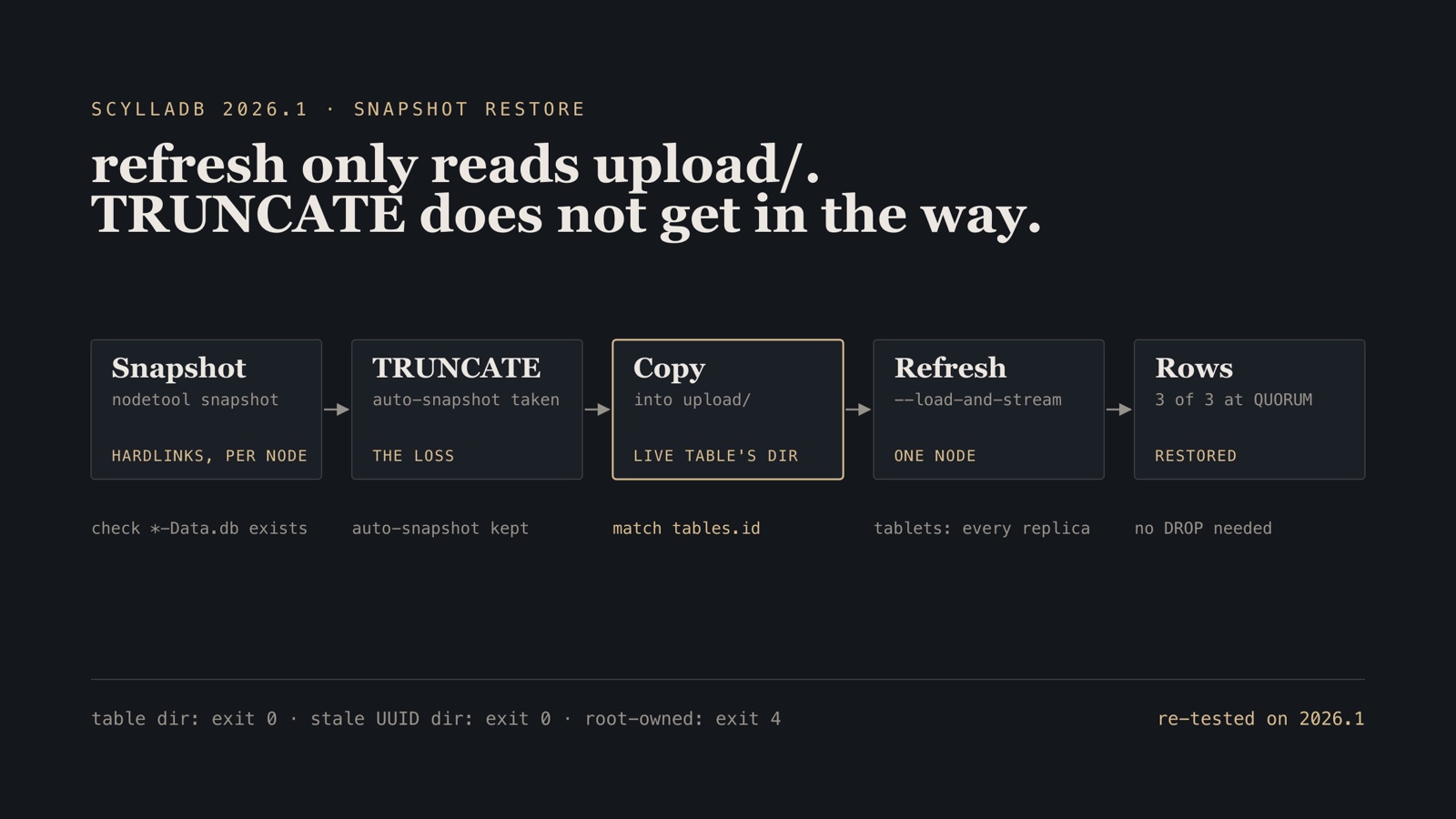
Correction, 14 October 2026. An earlier version of this post said that TRUNCATE leaves a marker that hides pre-truncate SSTables, and that recovering needs DROP TABLE and a recreate. That was wrong. I re-ran the sequence on ScyllaDB 2026.1 on one node and on this three-node ring, with tablets and with vnodes: snapshot SSTables copied into the truncated table’s upload/ loaded with a plain nodetool refresh, and all three rows came back at ONE, QUORUM and ALL, and after a restart. ScyllaDB’s own restore procedure truncates first. The truncation record governs commitlog, batchlog and Paxos replay, not SSTables loaded later. I cannot reproduce the zero I recorded in August; the two ways I can reproduce it are below, and neither involves TRUNCATE. Steps 6 to 8 and the troubleshooting table are rewritten.
What went wrong
I had a good snapshot. I had the SSTable files on disk. I ran nodetool refresh, got no error, and SELECT count(*) returned zero.
That is what makes a restore on this engine expensive to debug: the obvious procedure succeeds at every step, and the data is still not there. Three behaviors decide whether the rows come back, stated up front so you can stop reading if one of them is your problem:
nodetool refreshonly loads SSTables from the table’supload/subdirectory. Files placed in the table directory itself are ignored, silently, with a zero exit code.- The
upload/has to belong to the live table. A dropped and recreated table gets a new UUID and a new directory, and the old one survives on disk. Loading into the old one also exits 0 and loads nothing. - The files must be owned by the
scyllauser. This one is loud:refreshexits 4 and says so.
There is a fourth thing, which happens before any of this and is the reason the cluster would not start in the first place. It gets Step 1.
The compose file is reproduced inline below. It is also in the public db-failover-lab repository.
Step 1 — Raise fs.aio-max-nr before the third node
The first two Scylla nodes came up fine. The third exited during startup with:
system does not satisfy minimum AIO requirements
ScyllaDB’s Seastar runtime reserves asynchronous I/O contexts per reactor when it starts. fs.aio-max-nr is a kernel-wide ceiling on those contexts, and the Linux VM behind Docker Desktop ships with a low default. Two nodes fit under it. Three did not.
The limit belongs to the VM, not to a container, so raise it from a privileged throwaway container. It applies to every container on that daemon, including ones you start later.
docker run --rm --privileged alpine sysctl -w fs.aio-max-nr=1048576
Verify.
$ docker run --rm --privileged alpine sysctl -w fs.aio-max-nr=1048576
fs.aio-max-nr = 1048576
Gotcha. This sysctl lives inside the Docker VM, and the VM is rebuilt when Docker Desktop restarts. The fix does not persist. If a node that started yesterday refuses to start today with the same AIO message, re-run the privileged container before you look at anything else.
Step 2 — Bring the ring up one node at a time
Three nodes, each pinned to a single shard and 1200 MB, which is what makes three of them fit on one Docker host. scylla1 is the seed; the other two join it.
name: scylla-ha

services:
  scylla1:
    image: scylladb/scylla:2026.1
    command: ["--seeds=scylla1", "--smp=1", "--memory=1200M", "--overprovisioned=1", "--api-address=0.0.0.0"]
    ports: ["9042:9042"]
    volumes: ["s1:/var/lib/scylla"]

  scylla2:
    image: scylladb/scylla:2026.1
    command: ["--seeds=scylla1", "--smp=1", "--memory=1200M", "--overprovisioned=1", "--api-address=0.0.0.0"]
    volumes: ["s2:/var/lib/scylla"]
    depends_on: [scylla1]

  scylla3:
    image: scylladb/scylla:2026.1
    command: ["--seeds=scylla1", "--smp=1", "--memory=1200M", "--overprovisioned=1", "--api-address=0.0.0.0"]
    volumes: ["s3:/var/lib/scylla"]
    depends_on: [scylla1]

volumes:
  s1:
  s2:
  s3:
depends_on only controls start order, not readiness, so bring the nodes up by hand. Start the seed, wait for it to report Up/Normal, then add one joiner at a time.
docker compose -f scylla-ha/docker-compose.yml up -d scylla1
docker exec scylla-ha-scylla1-1 nodetool status
Once scylla1 shows UN, add the second, wait again, then the third:
docker compose -f scylla-ha/docker-compose.yml up -d scylla2
docker compose -f scylla-ha/docker-compose.yml up -d scylla3
Verify. nodetool status lists three nodes at UN — Up and Normal — each holding 256 tokens:
UN 172.21.0.2 ... rack1
UN 172.21.0.3 ... rack1
UN 172.21.0.4 ... rack1
A node stuck at UJ is still joining and streaming; give it time rather than restarting it. A node at DN never made it — check that its AIO problem is fixed and that the seed was UN before it started.
Step 3 — Create the keyspace and a query-driven table
RF=3 on a three-node cluster means every node holds every row, which is what makes the QUORUM behavior in the next step easy to reason about.
CREATE KEYSPACE poc WITH replication = {
  'class': 'NetworkTopologyStrategy',
  'datacenter1': 3
};

CREATE TABLE poc.sensor_by_day (
  sensor_id text,
  day       date,
  ts        timestamp,
  value     double,
  PRIMARY KEY ((sensor_id, day), ts)
) WITH CLUSTERING ORDER BY (ts DESC);
The partition key is (sensor_id, day), not sensor_id alone. Bucketing a time series by day bounds the partition: a sensor that reports for two years does not accumulate one enormous partition that has to be read, repaired and compacted as a unit. This is the single most common modeling mistake in Cassandra-family stores, and it does not show up until the partition is already too big to fix comfortably.
Three rows are enough for the whole exercise:
docker exec scylla-ha-scylla1-1 cqlsh -e "
INSERT INTO poc.sensor_by_day (sensor_id, day, ts, value) VALUES ('s1','2026-06-07','2026-06-07 09:00:00',42.0);
INSERT INTO poc.sensor_by_day (sensor_id, day, ts, value) VALUES ('s1','2026-06-07','2026-06-07 09:01:00',43.5);
INSERT INTO poc.sensor_by_day (sensor_id, day, ts, value) VALUES ('s1','2026-06-07','2026-06-07 09:02:00',41.2);"
Verify.
cqlsh> SELECT count(*) FROM poc.sensor_by_day;

 count
-------
     3

(1 rows)
Step 4 — Confirm RF=3, then lose a node
Before testing the failure, confirm the replication actually landed where you think it did. nodetool getendpoints answers “which nodes hold this partition” for a specific partition key.
docker exec scylla-ha-scylla1-1 nodetool getendpoints poc sensor_by_day "s1:2026-06-07"
Verify. Three addresses, one per node, because RF=3 on a three-node ring means every node is a replica:
172.21.0.2
172.21.0.3
172.21.0.4
Now stop one node and read at QUORUM. QUORUM of RF=3 is 2, so two survivors are exactly enough.
docker stop scylla-ha-scylla2-1
Verify.
cqlsh> CONSISTENCY QUORUM;
Consistency level set to QUORUM.
cqlsh> SELECT count(*) FROM poc.sensor_by_day;

 count
-------
     3

(1 rows)
That is the whole availability claim, checked. Stop a second node and the same query starts failing with an unavailable exception, which is also correct — at that point the cluster cannot prove it is returning current data, so it refuses rather than guessing.
Bring the node back before continuing:
docker start scylla-ha-scylla2-1
Step 5 — Take a snapshot on every node
nodetool snapshot flushes memtables and then hardlinks the current SSTables into a snapshots/<tag> directory under the table. It costs almost nothing at the moment you take it, because hardlinks; it starts costing disk later as compaction replaces the live files and the snapshot keeps the old ones alive.
A snapshot is per node. There is no cluster-wide snapshot command — you run it everywhere.
for n in 1 2 3; do
  docker exec scylla-ha-scylla$n-1 nodetool snapshot -t poc_bkp poc
done
Verify. The snapshot directory exists under the table directory, and it holds at least one *-Data.db file:
$ docker exec scylla-ha-scylla1-1 sh -c 'ls -d /var/lib/scylla/data/poc/sensor_by_day-*/snapshots/poc_bkp; ls /var/lib/scylla/data/poc/sensor_by_day-*/snapshots/poc_bkp | grep -c Data.db'
/var/lib/scylla/data/poc/sensor_by_day-b573cef0c7c011f1b6ea6fae48e15e5e/snapshots/poc_bkp
1
The UUID in that path is the table’s identity, and it will be different on your ring. Remember that it is there; it matters in Step 7.
Check every node, not just the first. On the re-run, scylla2 had been stopped within seconds of the inserts in Step 4, came back without them, and its snapshot held no data file at all. With the default periodic commitlog sync, a node stopped right after a write can lose it locally; the other replicas still have it. A snapshot is only as good as what that node had flushed.
Step 6 — Destroy the data
The loss scenario. TRUNCATE rather than a dropped table, because truncate is the mistake people actually make — it is one word away from a SELECT in a terminal that is pointed at the wrong environment.
docker exec scylla-ha-scylla1-1 cqlsh -e "TRUNCATE poc.sensor_by_day;"
Verify.
cqlsh> SELECT count(*) FROM poc.sensor_by_day;

 count
-------
     0

(1 rows)
TRUNCATE also takes a snapshot of its own before it deletes anything, because auto_snapshot is on by default. It appears next to yours, named <epoch-ms>-sensor_by_day (on the re-run, 1791976469830-sensor_by_day), and it is a complete restore source if you never took one:
docker exec scylla-ha-scylla1-1 sh -c 'ls /var/lib/scylla/data/poc/sensor_by_day-*/snapshots/'
Step 7 — Why the obvious restore does nothing
The obvious restore is: copy the snapshot’s SSTables back next to the live ones, then tell the node to pick them up.
docker exec scylla-ha-scylla1-1 sh -c '
  cp /var/lib/scylla/data/poc/sensor_by_day-*/snapshots/poc_bkp/* \
     /var/lib/scylla/data/poc/sensor_by_day-*/'
docker exec scylla-ha-scylla1-1 nodetool refresh poc sensor_by_day
That command exits 0. It prints nothing. And the count is still zero, at every consistency level and from every coordinator.
Gotcha 1 — refresh only reads upload/. nodetool refresh does not scan the table directory. It scans the table’s upload/ subdirectory, loads whatever valid SSTables it finds there, and returns. Files sitting directly in the table directory are not an error and not a warning; they are simply not looked at.
Do not leave them there, either. Copying files into a running node’s table directory is not a supported operation, and the node will read whatever is in that directory at its next start. Delete the copies, which carry the same names as the files in snapshots/poc_bkp/, before you go on.
Gotcha 2 — the upload/ must belong to the live table. The on-disk path is <table_name>-<table_id>. If someone dropped and recreated the table, CREATE minted a fresh id, and the old directory survives on disk with your snapshot inside it, which is why nothing looks broken. Files loaded into that directory’s upload/ exit 0 and load nothing. The live one is the directory whose suffix matches system_schema.tables.id.
Gotcha 3 — the files must be owned by scylla. Files copied in by docker cp, or by anything running as root, are refused: refresh exits 4 with File not owned by current euid: 998. Owner is: 0. In this image docker exec already runs as the scylla user, so a cp through docker exec gets ownership right; anything else needs a chown -R scylla:scylla first.
What is not on this list is the truncation. A pre-truncate snapshot loads into the truncated table normally, and the next step does exactly that.
Step 8 — The restore that works
No drop, no recreate. First confirm which directory is the live table. The id is what the directory suffix has to match:
docker exec scylla-ha-scylla1-1 cqlsh -e "
SELECT id FROM system_schema.tables
 WHERE keyspace_name='poc' AND table_name='sensor_by_day';"
On a table that was never dropped there is exactly one sensor_by_day-* directory, and its suffix is that id without the hyphens. If there are two, someone dropped and recreated the table, and only the one that matches is live.
Copy one node’s snapshot into the live table’s upload/, as the scylla user, then refresh on that node only:
docker exec scylla-ha-scylla1-1 sh -c '
  cp /var/lib/scylla/data/poc/sensor_by_day-*/snapshots/poc_bkp/* \
     /var/lib/scylla/data/poc/sensor_by_day-*/upload/'
docker exec scylla-ha-scylla1-1 nodetool refresh poc sensor_by_day --load-and-stream
One node is enough. A 2026.1 keyspace uses tablets by default, and on a tablets keyspace refresh streams each loaded SSTable to the replicas that own its data whether or not you pass --load-and-stream; I pass it so the command means the same thing on a vnode keyspace, where a plain refresh loads only into the local node. Upstream’s procedure is the same: upload each SSTable to one node, refresh with --load-and-stream. Loading all three nodes’ snapshots streams every row three times. My August run loaded all three, which is the likeliest reason it reported an SSTable count of 6.
Verify.
cqlsh> CONSISTENCY QUORUM;
Consistency level set to QUORUM.
cqlsh> SELECT count(*) FROM poc.sensor_by_day;

 count
-------
     3

(1 rows)
Three rows, at QUORUM, from a snapshot taken before the truncate and loaded into the truncated table. The same count came back at ONE through each of the three coordinators and at ALL. nodetool tablestats on each node confirms the load reached every replica:
for n in 1 2 3; do
  docker exec scylla-ha-scylla$n-1 nodetool tablestats poc.sensor_by_day | grep "SSTable count"
done
		SSTable count: 1
		SSTable count: 1
		SSTable count: 1
Two things worth saying about what this restore is and is not. First, snapshots are per node. On this ring RF=3, so one healthy node’s snapshot holds every row; on a larger ring with RF smaller than the node count, each node’s snapshot is a different subset, and you load each of them, each once, with --load-and-stream. Second, refresh is a load, not a repair. Real disaster recovery on this engine also involves nodetool repair for anti-entropy and node rebuild to restream from replicas, and gc_grace_seconds governs when tombstones can actually be collected — get that wrong and you resurrect deleted rows.
For monitoring, ScyllaDB exposes Prometheus metrics on port 9180 — scylla_storage_proxy_* for coordinator-side latency and errors, and reactor utilization for the shard-per-core saturation signal that is specific to this engine.
Step 9 — Clean up
docker compose -f scylla-ha/docker-compose.yml down -v
Verify.
$ docker volume ls --filter name=scylla-ha
DRIVER    VOLUME NAME
Three nodes’ worth of SSTables and snapshots come to real disk. down without -v keeps all of it.
Troubleshooting
| Symptom | Cause | Fix |
|---|---|---|
Node exits at startup: system does not satisfy minimum AIO requirements |
fs.aio-max-nr in the Docker VM is below what Seastar reserves per reactor |
docker run --rm --privileged alpine sysctl -w fs.aio-max-nr=1048576, then restart the node |
| That AIO fix worked yesterday and does not today | Docker Desktop restarted and rebuilt its VM, discarding the sysctl | Re-run the privileged sysctl container after every restart |
nodetool refresh exits 0 and nothing is loaded |
SSTables are in the table directory, not in upload/ |
Delete them from the table directory, copy them into <table-dir>/upload/ and refresh again |
Files are in upload/, refresh is clean, rows still missing |
The upload/ belongs to a dropped table’s stale directory, or the snapshot has no *-Data.db file |
Load into the directory whose suffix matches system_schema.tables.id; check the snapshot holds data, or use the TRUNCATE auto-snapshot |
| Restored rows are only on the node you refreshed | A vnode keyspace and a plain refresh, which loads locally |
Refresh with --load-and-stream |
| Every row was streamed three times | Every node’s full snapshot was loaded with --load-and-stream on an RF=3 ring |
Load one node’s snapshot when one node holds all the data; otherwise each node’s, once |
refresh exits 4: File not owned by current euid |
Files were placed by docker cp or as root; the server runs as scylla |
chown -R scylla:scylla <table-dir>/upload before refreshing |
A joiner sits at UJ for a long time |
Bootstrap streaming on a one-shard, 1200 MB node is slow, not stuck | Wait, and watch progress with nodetool netstats |
A joiner never appears in nodetool status |
All three nodes were started at once, before the seed was UN |
Start scylla1, wait for UN, then start scylla2 and scylla3 one at a time |
SELECT fails with an unavailable exception at QUORUM |
Two of three nodes are down, so QUORUM of RF=3 cannot be met | Bring a node back; do not lower the consistency level to hide it |
The next post in this series is PostgreSQL 18 won’t take a volume at /var/lib/postgresql/data. The rig itself, and the full eight-scenario results matrix, is in A failover lab: six database engines, eight scenarios, every one run.