On this page
- The short version
- Managed or self-run Postgres
- When one Postgres server is not enough: Citus
- Time series that stay in Postgres: TimescaleDB
- Analytics at scale: ClickHouse
- Queries across stores: Trino
- History in open files: Iceberg, and where it stops
- Vectors: pgvector, on Citus when it outgrows one server
- Every store is also a governance decision
- Checks before adding a store
- Frequently asked questions
Most data-store decisions are made by trend: the team that read about a lakehouse builds one, and the team that runs Postgres runs everything on it. Both work until a workload meets the store that does not suit it, and by then the data has a shape that is expensive to move.
This guide is how I choose, from production projects and from labs where I measured the behaviour that decides the choice. When a section says “on one of our previous projects”, it describes real production work; every figure comes from a lab anyone can re-run, linked where it appears.
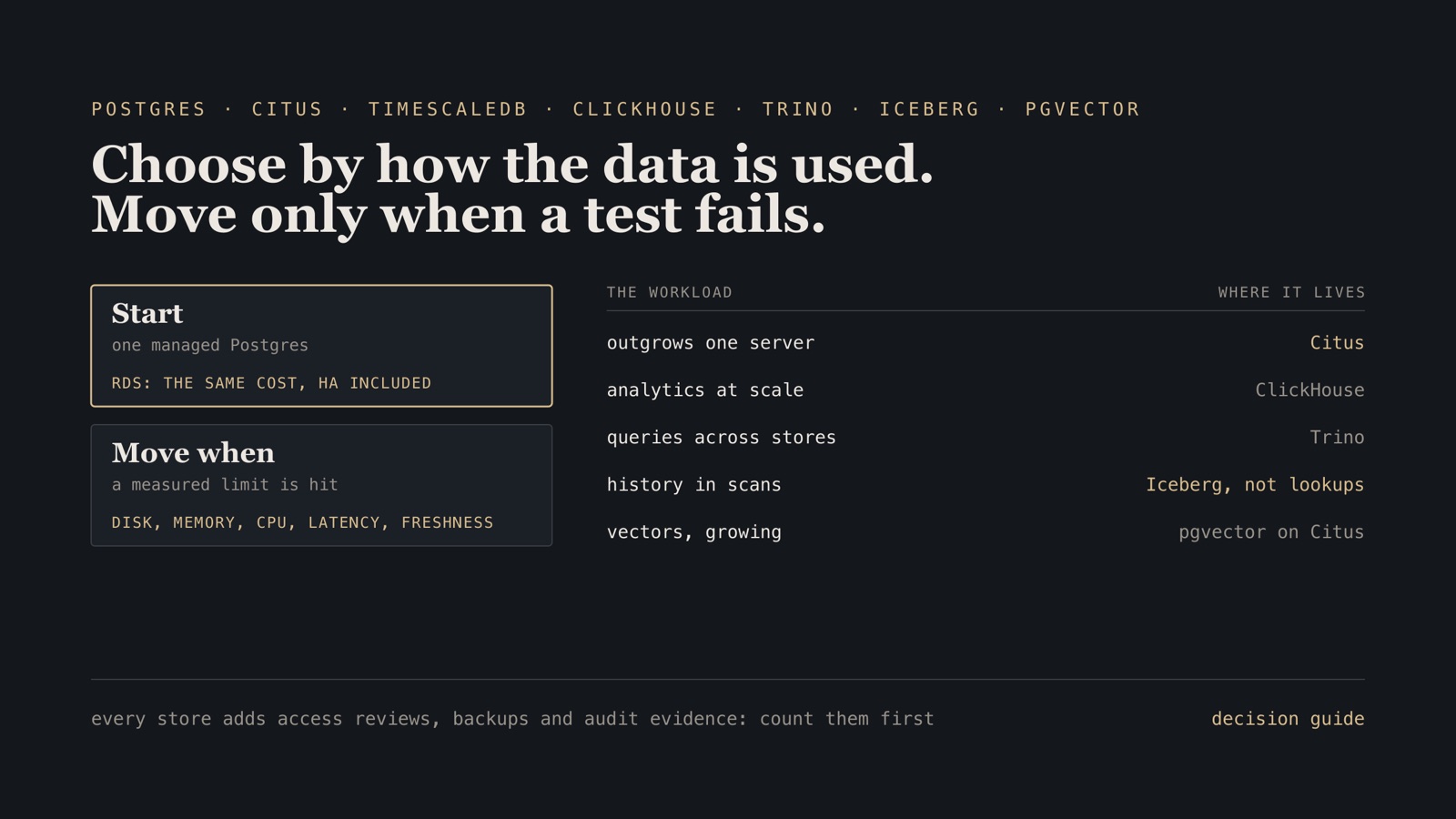
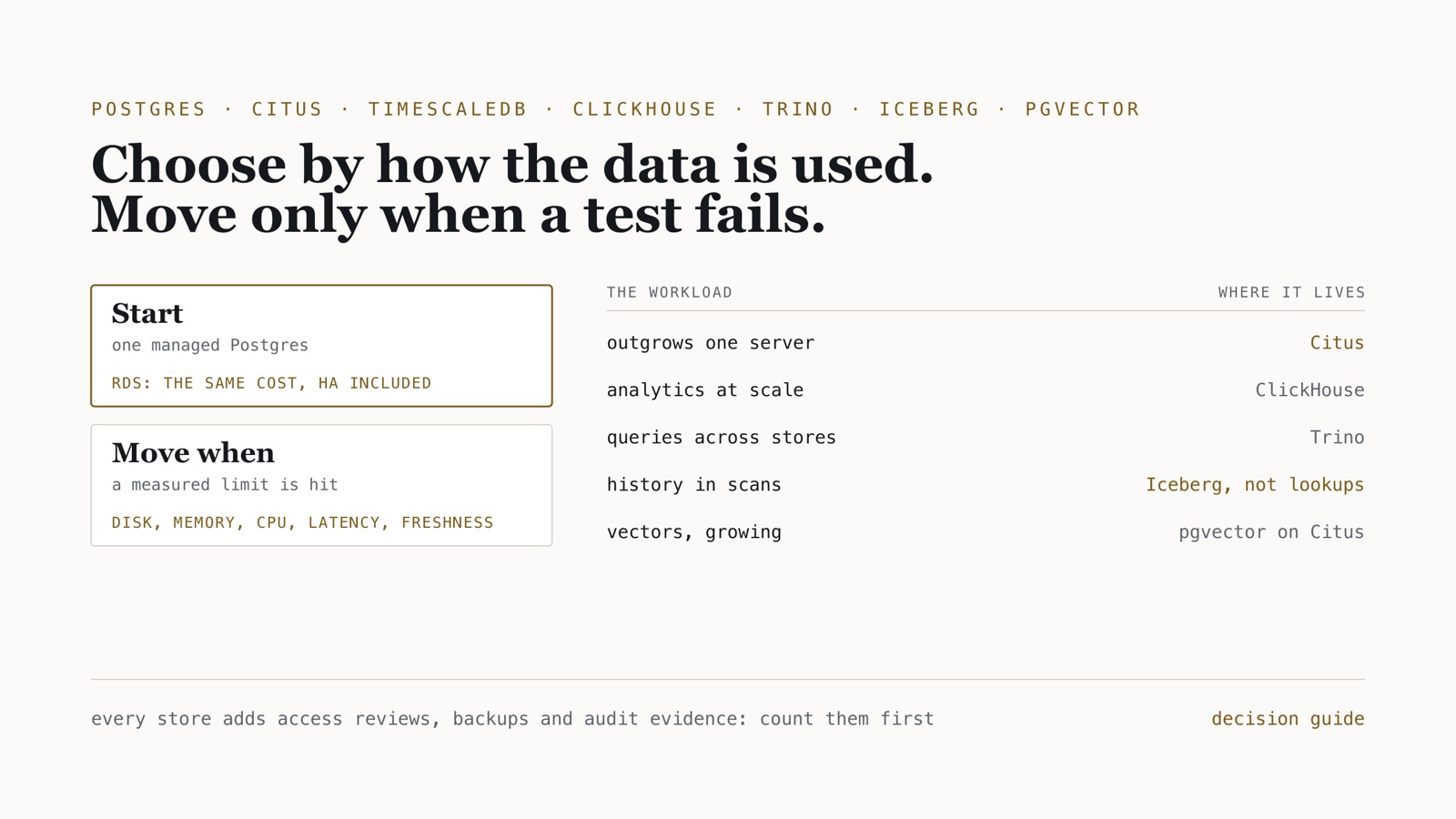
Operating rule. Start with one managed Postgres. Choose a store by how the data is read and written (point reads and writes in milliseconds, scans over history, time series, similarity search) and move a workload only when it fails a test you can measure: storage, memory, CPU, latency, freshness, or cost. Each new store brings its own access control, backups and audit trail, so count those before you count features.
The short version
| The workload | Start with | Move when | Move to |
|---|---|---|---|
| An application’s own data: point reads and writes, transactions | one managed Postgres (RDS) | you need an extension RDS lacks, or superuser | Postgres you run yourself |
| The same, outgrowing one server | disk, memory or CPU run out and queries keep slowing | Citus, distributed by the key most queries filter on | |
| Time series that must join application data | Postgres | the series dominate storage and scans | TimescaleDB |
| Analytics over large event volumes, low-latency dashboards | the warehouse or lakehouse | per-tenant dashboards must answer in seconds at high write rates | ClickHouse |
| Queries across stores, or over files in object storage | data lives in more than one place and copying it is the problem | Trino | |
| Years of history read in scans, by several engines | Parquet in object storage with a table format | Iceberg (or Delta) tables | |
| A lookup or dimension updated and read one record at a time | Postgres or Citus | never to a table format | |
| Vector embeddings next to the data they describe | pgvector | inserts, reads or index builds outgrow one server | pgvector on Citus, or a dedicated engine |
Managed or self-run Postgres
For an ordinary web application or a single service, run Postgres on RDS. On one of our previous projects we ran a fleet of RDS instances, and for services like these the cost came out about the same as running Postgres on EC2 ourselves. What differs is the work: RDS gives you Multi-AZ failover, point-in-time recovery, parameter management and monitoring without anyone having to build and rehearse them.
Self-managing is the right call in two cases: an extension RDS does not offer, or a need for full superuser access. Then you own high availability yourself, and it is real work. In postgres-ha-lab a Patroni cluster promoted a new leader 10–20 s after the old one was killed, and point-in-time restore recovered 5 of 5 rows; getting there took etcd, pgBackRest over mutual TLS and rehearsed failovers. That is the work RDS’s price already includes.
When one Postgres server is not enough: Citus
The signal is not a row count. It is one server running out: on one of our previous projects a single Postgres server was short of disk, memory and CPU at once, and queries and tables took longer every month, which made the business’s growth itself the risk. It moved to Citus, which keeps Postgres (its SQL, extensions and tools) and spreads tables across workers. On another, the same happened to vector embeddings (below).
What makes Citus work is the data model, not the cluster:
- Distribute by the key most queries filter on, usually the tenant or account. A query for one account then runs on one shard.
- Co-locate tables that join by distributing them on the same key; in distributed-db-lab a co-located join ran 4.2× faster than one that had to repartition.
- Make small shared tables reference tables, copied to every worker, so joins to them stay local.
- Plan for rebalancing. In the lab, a worker joined and 7 shard groups moved under load with 0 errors, and the spread between the largest and smallest worker narrowed, 2.36× → 1.10×.
- The coordinator is a single point of failure until you make it otherwise. On one of those projects we ran it with a standby managed by repmgr and HAProxy in front.
Columnar or heap storage, which Citus offers per table, depends on the workload: columnar for read-heavy scans of data that is mostly appended, heap for write-heavy tables with updates.
Time series that stay in Postgres: TimescaleDB
When most of the data is a time series that still has to join application tables, TimescaleDB keeps it in Postgres: hypertables partition by time, and its columnstore compresses old chunks. In the lab the columnstore made a time-series table 17.0× smaller. I have used it in labs, not on a client project, which is worth knowing before you weigh this section.
Analytics at scale: ClickHouse
ClickHouse is for scans and aggregates over large event volumes, answered in seconds while data keeps arriving: product analytics, usage pages, observability. Its data model is its ordering key: put the column every query filters on first, usually the account, then the time. In streaming-platform events were queryable in ClickHouse 6.1 s after they happened at the 99th percentile, at 1,000 events a second, and in the database lab 40 of 40 inserts succeeded with a replica down.
It is the wrong home for data that is updated record by record: updates and deletes are rewrites in the background, not transactions. On one of our previous projects we evaluated ClickHouse, Apache Pinot, StarRocks and Trino for the analytics side of a Postgres system that was moving to Citus; the shortlist itself says something, since all four answer the same question (scans at scale) in different ways.
Queries across stores: Trino
Trino stores nothing. It is a query engine that reads where the data already is: object storage, Postgres, Citus, Iceberg, and many more. That makes it the answer when the problem is that data lives in more than one place:
- Hot and cold. On one of our previous projects recent data lived in a Citus cluster for fast reads and writes, history lived in the lake, and Trino queried both, so a question spanning both did not need a copy.
- Analytics on files. On another, a contact-centre platform, Trino on S3 served the reporting, with Airflow computing the interval statistics contact centres run on, and the table catalog moved from a Hive Metastore to AWS Glue.
Trino is fast when it can skip data: in lakehouse-lab a one-month predicate over 1.5 million Iceberg rows took 88 ms because partitions it did not need were never read.
History in open files: Iceberg, and where it stops
Plain Hive-style tables are directories of files: a write is files appearing, with no atomic commit, no snapshot to go back to, and a schema change that can break readers. Iceberg (and Delta, with its UniForm Iceberg compatibility) adds atomic commits, snapshots, schema evolution and hidden partitioning, so several engines can share one copy of years of history. In the lake lab, compaction merged files per partition 20 → 1 and a snapshot rollback recovered 909,968 rows after a bad delete.
What it is not is a lookup store. On one of our previous projects a slowly changing dimension had to serve two needs at once: analytics, and a lookup that had to be updated and visible within milliseconds. We compared single-record writes and reads on Iceberg with the Citus cluster that was already running, and the dimension stayed on Citus: the lookup needed milliseconds that a table format committing files did not give. On the same project Iceberg’s own compaction was less efficient than the binning and compaction we had built for our write pattern, which is a reminder that table maintenance is part of the design, not a setting.
Row-level changes also cost more than they look. On UniForm tables Databricks refuses deletion vectors, so a change rewrites every file it touches; erasing one person rewrote 31,849,449 rows when their e-mail was copied into every event row (the erasure write-up).
Vectors: pgvector, on Citus when it outgrows one server
Keep embeddings next to the data they describe, in pgvector, for as long as one server copes. On one of our previous projects it stopped coping: embeddings grew quickly, one Postgres server could no longer keep up with the inserts and the reads, and building the vector index took longer and longer, failed more often than not, and performed poorly when it finished. We moved them to a Citus cluster, where each shard builds and searches a smaller index and the workers share the load.
Whichever engine holds them, test filtered search before you trust it. In retrieval-bench, pgvector, Qdrant and OpenSearch matched exact search to ≤ 0.0015 nDCG@10, but a post-filtered HNSW search at 10% selectivity returned 3.9 of 10 rows, until pgvector’s iterative scan restored recall to 0.949.
Every store is also a governance decision
The feature list is the easy part. Each store you add brings questions an auditor will ask, and the answers differ by engine:
| Row-level access | Backups and recovery | What the audit evidence comes from | |
|---|---|---|---|
| Postgres, RDS, Citus | row-level security policies on the tenant key | RDS snapshots and point-in-time recovery; pgBackRest when self-run | the database’s log, and the grants it holds |
| ClickHouse | row policies per user or role | replicas, and backups you schedule | its query log |
| Trino | access control rules or an external policy engine, per catalog | nothing to back up: it stores nothing | its event listener and query log |
| Iceberg, Delta | the catalog’s grants and, on a platform, row filters and masks | snapshots inside a retention window, plus a copy outside the bucket | the catalog’s audit and lineage records |
On every project where I have run data platforms I have been responsible for meeting the SOC 2 criteria for them and their infrastructure, and the pattern holds: each store adds access reviews, backups to test, changes to control and logs to keep. A design with four stores has four of each. That is a reason to prefer fewer stores, not a reason to avoid the right one.
Boundary. The project experience here is described without the clients’ or employers’ names, data or figures; every number is from a lab on synthetic data, on one host or a small cluster, and links to its method. TimescaleDB is lab experience only. The evaluation of ClickHouse, Pinot, StarRocks and Trino is mentioned for what it covered, not for a winner, because the right one depended on that client’s queries.
Checks before adding a store
- Name the access pattern that fails today, with a number: latency, freshness, storage, memory, CPU or cost.
- Show that a managed version of what you already run cannot meet it.
- Design the data model for the new store first: its distribution or ordering key decides most of its performance.
- Write down who reviews access to it, how it is backed up and restored, and where its audit evidence comes from.
- Decide how data stays consistent between stores, and which one is the source of record.
Frequently asked questions
Should I run PostgreSQL on Amazon RDS or on EC2 myself?
For an ordinary web application or service, RDS. In our projects the two cost about the same, and RDS brings high availability, configuration and monitoring without the work of running them. Run Postgres yourself when you need an extension RDS does not offer or full superuser access.
When should a PostgreSQL database move to Citus?
When one server runs out of disk, memory or CPU and queries keep slowing as tables grow, and the data has a key, usually the tenant or account, that most queries filter on. Distribute by that key, keep related tables co-located and small shared tables as reference tables; in a lab, a co-located join ran 4.2 times faster than one that had to repartition.
Is Apache Iceberg a good fit for slowly changing dimensions and lookup tables?
Not when the lookup must be updated and visible within milliseconds. On one of our projects a dimension that served both lookups and analytics was faster on a Citus cluster for single-record writes and reads, so it stayed there. Iceberg suits large history read in scans, written in batches.
pgvector, pgvector on Citus, or a dedicated vector database?
Start with pgvector next to the data. When embeddings grow faster than one server can insert, read and index, distribute them with Citus so each shard builds a smaller index. Whatever the engine, test filtered search: in a lab, a post-filtered HNSW search returned 3.9 of 10 rows at 10% selectivity until pgvector’s iterative scan restored recall to 0.949.
The labs behind every figure are in the work index, with the projects described in the Citus and pgvector case study, the RDS case study and the contact-centre lakehouse. More on PostgreSQL and distributed databases.